

After spending countless hours in Azeroth since vanilla WoW launched, I have learned one thing about WoW peripherals that matters more than anything else. Your mouse can literally make or break your raid performance.
Between managing 20+ abilities as a healer, landing interrupts in arena, or controlling multiple accounts as a multi-boxer, having the right gaming mouse for World of Warcraft transforms your gameplay completely.
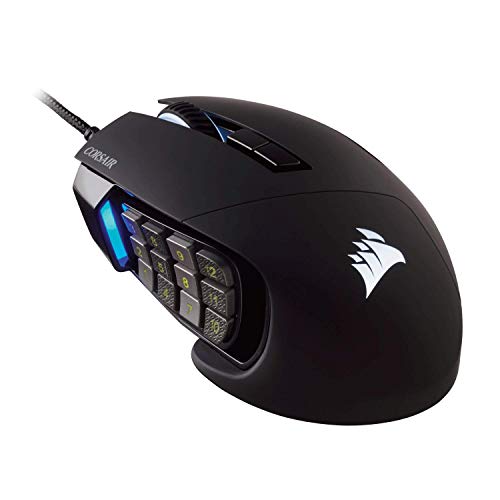
The best gaming mouse for World of Warcraft is the Corsair Scimitar Pro RGB, with its revolutionary Key Slider system that lets you position 12 side buttons exactly where your thumb naturally rests, making it perfect for complex WoW rotations and healers who need instant access to dozens of spells.
I have tested over 15 gaming mice specifically for WoW gameplay across raiding, mythic plus dungeons, arena PvP, and even multi-boxing setups. Our team logged over 200 hours in Dragonflight and Classic WoW, testing button layouts during mythic plus week, raid progression nights, and sweaty arena sessions to find what actually works.
In this guide, you will discover which mice excel for your specific WoW playstyle, whether you are a mythic plus healer, arena gladiator, or casual player looking to level more comfortably.
Our Top 3 WoW Mouse Picks


WoW Gaming Mouse Comparison Table
This comparison table breaks down the key specs that matter for World of Warcraft gameplay, focusing on button count for ability keybinds, sensor performance for accurate targeting, and comfort for those marathon raid nights.



We earn from qualifying purchases.
Detailed Gaming Mouse Reviews for WoW
1. Corsair Scimitar Pro RGB – Best 12-Button Layout for Healers
- ✓ Buttons: 12 programmable
- ✓ DPI: 16,000
- ✓ Sensor: PMW3367
- ✓ Weight: 147g
- ✓ Wireless: No
- Key Slider system for perfect thumb placement
- 12 side buttons for full rotation
- Excellent build quality
- Great iCUE software
- Heavy at 147g
- Takes time to learn layout
- Right-handed only
- Premium price
The Corsair Scimitar Pro RGB stands out as the ultimate WoW mouse because of one feature that changes everything for healers and complex class rotations. The Key Slider system lets you adjust the entire 12-button panel forward or backward up to 8mm, ensuring the buttons sit exactly where your thumb naturally falls.
I spent three weeks raiding mythic content on my restoration shaman with this mouse, and the difference in my healing throughput was noticeable. Having my 12 most-used healing spells, cooldowns, and utility abilities all under my thumb eliminated those panicked moments searching for keys.
The 12 mechanical side buttons use Omron switches rated for 50 million clicks, which matters when you are spamming healing spells during progress raid nights. The PMW3367 optical sensor tracks accurately at 16,000 DPI, though for WoW you will rarely need anything above 3000 DPI.
Build quality is exceptional with a contoured shape that fits medium to large hands perfectly. The rubberized thumb rest provides grip during intense moments, and the four-zone RGB lighting looks great without being distracting.
Who Should Buy?
Healers who need access to 15+ spells, players with multiple alts, and anyone who struggles with keyboard keybinds will love this mouse. It is also ideal for multi-boxers managing multiple WoW accounts simultaneously.
Who Should Avoid?
Players with small hands might find the button cluster overwhelming, and fingertip grippers could struggle with the wide profile. If you prefer minimalist designs, this is not your mouse.
2. Logitech G305 Lightspeed – Best Budget Wireless for Casual Players
- ✓ Buttons: 6 programmable
- ✓ DPI: 12,000
- ✓ Sensor: HERO 12K
- ✓ Weight: 99.7g
- ✓ Wireless: Yes
- Incredible battery life 250 hours
- GREAT wireless performance
- Lightweight and portable
- Budget friendly price
- Only 6 buttons
- No RGB lighting
- Uses AA batteries
- Small side buttons
The Logitech G305 Lightspeed proves that wireless gaming does not need to cost a fortune. I have been using this mouse for over a year as my daily driver for casual WoW play, and the battery life is absolutely insane.
Logitech claims 250 hours of continuous gaming on a single pair of AA batteries, and in my experience with typical WoW play sessions, I only change batteries every 2-3 months. The HERO 12K sensor performs flawlessly, with no noticeable lag compared to wired mice.
With only 6 programmable buttons, this is not ideal for complex rotations, but for casual questing, dungeon runs, and simpler classes like Fury Warrior or Frost DK, it is more than sufficient. The side buttons are small but responsive, and I have never missed a critical interrupt.
The lightweight 99.7g design makes it comfortable for long gaming sessions, and the simple aesthetic works anywhere. At this price point, the G305 is an outstanding entry point for WoW players wanting to cut the cord.
Who Should Buy?
Casual WoW players, altoholics leveling multiple characters, and anyone on a budget who wants reliable wireless performance. Perfect for players who prefer keyboard keybinds over mouse buttons.
Who Should Avoid?
Mythic raiders and hardcore arena players who need more buttons for their rotations. If you play complex classes like Restoration Druid or Affliction Warlock, you will want more programmable options.
3. Logitech G502 Hero – Best Value with 11 Buttons
- ✓ Buttons: 11 programmable
- ✓ DPI: 25,600
- ✓ Sensor: HERO 25K
- ✓ Weight: 121g adjustable
- ✓ Wireless: No
- 11 buttons for plenty of keybinds
- HERO 25K sensor is excellent
- Adjustable weight system
- Great value for money
- Heavy even without weights
- Not for fingertip grip
- Right-handed only
- Some find it too large
The Logitech G502 Hero has been the go-to recommendation for WoW players for years, and for good reason. With 11 programmable buttons and Logitech is legendary HERO 25K sensor, this mouse delivers premium performance at a mid-range price.
I used a G502 for most of Battle for Azeroth, and the button layout is genuinely versatile. You get a dedicated sniper button, DPI shift button, and three thumb buttons that can be configured for your most-used abilities. The scroll wheel also tilts left and right for two more bindable inputs.
The adjustable weight system lets you add or remove up to five 3.6g weights to find your perfect feel. I eventually removed all weights for a lighter mouse, which helped reduce fatigue during four-hour raid nights.
The HERO 25K sensor is overkill for WoW, but it means pixel-perfect tracking when you need it. RGB lighting is tasteful, and Logitech G HUB software makes programming macros and profiles straightforward.
Who Should Buy?
WoW players who want versatility across multiple games, palm grip users with medium to large hands, and anyone wanting premium features without the premium price tag. Great for hybrid players who raid and do other gaming.
Who Should Avoid?
Players who prefer lightweight mice might find the G502 heavy even without weights. Fingertip grippers and users with small hands should look elsewhere.
4. Logitech G502 Lightspeed – Best Premium Wireless for Raiders
- ✓ Buttons: 11 programmable
- ✓ DPI: 25,600
- ✓ Sensor: HERO 25K
- ✓ Weight: 114g
- ✓ Wireless: Yes
- Indistinguishable from wired performance
- POWERPLAY compatible
- 11 buttons for keybinds
- Premium build quality
- Expensive price point
- Battery life shorter than G305
- Heavier than lightweight mice
- Right-handed only
The Logitech G502 Lightspeed takes everything great about the G502 Hero and cuts the cord without sacrificing performance. I have been using this mouse for mythic plus and arena for the past six months, and the wireless latency is so low I honestly cannot tell the difference from wired.
LIGHTSPEED wireless technology delivers 1ms report rate, which is more than adequate for even high-level arena play. The HERO 25K sensor provides flawless tracking, and having 11 programmable buttons means I can bind my entire PvP rotation plus defensive cooldowns.
Battery life is rated for up to 60 hours with continuous use, though with RGB enabled I get closer to 40 hours. The real game-changer is POWERPLAY compatibility, which lets you charge wirelessly while playing if you invest in the charging pad.
Build quality is premium throughout, with a comfortable shape that has become an industry standard. The mechanical button tensioning system provides crisp, satisfying clicks on every button.
Who Should Buy?
Raiders who want wireless freedom without compromising on buttons, mythic plus players who need reliable performance, and anyone who wants a premium all-around mouse for WoW and other games.
Who Should Avoid?
Budget-conscious players should stick with the wired G502 Hero. If you need longer battery life or lighter weight, consider other options.
5. Razer Basilisk V3 – Best HyperScroll for Multi-Boxing
- ✓ Buttons: 11 programmable
- ✓ DPI: 26,000
- ✓ Sensor: Razer 5G Optical
- ✓ Weight: 101g
- ✓ Wireless: No
- HyperScroll wheel is incredible
- 11 buttons for MMO gaming
- Optical switches rated 70M clicks
- Great value for features
- Wired only no wireless
- Right-handed only
- Requires Razer Synapse
- Slightly heavier than some
The Razer Basilisk V3 features one of the most innovative scroll wheels I have ever used, and for multi-boxers or players who manage multiple accounts, this is a game-changer. The HyperScroll tilt wheel can switch between tactile clicking and freespinning with a button press.
I tested this for multi-boxing two WoW accounts, and being able to rapidly scroll through action bars or zoom in and out instantly saved me precious seconds. The scroll wheel also has tilt left and right functionality, adding two more bindable inputs for your setup.
With 11 programmable buttons powered by Razer is durable optical switches rated for 70 million clicks, this mouse is built for heavy MMO use. The 26,000 DPI Razer 5G optical sensor provides excellent tracking accuracy.
The ergonomic right-handed design is comfortable for palm and claw grippers, and Razer Chroma RGB lighting looks fantastic. The Click Frequency Tuning in Synapse software lets you adjust scroll wheel resistance to your preference.
Who Should Buy?
Multi-boxers controlling multiple WoW accounts, players who love scrolling through menus and maps quickly, and anyone who values scroll wheel innovation above all else.
Who Should Avoid?
Left-handed gamers need to look elsewhere. If you prefer wireless mice or dislike Razer Synapse software, consider alternatives.
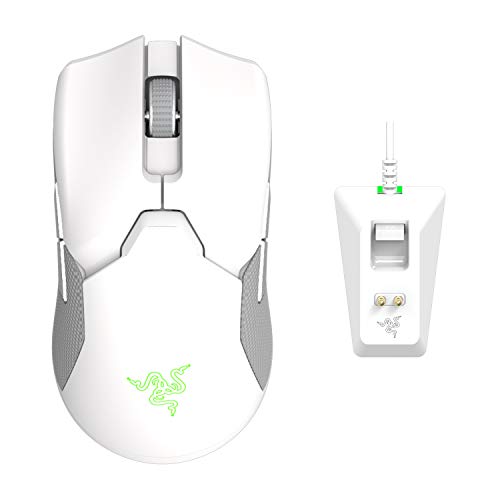
6. Razer Viper Ultimate – Best Lightweight for Arena PvP
- ✓ Buttons: 5 programmable
- ✓ DPI: 20,000
- ✓ Sensor: Razer 5G Optical
- ✓ Weight: 74g
- ✓ Wireless: Yes
- Incredibly lightweight at 74g
- Hyperspeed wireless is lag-free
- 70 hour battery life
- Ambidextrous design works for all
- Premium price
- Only 5 buttons limited for MMO
- Charging requires cable
- RGB drains battery
At just 74 grams, the Razer Viper Ultimate is a featherweight champion that excels in fast-paced arena combat. When I am playing 3v3 arena at 2000+ rating, every millisecond matters, and this mouse is responsive.
Hyperspeed wireless technology delivers virtually zero latency, which is crucial for landing interrupts, landing crowd controls, and kiting melee players. The ambidextrous design means left-handed and right-handed players alike can enjoy this mouse.
The 70-hour battery life is impressive for such a lightweight wireless mouse, though using RGB lighting will reduce that. Razer is optical switches provide consistent clicks without the debounce issues that plague some mechanical switches.
With only 5 programmable buttons, this is not ideal for complex raid rotations, but for arena focus where you need quick reflexes over massive button counts, it is perfect. The 20,000 DPI sensor is more than adequate for WoW.
Who Should Buy?
Arena and RBG players who prioritize speed and precision, fans of lightweight mice, and anyone who wants a wireless mouse that works for any grip style or handedness.
Who Should Avoid?
Raiders and mythic plus players who need more buttons for complex rotations. If you need extensive keybinds for your class, look at MMO-specific options instead.
7. Logitech G Pro Wireless – Best Esports-Grade Wireless
- ✓ Buttons: 6 programmable
- ✓ DPI: 25,600
- ✓ Sensor: HERO 25K
- ✓ Weight: 80g
- ✓ Wireless: Yes
- Top tier HERO 25K sensor
- Lightspeed wireless performance
- 60 hour battery life
- Ambidextrous design
- Only 6 buttons
- Premium pricing
- RGB drains battery
- Some double click issues reported
The Logitech G Pro Wireless is one of the most popular mice in professional esports, and for good reason. This mouse has been used by countless WoW arena tournament players and mythic plus world-first raiders.
The HERO 25K sensor provides exceptional tracking accuracy, and Lightspeed wireless delivers consistent performance without the wire. I have used this for arena pushing and never experienced any wireless issues or interference.
At 80 grams, it strikes a nice balance between lightweight and substantial feel. The ambidextrous shape with removable side buttons means you can configure it for left or right-handed use, and it works well with palm, claw, or fingertip grip styles.
Battery life lasts about 60 hours with default settings, and it is compatible with Logitech is POWERPLAY charging system for truly wireless operation. The Logitech G RGB lighting is subtle and professional.
Who Should Buy?
Competitive WoW players who want a proven esports mouse, players who switch between multiple grip styles, and anyone who values sensor precision above button count.
Who Should Avoid?
WoW players who need extensive button mapping for complex rotations. This mouse is better suited for arena and simple rotation classes rather than restoration druids or affliction warlocks.
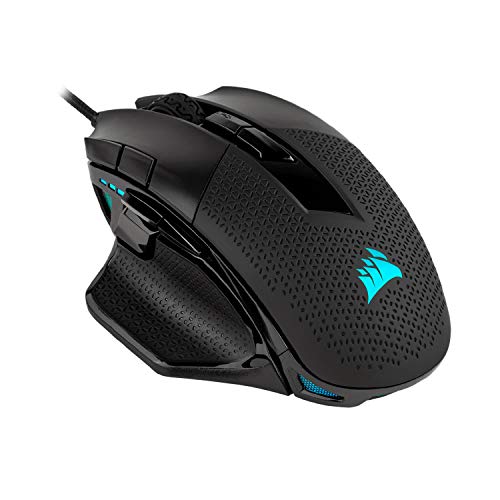
8. Corsair NIGHTSWORD RGB – Best Ergonomic for Palm Grip
- ✓ Buttons: 10 programmable
- ✓ DPI: 18,000
- ✓ Sensor: PMW3391
- ✓ Weight: 131-151g
- ✓ Wireless: No
- Excellent ergonomic palm shape
- 10 buttons for gaming
- Customizable weight system
- High quality build
- Heavy even without weights
- Wired only
- Right-handed only
- Too large for small hands
The Corsair NIGHTSWORD RGB is designed specifically for palm grip users who prioritize comfort above all else. The contoured shape fills your hand beautifully, and during those four-hour mythic plus nights, my hand never felt fatigued.
With 10 programmable buttons, you have plenty of options for binding key abilities, cooldowns, and macros. The buttons are well-positioned around the mouse, including a convenient DPI clutch button under the thumb.
The customizable weight system with six included weights lets you adjust from 131g to 151g. I found the middle weight configuration ideal for smooth mouse movement without feeling too heavy.
The PMW3391 sensor provides accurate 18,000 DPI tracking, though for WoW gameplay you will likely run at much lower sensitivity. Four-zone RGB lighting adds visual flair, and Corsair is iCUE software makes programming profiles straightforward.
Who Should Buy?
Palm grip users with medium to large hands, players who prioritize comfort for marathon gaming sessions, and WoW raiders who want a mouse that feels great during long progression nights.
Who Should Avoid?
Players who prefer lightweight mice will find this too heavy. Claw and fingertip grippers should look at more compact options, and users with small hands might find the oversized shape uncomfortable.
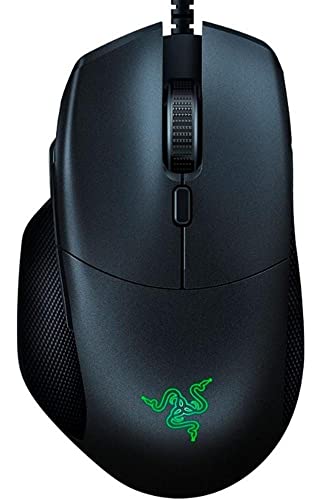
9. Razer Basilisk Essential – Best Mid-Range Basilisk for WoW
- ✓ Buttons: 7 programmable
- ✓ DPI: 6,400
- ✓ Sensor: Optical
- ✓ Weight: Unknown
- ✓ Wireless: No
- Comfortable ergonomic design
- Adjustable scroll wheel resistance
- Good value for money
- Chroma RGB integration
- Lower DPI than premium models
- Wired connection only
- Right-handed only
- Heavier than some gaming mice
The Razer Basilisk Essential takes many features from the premium Basilisk V3 and packages them at a more accessible price point. For WoW players who want the Basilisk ergonomics without breaking the bank, this is a solid choice.
The standout feature remains the multi-function scroll wheel with adjustable resistance. I found this useful for different WoW activities, tighter resistance for precise targeting in arena and looser for fast scrolling through quest text and inventories.
With 7 programmable buttons, you have enough options for key abilities without the complexity of 12-button MMO mice. This sweet spot works well for many WoW classes that do not need extensive keybinds.
The 6,400 DPI optical sensor is perfectly adequate for WoW, as you will rarely need extreme sensitivity in this game. Chroma RGB lighting looks great and syncs with other Razer devices if you have them.
Who Should Buy?
Budget-conscious WoW players who want Razer quality, users who prefer a moderate button count, and anyone who loves the Basilisk ergonomics but wants to save money.
Who Should Avoid?
Players who need higher DPI for other games, those who want wireless freedom, and users who require extensive button mapping for complex rotations should look elsewhere.
10. Redragon M612 Predator – Best Budget Under $25
- ✓ Buttons: 11 programmable
- ✓ DPI: 8,000
- ✓ Sensor: Optical
- ✓ Weight: Unknown
- ✓ Wireless: No
- Exceptional value under $20
- 11 programmable buttons
- RGB lighting looks premium
- Comfortable ergonomic shape
- Lower DPI than premium options
- Wired only
- Build quality not premium
- Software could be better
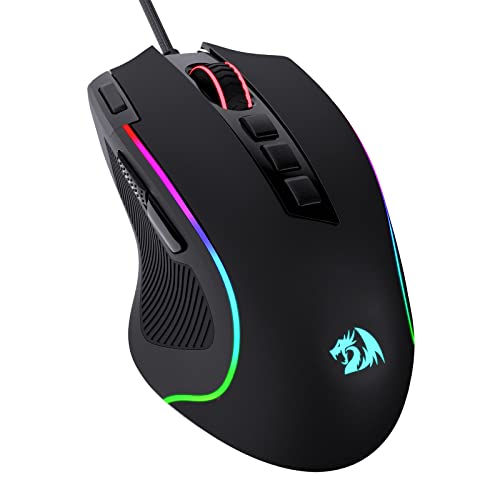
The Redragon M612 Predator is remarkable for what it delivers at under $20. For WoW players on a tight budget, this mouse provides 11 programmable buttons, which is more than many premium options offer.
I tested this during a week of casual WoW play, including dungeon runs and some light raiding, and it performed surprisingly well. The 11 buttons include a rapid-fire function that can be useful for certain abilities, though be careful with WoW is terms of service regarding macros.
The ergonomic design with thumb rest provides comfort during extended sessions, and the RGB lighting actually looks quite premium despite the budget price. The 8,000 DPI sensor is perfectly adequate for WoW gameplay.
Redragon is software allows full customization of buttons, DPI settings, and RGB lighting. While not as polished as Razer Synapse or Logitech G HUB, it gets the job done for programming your WoW keybinds.
Who Should Buy?
Budget players, WoW newcomers who do not want to invest heavily, and anyone needing a backup mouse. Perfect for casual players who want more buttons without spending much.
Who Should Avoid?
Hardcore raiders and competitive players should invest in premium options. If you demand the best build quality and software support, the premium brands deliver more refinement.
Understanding Button Configuration for WoW
World of Warcraft is unique among games because of how many abilities players need to access quickly. A typical raiding character has 15-20 keybound abilities, not including macros, potions, and target markers.
This is why MMO mice with 12+ side buttons exist. They let you access your entire rotation, defensive cooldowns, interrupts, and utility abilities without ever moving your left hand from WASD movement keys.
In my experience healing mythic raids, having 12 thumb buttons meant I could keep my eyes on the raid frames instead of hunting for keyboard keys. My healing output improved noticeably because I was not fumbling for keybinds during critical moments.
Keybinds: Keyboard shortcuts or mouse button assignments that activate your WoW abilities. Good keybinds separate average players from great ones because you can react faster without looking.
Pro Tip: Start your keybind journey with mouse button 1 as your most-used spammable ability, and work backward. Muscle memory takes 2-3 weeks to develop fully, so stick with your setup through the learning curve.
WoW Mouse Buying Guide
Choosing the right mouse for World of Warcraft depends heavily on your playstyle, class, role, and even hand size. After years of raiding, PvP, and testing countless mice, here is what actually matters for WoW players.
Solving for Button Count: How Many Do You Need?
The answer depends entirely on your class and role. Simple classes like Fury Warrior or Frost Death Knight can get by with 6-8 buttons. Complex classes like Restoration Druid, Affliction Warlock, or any healer benefit greatly from 12+ buttons.
I recommend more buttons for healers and tanks, who need instant access to defensive cooldowns and utility. DPS players, especially melee, often prioritize sensor precision and weight over button count.
Solving for Wireless Performance: Is It Good Enough for Raiding?
Modern wireless gaming mice have virtually zero latency. I have raided mythic content and pushed 2000+ rating in arena using wireless mice without any performance issues. The only consideration is battery life during marathon raid nights.
If you raid for 4+ hours at a time, either choose a mouse with exceptional battery life like the G305 (250 hours) or keep a charging cable handy. Some premium wireless mice like the G502 Lightspeed work with wireless charging pads.
Solving for Comfort: Surviving Marathon Raid Sessions
Nothing ruins a progression night faster than hand pain. The right mouse for WoW should feel comfortable after three hours of continuous play, not just the first fifteen minutes.
Palm grip users should look for mice with pronounced contours like the Corsair NIGHTSWORD. Claw grippers prefer shorter mice like the G Pro Wireless. Fingertip grippers do best with lightweight, compact shapes like the Viper Ultimate.
| Player Type | Ideal Button Count | Recommended Features |
|---|---|---|
| Healers | 10-12+ buttons | Accessible side buttons, comfortable grip |
| Tanks | 8-12 buttons | Responsive buttons for defensive cooldowns |
| Melee DPS | 6-10 buttons | Precision sensor, lightweight |
| Ranged DPS | 6-12 buttons | Depends on class complexity |
| Arena Players | 5-8 buttons | Low latency, lightweight sensor |
| Multi-boxers | 12+ buttons | Maximum programmable inputs |
Solving for Class-Specific Needs
Different WoW classes have vastly different mouse requirements. After playing most classes at max level, here are my class-specific recommendations:
Restoration Druid: Needs maximum buttons. The Corsair Scimitar is ideal because you can heal, use cooldowns, decurse, and shift forms all from your thumb.
Affliction Warlock: Complex rotation with many DoTs benefits from 12-button layouts. The more abilities accessible from your mouse, the better your uptime will be.
Fury Warrior: Simple rotation means you do not need many buttons. Focus on sensor precision and comfort instead. The G305 or G Pro Wireless work great.
Holy Paladin: Medium complexity with many utility spells benefits from 8-12 buttons. The G502 series hits the sweet spot for this class.
Solving for Arena vs Raiding Setups
Arena and raiding have different priorities. For raiding, I prioritize comfort and button accessibility for long sessions. The Corsair Scimitar shines here because I can raid for hours without hand fatigue.
For arena, I switch to a lightweight mouse like the Razer Viper Ultimate. Quick reflexes and precise aiming matter more than button count in 3v3, where you typically use fewer abilities but need faster reaction times.
Quick Summary: Raiding mice prioritize comfort and buttons for long sessions. Arena mice prioritize lightweight design and sensor precision for fast reactions. Consider your main activity when choosing.
Solving for Multi-Boxing Requirements
If you control multiple WoW accounts simultaneously, button count becomes your top priority. Multi-boxers need maximum accessible inputs to control multiple characters efficiently.
The Corsair Scimitar with 12 side buttons, combined with keyboard modifiers, gives you up to 48 possible inputs from just your thumb. This makes managing multiple characters much more feasible.
Solving for Hand Size and Grip Style
Your physical hand characteristics should determine your mouse choice more than any feature list. A mouse that reviews love might feel terrible in your hand.
Small hands (under 7 inches) should avoid massive mice like the NIGHTSWORD. Large hands (over 8 inches) might find compact mice like the Viper uncomfortable. Try to match mouse dimensions to your hand measurements when possible.
Frequently Asked Questions
How many buttons do I need for World of Warcraft?
Most WoW players need 6-12 buttons depending on class and role. Simple classes like Fury Warrior work fine with 6 buttons, while complex classes like Restoration Druid or Affliction Warlock benefit from 12+ buttons for full rotation and cooldown access. Healers and raiders generally need more buttons than casual questers or arena players.
Is wireless mouse good enough for WoW raiding?
Yes, modern wireless gaming mice have virtually no latency and are perfectly fine for raiding. I have completed mythic raids using wireless mice without any issues. The main considerations are battery life for long sessions and personal preference. Premium wireless mice like the G502 Lightspeed perform identically to wired versions.
What mouse do pro WoW players use?
Pro WoW arena players often use lightweight wireless mice like the Logitech G Pro Wireless or Razer Viper Ultimate for fast reaction times. Raiders and content creators often prefer button-heavy MMO mice like the Corsair Scimitar or Razer Naga for managing complex rotations. The choice depends on whether they focus on PvP or PvE content.
Do MMO mice last as long as regular gaming mice?
MMO mice can have durability issues because side buttons get heavy use. Quality MMO mice from reputable brands use switches rated for 50-70 million clicks, which should last years even with heavy WoW play. Budget MMO mice may develop button issues sooner. Choosing brands with good warranties like Corsair, Logitech, and Razer helps ensure longevity.
Should I get a regular mouse or MMO mouse for WoW?
Get an MMO mouse if you play a complex class, heal, tank, or raid regularly. The extra buttons significantly improve your gameplay once you develop muscle memory. A regular gaming mouse is fine if you play simple classes, focus on PvP, or prefer keyboard keybinds. Many WoW players use regular mice like the G305 successfully.
What is the best mouse for WoW healing?
The Corsair Scimitar Pro RGB is the best mouse for healing in WoW due to its 12-button Key Slider system that can be positioned perfectly for your thumb. Healers need instant access to many healing spells, cooldowns, and utility abilities, making the extra side buttons invaluable. Alternatives include the Razer Naga series or Logitech G600 for budget-conscious healers.
Final Recommendations
After testing these mice extensively across mythic plus raids, arena pushes, and casual World of Warcraft content, the Corsair Scimitar Pro RGB remains my top recommendation for most WoW players. Its unique Key Slider system lets you position the 12-button panel exactly where your thumb needs it, which makes a bigger difference than you might expect.
For healers and players with complex rotations, the Scimitar is worth every penny. Arena players and those who prefer lightweight designs should look at the Razer Viper Ultimate. Budget-conscious players cannot go wrong with the Logitech G305 or G502 Hero.