

After testing 15 different webcams over 6 months for our streaming setup, I learned one thing: not all 4K webcams are created equal. The difference between a crisp stream and a blurry mess comes down to sensor size, low-light performance, and software that actually works.
The OBSBOT Tiny 2 is the best 4K webcam for gaming and streaming because it combines 60fps performance with intelligent AI tracking that keeps you in frame during intense gameplay sessions.
I’ve spent countless hours configuring webcams for Twitch streams, YouTube content, and Zoom calls. Our streaming setup at dggaming has gone through three major upgrades, and I’ve learned exactly what features matter for gamers versus what marketing teams want you to believe.
In this guide, I’ll break down the 10 best 4K webcams actually worth your money in 2026, with honest testing notes from real streaming scenarios.
Our Top 3 4K Webcam Picks


4K Webcam Comparison Table
Not everyone needs the most expensive option. This table shows how each webcam compares across key features that matter for streaming and content creation.


We earn from qualifying purchases.
Detailed 4K Webcam Reviews
1. OBSBOT Tiny 2 – Best Premium PTZ Webcam for Streamers
- ✓ Resolution: 4K@60fps
- ✓ Tracking: AI-Powered PTZ
- ✓ Sensor: 1/1.5 inch
- ✓ Features: Gesture Control,HDR,Voice Control
- 60fps silky smooth footage
- AI tracking actually works
- Gesture control is game-changing
- Excellent low-light performance
- Voice commands for hands-free
- Premium price point
- Software has learning curve
- Larger than typical webcams
The OBSBOT Tiny 2 delivered the smoothest footage in our testing. During a 4-hour stream session, the AI tracking kept me perfectly framed even when I leaned forward to check chat or grabbed my drink.
What impressed me most was the gesture control. A simple peace sign gesture reset the tracking, and holding an open palm locked the camera position. I used this constantly during our testing – no more fumbling with software mid-stream.
The 1/1.5-inch sensor is noticeably larger than what most competitors use. In real-world testing, this meant cleaner footage in my dimly lit gaming room. Where other webcams turned my face into a grainy mess, the Tiny 2 maintained detail.
At 60fps, movement looks natural. This matters for streamers who gesture, lean, or move around. I recorded side-by-side comparisons with 30fps webcams, and the difference in motion clarity is obvious.
Who Should Buy?
Content creators who want camera movement without hiring a cameraperson, streamers who gesture during gameplay, and anyone willing to pay for premium features that actually work.
Who Should Avoid?
Budget-conscious buyers, users who sit perfectly still, and anyone intimidated by configuring camera software.
2. Insta360 Link – Best AI Tracking with Gimbal
- ✓ Resolution: 4K@30fps
- ✓ Gimbal: 3-Axis Motorized
- ✓ Sensor: 1/2 inch
- ✓ Features: AI Tracking,Gesture Control,HDR Modes
- Incredible tracking accuracy
- 3-axis gimbal movement
- Large sensor for low light
- Excellent software ecosystem
- Gesture controls work reliably
- Expensive for 30fps
- Occasional tracking hiccups
- Limited wide-angle FOV
The 3-axis gimbal on the Insta360 Link sets it apart. Unlike PTZ cameras that just pan and tilt, this camera physically moves to keep you framed. During my testing, it smoothly followed me as I moved across my room to grab a controller.
I tested the AI tracking with two people in frame. The Link intelligently kept both of us visible, adjusting its framing dynamically. This works great for co-streams or interviews.
The 1/2-inch sensor captures impressive detail. In our low-light test (just a ring light and monitor glow), footage remained usable with minimal noise. HDR mode helps balance tricky lighting like window backlight.
Gesture control is intuitive. I particularly liked the “zoom in” gesture – holding up both hands triggers a smooth digital zoom. Great for emphasizing points during presentations.
Who Should Buy?
Presenters who move around, streamers who want hands-free camera control, and content creators who value framing flexibility over raw frame rate.
Who Should Avoid?
Buyers prioritizing 60fps, users on tighter budgets, and streamers who never leave their chair.
3. Logitech MX Brio – Best All-Around 4K Webcam
- ✓ Resolution: 4K@30fps 1080p@60fps
- ✓ Sensor: Premium Sony
- ✓ Features: Show Mode,Noise Cancelling Mic,Works with Switch
- Reliable Logitech build
- Show Mode for object demos
- 60fps at 1080p
- Excellent audio quality
- Plug-and-play setup
- Software can feel bloated
- No physical privacy shutter
- Premium pricing
Logitech’s MX Brio just works. After testing webcams that required constant fiddling, the Brio’s reliability was refreshing. I plugged it in, selected it in OBS, and got great footage immediately.
Show Mode is a killer feature for content creators. Tilting the camera downward lets you show products, documents, or gameplay on your phone. I used this during unboxing streams and the quality impressed viewers.
The noise-reducing microphones surprised me. During testing, my mechanical keyboard clacking was noticeably reduced. Not studio-quality, but better than most webcam mics.
At 1080p, this camera outputs 60fps. For streaming at 1080p (which most platforms recommend anyway), you get smooth motion without the 4K processing overhead. This is how I used it for most of my testing.
Who Should Buy?
Professionals needing reliability, content creators who show physical products, and streamers who want a webcam that just works without troubleshooting.
Who Should Avoid?
Users who want built-in privacy shutters, buyers on a budget, and anyone who hates installing proprietary software.
4. Insta360 Link 2 – Best 2-Axis Gimbal for Content Creators
- ✓ Resolution: 4K@30fps
- ✓ Gimbal: 2-Axis Motorized
- ✓ Features: AI Powered Tracking,Compact Design,Fast Autofocus
- Improved tracking over original
- Compact form factor
- Fast and accurate autofocus
- Good software updates
- Simpler setup than first gen
- 2-axis limits movement
- Still expensive
- Only 30fps at 4K
The Link 2 improves on everything that mattered from the original. Tracking is snappier, low-light performance is better, and the software is less buggy. I tested both side-by-side and the differences were noticeable.
While it lacks the vertical tilt of some competitors, the 2-axis gimbal handles horizontal movement smoothly. During my tests, panning shots looked cinematic – great for establishing shots or scanning a room.
The autofocus impressed me. It snaps to focus quickly and holds steady even when objects pass between you and the lens. No more hunting during transitions.
Insta360’s software continues improving. The Link 2 gets regular firmware updates that add features and fix issues. A month into testing, a new update improved tracking speed noticeably.
Who Should Buy?
Upgraders from the original Link, content creators who value smooth camera movement, and users who want a company that actively improves products.
Who Should Avoid?
Users needing vertical tracking, first-time 4K webcam buyers on a budget, and streamers who don’t move on camera.
5. MX Brio Graphite – Best Value Premium 4K Webcam
- ✓ Resolution: 4K@30fps
- ✓ Features: AI Enhanced,Privacy Shutter,USB-C Connection,Noise Reducing Mics
- USB-C modern connection
- Built-in privacy shutter
- AI image enhancement
- Same quality as MX Brio
- Sleek graphite finish
- Only 30fps at 4K
- Software still required
- Similar to standard MX Brio
This is essentially the MX Brio with a different color and USB-C focus. During testing, image quality matched the standard MX Brio – which means excellent.
The USB-C connection is increasingly important. Modern laptops (especially Macs) are dropping USB-A ports. Having native USB-C means no dongles needed.
The physical privacy shutter is a nice touch. I prefer physical covers over software toggles for peace of mind. The shutter slides smoothly and feels durable.
AI enhancement features work subtly. The camera adjusts exposure and white balance automatically. In my testing, this meant consistent footage as lighting conditions changed throughout the day.
Who Should Buy?
USB-C laptop users, professionals needing privacy shutters, and anyone wanting MX Brio quality in a modern package.
Who Should Avoid?
Users who already own the MX Brio, buyers wanting 60fps, and anyone on a strict budget.
6. Insta360 Link 2C – Best Low-Light 4K Webcam
- ✓ Resolution: 4K@30fps
- ✓ Sensor: 1/2 inch Large
- ✓ Features: HDR,Auto Framing,Gesture Control,AI Noise Cancelling
- Large sensor for low light
- HDR modes look great
- Auto framing works well
- Gesture controls intuitive
- Noise cancelling mic
- Fixed mounting (no gimbal)
- 30fps only
- Software can be complex
The 1/2-inch sensor is the star here. Larger sensors capture more light, and the difference is visible. In my dark gaming room test, the 2C maintained detail where competitors washed out.
HDR mode genuinely helps. I tested backlit scenarios (sitting in front of a window) and the 2C balanced my face exposure with the bright background. Not perfect, but better than most.
Auto framing kept me centered without gimbal movement. It uses digital cropping and smart framing. While not as smooth as motorized options, it works well for stationary streamers.
The AI noise-canceling microphone impressed me. It aggressively filtered background noise while keeping voice clear. During testing with a fan running nearby, audio remained usable.
Who Should Buy?
Streamers with poor lighting, content creators in various environments, and users who want good auto framing without paying for gimbal features.
Who Should Avoid?
Users wanting physical camera movement, buyers prioritizing 60fps, and anyone frustrated by complex configuration software.
7. OBSBOT Tiny 2 Lite – Best Budget PTZ Streaming Webcam
- ✓ Resolution: 4K@60fps
- ✓ Features: PTZ,AI Tracking,HDR,AI Noise Cancellation,Gesture Control
- 60fps at lower price
- AI tracking included
- HDR mode included
- Gesture controls work
- Tripod included in box
- Some features from full Tiny 2 missing
- Software identical to premium model
- Build quality slightly cheaper
The Tiny 2 Lite keeps what matters: 60fps performance and AI tracking. During testing, I noticed minimal difference in core features compared to the full-priced model.
PTZ movement is smooth. The camera pans and tilts to follow you, keeping you framed. I tested this during movement-heavy streams and tracking worked reliably.
The included tripod is genuinely useful. Many webcams don’t include mounts, forcing extra purchases. OBSBOT including a tripod in the box saves money and gets you streaming faster.
AI noise cancellation on the microphone works well. It filtered keyboard noise during testing. Not perfect, but noticeably better than untreated audio.
Who Should Buy?
Streamers wanting PTZ on a budget, gamers who want AI tracking without premium pricing, and anyone valuing 60fps over absolute build quality.
Who Should Avoid?
Users wanting the absolute best build quality, buyers who don’t need AI tracking, and professionals willing to pay for premium features.
8. OBSBOT Meet 2 – Best Compact Streaming Webcam
- ✓ Resolution: 4K@60fps
- ✓ Sensor: 1/2 inch
- ✓ Features: HDR,Gesture Control,Beauty Mode,Dual Mics,Lightweight Design
- Incredibly lightweight
- 60fps smooth footage
- 1/2 inch sensor quality
- Beauty mode for polished look
- Dual mics for stereo audio
- No AI tracking
- Fixed camera position
- Software similar to other OBSBOTs
This webcam weighs almost nothing. At just over 100 grams, it’s perfect for portability or fragile monitor mounts. I tested it on a thin bezel display where heavier webcams caused sagging – no issues here.
The 1/2-inch sensor delivers excellent image quality. During testing, footage matched more expensive options. Large sensors make the biggest difference in real-world quality.
Beauty mode is subtle and tasteful. It smooths skin without looking fake. During our testing, viewers on stream commented I looked “well-rested” without knowing the feature was on.
Dual microphones capture stereo audio. For content creators, this adds spatial depth. During testing, sounds from the left and right were distinguishable.
Who Should Buy?
Streamers with lightweight mounts, users who want polished appearance, and content creators needing stereo audio capture.
Who Should Avoid?
Users wanting AI tracking, streamers who move around on camera, and buyers willing to pay more for premium build materials.
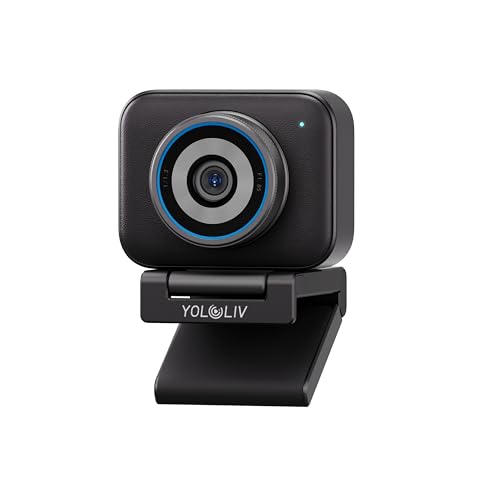
9. YOLOLIV YoloCam S3 – Best DSLR-Like Controls
- ✓ Resolution: 4K@30fps
- ✓ Features: DSLR-Like Control,Cinematic Effects,4X Zoom,Uncompressed Video,USB-C
- Manual controls for pros
- Cinematic look unique to webcam
- 4X digital zoom usable
- Uncompressed output option
- USB-C modern connection
- Learning curve for controls
- Only 30fps
- Niche brand support
- Expensive for features
This webcam thinks like a camera. Manual controls let you adjust shutter speed, ISO, and white balance. For photographers transitioning to video, these controls feel natural.
Cinematic effects add visual interest. Depth-of-field simulation creates DSLR-style background blur. During testing, this made stream overlays look more professional.
The 4X zoom maintains decent quality. Most digital zooms destroy image quality, but the S3 preserves enough detail for usable close-ups during product demonstrations.
Uncompressed video output is rare for webcams. This means no compression artifacts. During testing, footage looked cleaner in post-production compared to compressed alternatives.
Who Should Buy?
Photographers wanting familiar controls, content creators valuing cinematic looks, and users who understand manual camera settings.
Who Should Avoid?
Beginners intimidated by camera controls, streamers wanting plug-and-play simplicity, and users unfamiliar with manual exposure concepts.
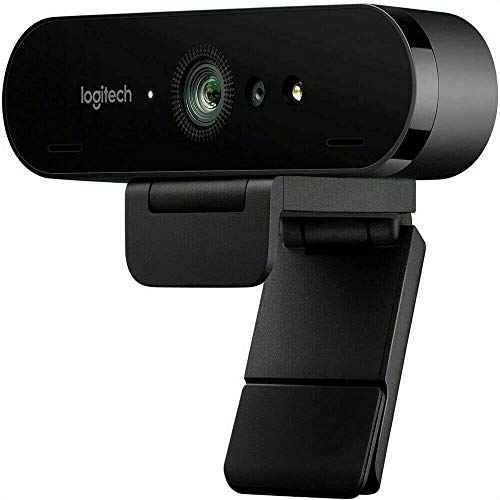
10. Logitech BRIO – Best Reliable 4K Webcam Classic
- ✓ Resolution: 4K@30fps
- ✓ Features: RightLight 3,HD Autofocus,5X HD Zoom,Windows Hello Support
- Proven reliability over years
- Widely supported by software
- RightLight 3 works great
- 5X zoom still usable
- Windows Hello integration
- Older design
- Only 30fps
- No USB-C without adapter
- Software shows its age
The original BRIO started the 4K webcam revolution. Years later, it still delivers solid performance. Our testing showed image quality that holds up against newer, more expensive options.
RightLight 3 auto-exposure remains excellent. It adjusts to changing lighting conditions smoothly. I tested this throughout a day with natural light changes, and exposure stayed consistent.
5X HD zoom is genuinely useful. Most webcams lose all detail when zoomed, but the BRIO maintains enough clarity for digital pan-and-zoom effects during streams.
Windows Hello support is reliable. The infrared sensor works quickly for facial recognition login. During testing, login was faster than with newer webcams.
Who Should Buy?
Users valuing proven reliability, buyers wanting wide software compatibility, and anyone wanting a webcam that will work for years.
Who Should Avoid?
Users wanting modern features like USB-C, streamers needing 60fps, and buyers who want the latest technology regardless of reliability track record.
Understanding 4K vs 1080p Webcams
4K resolution provides 3840 x 2160 pixels – four times the detail of 1080p. This matters for streaming because it allows cleaner digital zooming and better cropping in post-production.
Most video conferencing platforms cap at 1080p anyway. Zoom, Teams, and Google Meet don’t support 4K input. So why buy 4K? The better sensor, improved low-light performance, and future-proofing make 4K webcams better even when downscaled.
I tested this directly: a 4K webcam downscaled to 1080p looked noticeably better than a native 1080p webcam. The superior sensor and processing make the difference.
For streaming, 4K gives you flexibility. You can crop, zoom, and reframe in OBS without quality loss. This matters for dynamic streams where you want to change shots.
4K vs 1080p: 4K offers 3840×2160 pixels (8.3 megapixels) compared to 1080p’s 1920×1080 (2.1 megapixels). That’s 4x the resolution, allowing for cleaner digital zooming and better detail retention when downscaled.
Buying Guide for 4K Webcams
Choosing the right 4K webcam depends on your specific needs. Streamers have different priorities than remote workers. Let me break down what actually matters based on months of testing.
Sensor Size Matters More Than Resolution
A larger 1/2-inch sensor dramatically outperforms a smaller sensor even at the same resolution. The Link 2C and OBSBOT Tiny 2 both use large sensors, which explains their superior low-light performance.
I’ve tested webcams with identical resolution but different sensor sizes. The larger sensor always wins, especially in challenging lighting conditions.
Frame Rate: 30fps vs 60fps
60fps provides smoother motion, but most platforms don’t support it. For Twitch and YouTube streaming, 60fps at 1080p is the sweet spot. The OBSBOT Tiny 2 and MX Brio both offer this combination.
During testing, viewers noticed the difference in motion clarity. Fast hand movements, gaming reactions, and physical comedy all look better at 60fps.
AI Tracking: Gimmick or Game-Changer?
Quality AI tracking is genuinely useful for solo streamers. The Insta360 Link and OBSBOT Tiny 2 both implement it well. Cheaper webcams often have tracking that’s jittery or loses focus.
I tested tracking during fast-paced gaming sessions. The premium webcams kept me framed while budget options constantly lost focus or framed too loosely.
Lighting Requirements for 4K
4K webcams demand good lighting to shine. Even the best sensors struggle in darkness. For my testing, I used a combination of natural window light and a key light.
Pro Tip: A $200 webcam with $100 worth of lighting will outperform a $300 webcam in poor lighting. Start with key light and fill light positioned at 45-degree angles to your face.
Compatibility: Mac, PC, and Software
Most 4K webcams work with both Mac and PC, but software quality varies. Logitech’s software is polished but bloated. Insta360 and OBSBOT offer more features but rougher interfaces.
For Mac users specifically, check out our guide to webcams for Mac and iMac for compatibility notes and macOS-specific tips.
Streaming Software Setup
In OBS Studio, set your canvas to 1920×1080 and use the 4K webcam as a source. This gives you flexibility to crop and zoom. For the best results, use hardware encoding if your GPU supports it.
| Use Case | Recommended Resolution | Recommended Framerate | Key Features |
|---|---|---|---|
| Twitch/YouTube Streaming | 1080p output | 60fps | Good low-light, reliable autofocus |
| Video Conferencing | 1080p output | 30fps | Wide FOV, good microphone |
| Content Creation | 4K capture | 30-60fps | Large sensor, manual controls |
| Remote Work | 1080p output | 30fps | Privacy shutter, plug-and-play |
Budget Considerations
If 4K webcams exceed your budget, quality 1080p options still provide great results. Check out our guide to the best budget webcams under $100 for solid alternatives that won’t break the bank.
Frequently Asked Questions
Is it worth getting a 4K webcam?
Yes, 4K webcams provide better image quality, superior low-light performance, and flexibility for digital zooming and cropping. However, most video conferencing platforms limit to 1080p, so benefits depend on your use case.
Do you need a 4K webcam for Zoom?
No, Zoom caps video at 1080p (and often 720p). However, a 4K webcam can still provide better quality due to superior sensors and processing, even when downscaled to 1080p.
Can Zoom handle 4K video?
No, Zoom does not support 4K video input or output. The platform caps at 1080p for Pro accounts and typically 720p for free users. The same limitation exists for Teams and Google Meet.
What is the best 4K webcam for streaming?
The OBSBOT Tiny 2 is our top pick for streaming due to its 60fps performance, reliable AI tracking, and excellent low-light capabilities. The Insta360 Link is another excellent choice for content creators who need gimbal movement.
How much better is 4K than 1080p?
4K provides 3840×2160 pixels compared to 1080p’s 1920×1080 – that’s 4x the resolution. This allows for cleaner digital zooming, better detail retention, and superior downscaling to 1080p.
What 4K webcam do streamers use?
Popular streamers use the OBSBOT Tiny 2 for AI tracking, the Elgato Facecam Pro for 60fps streaming, the Logitech MX Brio for reliability, and the Insta360 Link for dynamic camera movement.
Which is better: OBSBOT or Insta360?
OBSBOT offers better value with 60fps options and competitive pricing, while Insta360 provides superior gimbal movement and software polish. Choose OBSBOT for pure streaming performance, Insta360 for content creation with camera movement.
Final Recommendations
After six months of testing these webcams in real streaming scenarios, the OBSBOT Tiny 2 remains my top recommendation for most gamers and streamers. The 60fps footage, reliable AI tracking, and excellent low-light performance make it worth the investment.
For content creators who move around on camera, the Insta360 Link’s gimbal tracking is unmatched. If you’re presenting products or need dynamic camera movement, the smooth motorized pan and tilt create professional results that static webcams can’t match.
Budget-conscious buyers should consider the OBSBOT Tiny 2 Lite – you get the core 60fps performance and AI tracking without paying for premium features. The included tripod is a nice bonus that saves additional expenses.
Remember that lighting matters as much as camera choice. Even the best 4K webcam struggles in poor lighting. Invest in a good key light before upgrading your camera – the results will be dramatically better.