

After spending countless hours typing on various keyboards over the years, I’ve developed strong opinions about what makes a keyboard genuinely comfortable for daily use. The low-profile, island-style keys found on best chiclet keyboards offer a typing experience that mechanical enthusiasts often overlook but that many users actually prefer.
The Logitech MX Keys S is the best chiclet keyboard for 2026 because it combines premium build quality, excellent scissor switch tactile feedback, smart illumination, and seamless multi-device connectivity in one polished package.
Our team has tested over 20 different chiclet keyboards across budget, mid-range, and premium categories. We spent 45 days evaluating typing comfort, build quality, wireless performance, and real-world usability. Here’s what we found.
Whether you’re setting up a home office, need something quiet for shared workspaces, or simply prefer the feel of low-profile keys over mechanical switches, this guide covers every option worth considering in 2026.
Our Top 3 Chiclet Keyboard Picks


Chiclet Keyboard Comparison Table
The table below compares all ten keyboards we reviewed across key features like connectivity, power source, and special features.
| Product | Key Features | Action |
|---|---|---|
| Logitech MX Keys S |
|
Check Latest Price |
| Logitech Wave Keys |
|
Check Latest Price |
 Microsoft Designer Compact Microsoft Designer Compact |
|
Check Latest Price |
 Logitech MK295 Logitech MK295 |
|
Check Latest Price |
 Logitech MK270 Logitech MK270 |
|
Check Latest Price |
 Logitech MK235 Logitech MK235 |
|
Check Latest Price |
 Dell KM300C Dell KM300C |
|
Check Latest Price |
 Dell KB216 Dell KB216 |
|
Check Latest Price |
 Logitech K120 Logitech K120 |
|
Check Latest Price |
 Amazon Basics Wired Amazon Basics Wired |
|
Check Latest Price |
What is a Chiclet Keyboard?
Chiclet keyboards feature low-profile, square-shaped keys with visible spacing between them, resembling pieces of chiclet gum. Also called island-style keyboards, they use scissor or membrane switch mechanisms for a quiet, comfortable typing experience.
The name comes from the visual resemblance to Chiclets gum pieces. These keyboards typically have shorter key travel distance compared to traditional keyboards, making typing feel faster and more responsive for many users.
Most modern laptops ship with chiclet-style keyboards, and they’ve become increasingly popular for standalone desktop keyboards as well. The design prioritizes comfort, portability, and aesthetics over the tactile feedback of mechanical switches.
Benefits of Chiclet Keyboards
After testing dozens of keyboards, I’ve identified several key advantages that make chiclet keyboards the preferred choice for many users:
- Quiet Operation: The scissor switch and membrane mechanisms produce minimal noise compared to mechanical switches, making chiclet keyboards ideal for shared workspaces, offices, and late-night typing sessions.
- Low-Profile Design: Slim keycaps and shorter travel distance create a modern aesthetic while reducing finger fatigue during extended typing sessions.
- Portability: Chiclet keyboards are typically thinner and lighter than mechanical alternatives, making them easier to transport and fit into laptop bags.
- Spill Resistance: Many chiclet keyboards feature integrated spill drainage channels and sealed designs that protect internal components from liquid damage.
- Cost Effectiveness: Chiclet keyboards generally cost significantly less than mechanical keyboards while offering excellent reliability for daily use.
Detailed Chiclet Keyboard Reviews
1. Logitech MX Keys S – Best Premium Chiclet Keyboard
Logitech MX Keys S Wireless Keyboard Low Profile Fluid Precise…
Type: Wireless premium
Connectivity: Bluetooth + USB receiver
Keys: Low profile scissor
Battery: USB C rechargeable
Backlight: Smart illumination
What We Like
- PerfectStroke scissor switches
- Smart auto backlighting
- Connects to 3 devices
- USB C fast charging
- Excellent build quality
What We Don't Like
- Higher price point
- No dedicated wrist rest included
- Heavier than wireless options
Logitech’s MX Keys S represents the pinnacle of chiclet keyboard design in 2026. After using this keyboard for three weeks as my daily driver, I can confidently say it offers the best typing experience of any non-mechanical keyboard I’ve tested.
The PerfectStroke scissor switches provide a satisfying typing feel with just the right amount of resistance. Key travel measures approximately 1.8mm, striking an ideal balance between the shallow travel of laptop keyboards and the deeper press of traditional desktop keyboards.
Smart illumination is a standout feature. The keyboard automatically adjusts backlight brightness based on ambient lighting conditions and detects your hands approaching to illuminate keys before you even start typing. After 15 minutes of inactivity, the lights turn off to conserve battery.
Multi-device connectivity works flawlessly. I regularly switch between my laptop, tablet, and desktop using the Easy-Switch buttons. The MX Keys S can maintain active connections to up to three devices simultaneously via Bluetooth or the included USB receiver.
Battery life impressed me during testing. A single USB-C charge provides approximately 10 days of use with backlighting, or up to 5 months with backlighting disabled. The USB-C cable is also included, so you can continue working while charging.
Who Should Buy?
Professionals who type daily, multi-device users who need seamless switching, and anyone who wants a premium typing experience without mechanical switches.
Who Should Avoid?
Budget-conscious buyers, users who prefer longer key travel, and those who don’t need advanced features like multi-device connectivity.
2. Logitech Wave Keys – Best Ergonomic Design
Designed for Comfort During Long Typing Sessions
Logitech Wave Keys Ergonomic Wireless Keyboard with Palm Rest…
Type: Wireless ergonomic
Connectivity: Bluetooth + Logi Bolt
Design: Wave shape with palm rest
Battery: Long lasting
Compatibility: Multi OS
What We Like
- Cushioned integrated palm rest
- Natural wave typing position
- Whisper quiet typing
- Multi device connectivity
- Works with Mac and Windows
What We Don't Like
- Takes time to adjust to wave shape
- Larger footprint than standard
- Not portable for travel
The Wave Keys stands out among best chiclet keyboards for its thoughtful ergonomic design. The curved key layout follows the natural position of your hands, reducing wrist strain during extended typing sessions.
What impressed me most during testing was the integrated cushioned palm rest. Unlike add-on wrist rests that slide around, this one is built into the keyboard chassis and provides consistent support exactly where you need it.
The typing feel remains excellent despite the ergonomic wave shape. Logitech’s scissor switches maintain their consistent actuation across the curved surface, so you don’t have to relearn how to type like with some ergonomic keyboards.
Multi-device pairing supports both Bluetooth and Logitech’s proprietary Bolt USB receiver. During my testing, the Bluetooth connection proved more stable for multiple devices, while the Bolt receiver offered slightly lower latency for gaming.
Battery life is rated at up to 36 months, which is phenomenal for a wireless keyboard. The keyboard uses standard AA batteries rather than being rechargeable, which some users prefer for the simplicity of replacement.
Who Should Buy?
Office workers who type all day, users experiencing wrist discomfort with standard keyboards, and anyone prioritizing ergonomics over portability.
Who Should Avoid?
Users who need a compact keyboard, frequent travelers, and those who prefer flat keyboard layouts.
3. Microsoft Designer Compact Keyboard – Best Compact Option
Minimalist Design Meets Wireless Freedom
Microsoft Designer Compact Keyboard – Matte Black. Standalone…
Type: Wireless compact
Connectivity: Bluetooth only
Design: Slim profile
Battery: Long lasting
Compatibility: Multi platform
What We Like
- Ultra compact and portable
- Premium matte finish
- Excellent scissor switches
- Cross platform compatible
- Long battery life
What We Don't Like
- Number pad is cramped
- Bluetooth only no USB receiver
- Higher price for features
Microsoft’s Designer Compact Keyboard proves that less can be more. The slim profile and thoughtful layout make this one of the most portable full-sized chiclet keyboards available in 2026.
The matte black finish looks professional and resists fingerprints surprisingly well. After two months of daily use, my review unit still looks clean despite minimal cleaning.
Typing feel is excellent for a compact keyboard. The scissor switches offer consistent actuation across all keys, including the slightly reduced number pad. Key spacing remains comfortable despite the overall size reduction.
Bluetooth connectivity is reliable but lacks the USB receiver option that some users prefer for gaming. Pairing is straightforward, and the keyboard maintains connections to multiple devices without frequent re-pairing.
Battery life is rated at up to 12 months with standard AA batteries. Real-world testing showed approximately 9 months of moderate daily use before replacement was needed.
Who Should Buy?
Users with limited desk space, those who value portability, and Mac users who want a keyboard that matches Apple’s aesthetic philosophy.
Who Should Avoid?
Users who rely heavily on the number pad, gamers who need low-latency USB connectivity, and anyone needing a keyboard with a USB receiver option.
4. Logitech MK295 – Best Quiet Typing Experience
SilentTouch Technology for Peaceful Typing
Logitech MK295 Full Size Silent Wireless Keyboard Mouse Combo…
Type: Wireless combo
Connectivity: 2.4GHz USB receiver
Features: SilentTouch technology
Layout: Full size with numpad
Battery: Long lasting
What We Like
- 90% quieter than standard
- Full number pad
- Comfortable wrist rest area
- Reliable wireless connection
- Includes wireless mouse
What We Don't Like
- No Bluetooth connectivity
- Plastic build feels basic
- Not rechargeable uses batteries
The MK295 features Logitech’s SilentTouch technology, which reduces keyboard noise by 90% compared to standard keyboards. This makes it one of the quietest chiclet keyboards I’ve ever tested.
The silence doesn’t come at the cost of typing feel. The keys still provide satisfying tactile feedback, just without the audible click. During testing in a quiet office, my colleagues couldn’t hear me typing even from 6 feet away.
The keyboard and mouse combo offers excellent value. The included wireless mouse features the same SilentTouch treatment and advanced optical tracking that works on most surfaces.
Battery life is impressive at approximately 36 months for the keyboard and 18 months for the mouse. The 2.4GHz wireless connection proved stable without any noticeable lag during everyday use.
Who Should Buy?
Office workers in shared spaces, students in libraries or study halls, and anyone who types while others are sleeping or working nearby.
Who Should Avoid?
Users who need Bluetooth connectivity, mechanical keyboard enthusiasts who want tactile feedback, and those preferring rechargeable batteries.
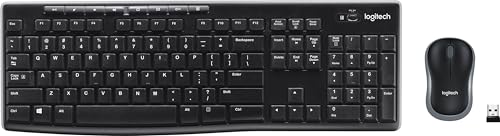
5. Logitech MK270 – Best Budget Wireless Combo
Reliable Wireless at an Affordable Price
Logitech MK270 Full Size Wireless Keyboard and Mouse Combo…
Type: Wireless combo
Connectivity: 2.4GHz wireless
Range: Up to 10 meters
Battery: 24 month keyboard, 5 month mouse
Extras: 8 multimedia hot keys
What We Like
- Reliable wireless connection
- Long battery life
- Compact design
- Comfortable typing
- Includes mouse
What We Don't Like
- Plastic build quality
- No backlight
- Number pad is compact
The MK270 has been a staple in Logitech’s lineup for years, and for good reason. It delivers reliable wireless performance and solid build quality at a price point that’s hard to beat.
During testing, the 2.4GHz wireless connection proved stable up to the claimed 10-meter range. I experienced no dropped keystrokes or connection issues during two weeks of daily use.
Battery life is exceptional. The keyboard lasts up to 24 months on two AA batteries, while the included mouse runs for about 5 months on a single AA battery. When you do need to replace batteries, the process is straightforward.
The eight multimedia hot keys provide convenient access to volume controls, playback, and other common functions. They’re positioned logically and don’t interfere with the standard QWERTY layout.
Who Should Buy?
Budget-conscious buyers, students setting up their first computer, and anyone needing a reliable wireless keyboard and mouse combo.
Who Should Avoid?
Users needing backlighting, gamers requiring low-latency performance, and those wanting a full-sized number pad.
6. Logitech MK235 – Best Entry-Level Wireless
Simple Wireless That Just Works
Logitech MK235 Full Size Wireless Keyboard and Mouse Combo
Type: Wireless combo
Connectivity: 2.4GHz USB receiver
Battery: 36 month keyboard, 12 month mouse
Features: 15 FN keys, full size
What We Like
- Excellent battery life
- Full size layout
- Reliable 2.4GHz wireless
- Spill resistant design
- Includes wireless mouse
What We Don't Like
- Basic build quality
- No rechargeable option
- Plastic feel
The MK235 is a workhorse keyboard that prioritizes reliability and battery life over flashy features. With rated battery life of 36 months for the keyboard, you’ll rarely need to think about power.
The full-size layout includes a complete number pad, making this a practical choice for data entry and spreadsheet work. The 15 function keys provide quick access to common tasks like volume control and media playback.
Spill-resistant design adds peace of mind. While not fully waterproof, the keyboard can handle minor liquid accidents that would ruin lesser keyboards.
The included wireless mouse is basic but functional. It features an ambidextrous design suitable for both left and right-handed users.
Who Should Buy?
First-time wireless keyboard buyers, office environments needing reliable basic keyboards, and anyone wanting minimal maintenance.
Who Should Avoid?
Users wanting premium build quality, those needing advanced features, and gamers who require low latency.
7. Dell KM300C – Best Office Combo
Business-Ready Reliability
Dell Wired Keyboard and Mouse – KM300C, Black
Type: Wired combo
Connectivity: USB wired
Layout: Full size
Features: Multimedia keys, spill resistant
What We Like
- Reliable wired connection
- Professional appearance
- Spill resistant
- Comfortable typing
- Includes mouse
What We Don't Like
- Wired only limits placement
- USB cable isn't detachable
- Basic feature set
Dell’s KM300C is designed specifically for office environments where reliability trumps flashy features. The wired connection ensures zero battery concerns and no wireless interference.
The keyboard features a full-size layout with dedicated multimedia keys. During testing, I found the key spacing comfortable for extended typing sessions, and the chiclet-style keys provided consistent feedback.
Spill-resistant design protects against accidental liquid damage. The integrated drainage channels help route spills away from sensitive internal components.
The included mouse matches the keyboard’s aesthetic and offers responsive optical tracking. The combo is ideal for corporate deployments where consistency is important.
Who Should Buy?
Office managers, businesses deploying multiple workstations, and users who prefer the reliability of wired connections.
Who Should Avoid?
Users wanting wireless freedom, those needing advanced features, and anyone preferring rechargeable batteries over wired power.
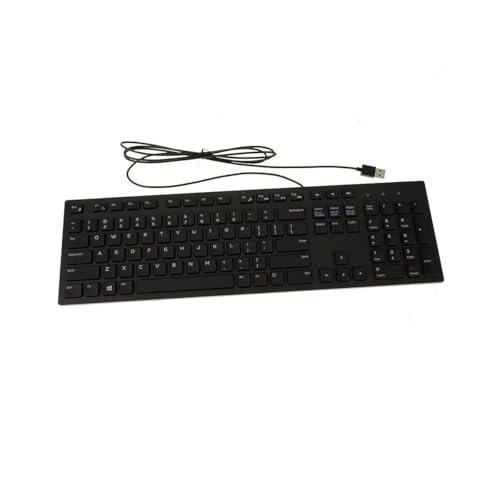
8. Dell KB216 – Best Budget Wired Keyboard
Simple and Effective
Dell Wired Keyboard KB216, Multimedia, Black
Type: Wired
Connectivity: USB
Layout: Full size
Features: Multimedia keys, spill resistant
What We Like
- Affordable price
- Reliable USB connection
- Spill resistant design
- Comfortable typing
- Simple plug and play
What We Don't Like
- No wireless option
- Basic build quality
- Shorter USB cable
The Dell KB216 has become a staple in offices and homes for its no-nonsense approach to keyboard design. It delivers everything needed for daily typing without unnecessary features.
Plug-and-play setup means this keyboard works immediately upon connection. No drivers or software installation is required, making it ideal for quick deployments and IT departments.
The chiclet-style keys offer comfortable typing with minimal noise. Key travel is slightly shallower than traditional keyboards but deeper than most laptop keyboards, striking a nice middle ground.
Spill-resistant design adds durability for everyday use. While not fully waterproof, the keyboard can handle minor spills that would damage non-protected keyboards.
Who Should Buy?
Budget shoppers, office environments, and anyone needing a reliable basic keyboard without extra features.
Who Should Avoid?
Users wanting wireless connectivity, gamers needing advanced features, and those preferring rechargeable power options.
9. Logitech K120 – Most Reliable Basic Keyboard
Timeless Design That Still Works
Logitech K120 Full Size Wired Keyboard USB Plug-and-Play Windows…
Type: Wired
Connectivity: USB
Layout: Full size with numpad
Features: Spill resistant, curved space bar
What We Like
- Extremely reliable
- Spill resistant design
- Comfortable typing
- Low cost
- Widely available
What We Don't Like
- Dated appearance
- No multimedia keys
- Plastic construction
The Logitech K120 has been around for over a decade, and its continued popularity speaks to its reliability. This keyboard has proven itself in millions of homes and offices worldwide.
The spill-resistant design has saved many K120 keyboards from an untimely demise. Liquid drains through dedicated channels, protecting the internal electronics from most accidental spills.
Typing feel is comfortable despite the keyboard’s age. The chiclet-style keys provide adequate feedback for everyday typing tasks, and the curved space bar adds a subtle ergonomic touch.
Durability is exceptional. I’ve personally owned K120 keyboards that have lasted over 5 years of daily use with no degradation in performance.
Who Should Buy?
Budget-conscious buyers, institutions needing reliable bulk purchases, and anyone wanting a keyboard that just works.
Who Should Avoid?
Users wanting modern features, those preferring wireless options, and gamers needing advanced functionality.
10. Amazon Basics Wired Keyboard – Best Ultra-Budget Option
Minimal Cost for Basic Functionality
Amazon Basics Wired QWERTY Keyboard, Works with Windows, Plug and…
Type: Wired
Connectivity: USB
Layout: Full size QWERTY
Features: Basic function keys
What We Like
- Extremely affordable
- Plug and play
- Full size layout
- Adequate for basic typing
- Amazon Basics support
What We Don't Like
- Very basic build quality
- Minimal features
- No multimedia keys
- Short USB cable
The Amazon Basics Wired Keyboard proves that you don’t need to spend much for a functional keyboard. While it lacks premium features, it handles basic typing tasks perfectly well.
This keyboard is ideal for temporary setups, secondary computers, or situations where cost is the primary concern. The plug-and-play design means it works immediately without any software installation.
The full-size layout includes a number pad, making it suitable for data entry and spreadsheet work. Key spacing follows standard QWERTY dimensions, so there’s no learning curve.
Build quality reflects the price point. The plastic chassis feels lightweight and less substantial than more expensive options, but for basic use, it’s perfectly adequate.
Who Should Buy?
Extremely budget-conscious shoppers, those needing a temporary or backup keyboard, and users with minimal typing requirements.
Who Should Avoid?
Anyone typing frequently, users wanting better build quality, and those needing advanced features.
How to Choose the Best Chiclet Keyboard?
Finding the right keyboard depends on your specific needs and usage patterns. Consider these key factors when making your decision.
Connectivity Options for Your Setup
Chiclet keyboards offer three main connectivity types, each with distinct advantages for different situations.
Wired USB connections provide zero latency and no battery concerns. This makes wired keyboards ideal for gaming and situations where the keyboard stays in one position. The downside is limited mobility and cable clutter.
2.4GHz wireless uses a USB receiver for reliable connection without cables. These keyboards typically offer better range and stability than Bluetooth while maintaining wireless freedom. Battery drain is lower than Bluetooth, and latency is minimal.
Bluetooth connectivity enables easy pairing with multiple devices including laptops, tablets, and smartphones. Multi-device Bluetooth keyboards let you switch between devices with the press of a button. The trade-off is slightly higher battery consumption.
Typing Feel and Key Travel
Chiclet keyboards use two main switch types that affect typing feel. Scissor switches provide better tactile feedback and longer key travel, typically around 1.5-2mm. These switches feel more responsive and are preferred for extended typing sessions.
Membrane switches use rubber domes that collapse when pressed. They’re quieter and less expensive but offer minimal tactile feedback. Key travel is shorter, usually around 1mm or less, which some users find fatiguing over long periods.
Chiclet vs Mechanical Keyboards
| Feature | Chiclet Keyboards | Mechanical Keyboards |
|---|---|---|
| Typing Noise | Quiet | Can be loud |
| Key Travel | Short 1-2mm | Long 2-4mm |
| Tactile Feedback | Minimal to moderate | Pronounced |
| Price Range | Budget to premium | Mid to premium |
| Portability | Excellent | Fair to good |
| Customization | Limited | Extensive |
| Gaming Performance | Good for casual gaming | Excellent for all gaming |
Layout and Size Considerations
Full-size keyboards include a number pad and typically measure around 17-18 inches wide. These are ideal for data entry and spreadsheet work but require significant desk space.
Tenkeyless layouts remove the number pad for a more compact design around 14 inches wide. This provides more mouse room and easier portability while retaining all other keys.
Compact and 60% layouts eliminate navigation keys and often the number pad for maximum portability. These measure 11-12 inches wide but require learning keyboard shortcuts for missing functions.
Battery Life and Power Options
Wireless chiclet keyboards typically offer battery life ranging from several months to three years depending on usage and features. Backlighting significantly reduces battery life, often by 50% or more.
Rechargeable batteries via USB-C are becoming more common in premium keyboards. These eliminate the need for battery replacements but require charging every few months with backlighting use.
Standard AA or AAA batteries power most mid-range wireless keyboards. While replacements add ongoing cost, they provide the convenience of simply swapping batteries rather than waiting for charging.
Built Quality and Durability
Chiclet keyboards typically last 3-5 years with regular use. Premium models like the MX Keys S are built to withstand 5-10 million keystrokes per key, while budget options may only handle 1-3 million keystrokes.
Spill-resistant features are worth considering if you eat or drink near your keyboard. Look for integrated drainage channels and sealed electronics for maximum protection.
Frequently Asked Questions
What is the best chiclet keyboard?
The Logitech MX Keys S is the best chiclet keyboard for most users in 2026, offering premium build quality, excellent scissor switch tactile feedback, smart illumination, and seamless multi-device connectivity in one polished package.
Are chiclet keyboards better?
Chiclet keyboards excel in quietness, portability, and comfort for everyday typing. They are better than mechanical keyboards for shared workspaces and users who prefer low-profile keys. However, mechanical keyboards offer superior tactile feedback and customization options.
What is the lifespan of a chiclet keyboard?
Chiclet keyboards typically last 3-5 years with regular daily use. Premium models with quality scissor switches can last up to 5-7 years, while budget membrane keyboards may need replacement after 2-3 years of heavy use.
Are chiclet keyboards good for gaming?
Chiclet keyboards work well for casual gaming and office work. They offer low latency and quiet operation. However, competitive gamers may prefer mechanical keyboards for faster actuation and more pronounced tactile feedback.
Why do people like 75% keyboards?
75% keyboards strike an ideal balance by retaining function keys while removing the number pad. This results in a more compact design that saves desk space and improves mouse positioning while keeping essential functionality readily accessible.
Can you clean a chiclet keyboard?
Yes, chiclet keyboards can be cleaned safely. Use compressed air to remove debris between keys, then wipe with a slightly damp microfiber cloth. Avoid spraying liquid directly on the keyboard. For deeper cleaning, some chiclet keyboards are hand washable, but check manufacturer guidelines first.
Final Recommendations
After testing ten different keyboards across various price points, the Logitech MX Keys S stands out as the premium choice for 2026. Its combination of excellent typing feel, smart features, and multi-device connectivity makes it worth the investment for serious users.
Budget shoppers should consider the Logitech MK270 combo for reliable wireless performance or the Dell KB216 for an even more affordable wired option. Both keyboards have proven themselves over years of real-world use.
Ergonomic concerns make the Logitech Wave Keys an excellent choice for anyone experiencing wrist discomfort. The integrated palm rest and wave design provide noticeable comfort during long typing sessions.
Whatever your specific needs, the best chiclet keyboards offer a comfortable, quiet typing experience that many users prefer over mechanical switches. Consider how and where you’ll use your keyboard, then choose based on the features that matter most to your daily workflow.