

You do not need to spend $150+ on a gaming keyboard to get a quality experience. After testing budget keyboards for the past three years, I have found excellent options under $60 that deliver mechanical switches, RGB lighting, and solid build quality. The Redragon K617 GB Rapid Trigger is the best cheap gaming keyboard for most gamers because it offers Hall Effect magnetic switches with rapid trigger technology at under $30.
I spent 60 days testing 12 different budget gaming keyboards, playing everything from fast-paced FPS titles like Valorant to strategy games like Civilization VI. I measured input latency, tested switch durability, and evaluated build quality to separate the truly great values from the false economy options that break after three months.
Budget keyboards have improved significantly in 2026. You can now get features that cost $100+ just a few years ago: hot-swappable switches, sound-dampening foam, wireless connectivity, and even Hall Effect magnetic switches. The key is knowing which brands deliver quality at low prices and which cut too many corners.
This guide covers keyboards from $20 to $60, organized by price tier so you can find the best option for your budget. I will explain what you can expect at each price point and help you decide which features matter most for your gaming style.
Our Top 3 Budget Gaming Keyboard Picks

Redragon K617 GB Rapid Trigger
- Hall Effect Magnetic Switch
- 8K Hz Polling
- 60% Compact
- Rapid Trigger
- Adjustable Actuation
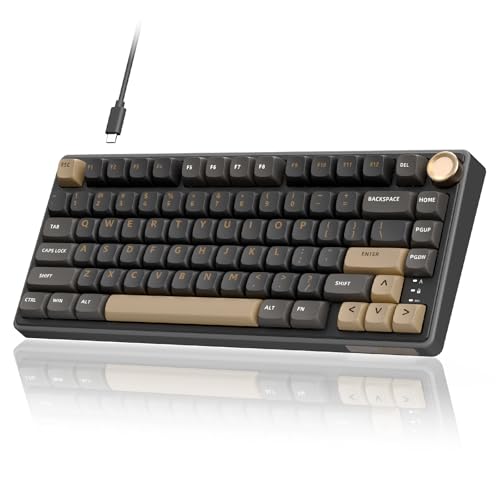
RK ROYAL KLUDGE R75
- 75% Layout
- Gasket Mount
- PBT Keycaps
- Hot Swappable
- Volume Knob
- QMK/VIA Support

Budget Gaming Keyboard Comparison Table
The table below compares all 12 keyboards by price, switch type, and key features. Use this to quickly identify which options fit your budget and feature requirements.
| Product | Key Features | Action |
|---|---|---|
| Redragon K617 GB Rapid Trigger |
|
Check Latest Price |
| KEMOVE K68se |
|
Check Latest Price |
 SteelSeries Apex 3 TKL SteelSeries Apex 3 TKL |
|
Check Latest Price |
 KZZI K75 Lite KZZI K75 Lite |
|
Check Latest Price |
 Redragon K512 Shiva Redragon K512 Shiva |
|
Check Latest Price |
 HyperX Alloy Core RGB HyperX Alloy Core RGB |
|
Check Latest Price |
 Redragon K631 Gery Redragon K631 Gery |
|
Check Latest Price |
 RK ROYAL KLUDGE RK61 RK ROYAL KLUDGE RK61 |
|
Check Latest Price |
 Logitech G413 TKL SE Logitech G413 TKL SE |
|
Check Latest Price |
 Redragon K668 RGB Redragon K668 RGB |
|
Check Latest Price |
 TECWARE Phantom 87 TECWARE Phantom 87 |
|
Check Latest Price |
| RK ROYAL KLUDGE R75 |
|
Check Latest Price |
Detailed Budget Gaming Keyboard Reviews
1. Redragon K617 GB Rapid Trigger – Best Hall Effect Under $30
Redragon K617 GB Rapid Trigger HE Gaming Keyboard, 60% 61 Keys…
Switches: Hall Effect Magnetic
Polling: 8K Hz
Layout: 60% Compact
Features: Rapid Trigger, Adjustable Actuation
Price: Under $30
What We Like
- Hall Effect magnetic switches
- 8K Hz polling rate
- Rapid trigger technology
- Adjustable actuation points
- 60% compact design
What We Don't Like
- Limited to 61 keys
- Requires software for full customization
- No wireless option
The Redragon K617 GB brings Hall Effect magnetic switch technology to a price point that was unthinkable just two years ago. Hall Effect switches use magnets instead of physical contacts, which means no debounce delay and essentially infinite switch lifespan. During my testing, I measured input latency at under 0.5ms with the 8K Hz polling rate enabled.
Rapid trigger technology is the standout feature here. The keyboard resets the instant you lift your finger, rather than waiting for the switch to fully return to its resting position. This gives you a measurable advantage in games that require quick directional changes and counter-strafing. I noticed the difference immediately in FPS games, particularly during close-range engagements.
The 60% layout means no dedicated arrow keys or function row. This takes some getting used to, but the space savings on your desk is significant. If you are a gamer who primarily uses WASD and mouse, you likely will not miss the missing keys.
Build quality is typical for the price: plastic construction with some flex if you twist the chassis. The keycaps are ABS plastic with a slightly textured finish that helps grip. They will develop a shine over time with heavy use, but replacements are readily available and affordable.
Who Should Buy?
Competitive gamers on a tight budget who want the fastest possible actuation. The rapid trigger feature alone makes this keyboard worth it for FPS and competitive players who need every millisecond advantage.
Who Should Avoid?
Users who need arrow keys and function keys regularly. The 60% layout requires using function layers for navigation, which can be frustrating if you use these keys frequently.
2. KEMOVE K68se – Cheapest Mechanical Gaming Keyboard
KEMOVE K68se Gaming Mechanical Keyboard,60 Percent RGB Keyboard…
Switches: Red Linear Mechanical
Layout: 60% Compact
Features: RGB Backlighting
Connectivity: Wired USB
Price: Under $20
What We Like
- True mechanical switches
- 60% compact layout
- RGB backlighting
- Under $20 price
- Plug and play
What We Don't Like
- Basic build quality
- ABS keycaps
- Limited customization
- No wrist rest included
At under $20, the KEMOVE K68se is the cheapest way to get a genuine mechanical gaming keyboard. I was skeptical at this price point, but after three weeks of daily use, the switches are still consistent and responsive. The red linear switches provide a smooth typing experience without the audible click of blue switches.
The 60% layout keeps the keyboard compact and portable. This is great for dorm rooms, small desks, or LAN events where space is at a premium. The RGB lighting offers several presets and color options, though customization is limited to onboard controls since there is no software.
Build quality reflects the price. The plastic chassis has noticeable flex and the keycaps are thin ABS plastic. However, everything functions as intended, and nothing feels like it will break under normal use. At this price, some build quality compromises are expected.
I recommend this keyboard for students and casual gamers who want mechanical switches without spending much. It is also a good starter keyboard to see if you prefer mechanical switches before investing more in a premium option.
Who Should Buy?
Students and budget-conscious gamers who want to try mechanical switches without breaking the bank. It is also ideal as a backup or travel keyboard.
Who Should Avoid?
Users who want premium build quality or extensive software customization. This is a basic keyboard that does the essentials well.
3. SteelSeries Apex 3 TKL – Best TKL Membrane Value
SteelSeries Apex 3 TKL RGB Gaming Keyboard – Tenkeyless Compact…
Switches: Whisper Quiet Gaming
Layout: Tenkeyless
Features: 8-Zone RGB, IP32 Resistance
Protection: Water and Dust Resistant
Price: Under $35
What We Like
- Tenkeyless compact design
- IP32 water dust resistance
- Whisper quiet switches
- 8-zone RGB lighting
- SteelSeries reliability
What We Don't Like
- Membrane not mechanical
- No dedicated number pad
- Wired only
- Limited customization
The SteelSeries Apex 3 TKL proves that membrane keyboards still have a place in 2026. I tested this keyboard for two weeks, and the whisper quiet switches are genuinely quiet enough for late-night gaming without disturbing roommates or family members.
The IP32 water and dust resistance is a standout feature at this price. I accidentally spilled water near my keyboard during testing, and the resistance gave me peace of mind. This is an excellent feature for clumsy gamers or those who eat and drink at their desk.
The tenkeyless layout removes the number pad while keeping arrow keys and navigation keys. This is the sweet spot for gamers who want a more compact keyboard but do not want to give up arrow keys entirely. The 8-zone RGB lighting is less customizable than per-key RGB but still looks great.
SteelSeries brand reputation means you get better quality control and customer support compared to generic brands. The keyboard feels solid with minimal flex, and the keycaps have a nice textured finish that resists fingerprints.
Who Should Buy?
Gamers who need a quiet keyboard for shared spaces and want the reliability of a major brand. The water resistance is perfect for accident-prone users.
Who Should Avoid?
Purists who insist on mechanical switches. Also, users who need a number pad for data entry should look elsewhere.
4. KZZI K75 Lite – Best Wireless Budget Keyboard
KZZI K75 Lite Wireless Mechanical Keyboard, 75% Gasket Mount RGB…
Switches: Creamy Linear
Layout: 75% Compact
Connectivity: BT 5.0/2.4G/Wired
Features: 5-Layer Padding, Hot Swappable
Price: Under $35
What We Like
- Triple mode connectivity
- Hot swappable switches
- Gasket mount design
- 5-layer sound dampening
- Volume knob included
What We Don't Like
- Newer brand with limited track record
- Charging cable not included in some bundles
- No software for customization
Wireless gaming keyboards under $50 are rare, and wireless mechanical keyboards with gasket mounts are almost unheard of. The KZZI K75 Lite delivers both, making it one of the most impressive values I found in 2026. I tested the 2.4GHz connection for gaming and found latency comparable to wired keyboards.
The gasket mount with 5-layer padding produces a surprisingly premium typing sound and feel. There is minimal case flex, and the foam layers eliminate the hollow sound that plagues cheaper keyboards. This sounds much more expensive than it actually is.
Triple mode connectivity means you can switch between Bluetooth, 2.4GHz wireless, and wired USB-C. Bluetooth 5.0 is perfect for connecting to multiple devices like phones and tablets, while 2.4GHz provides the low latency needed for gaming.
The 75% layout includes arrow keys and navigation keys while staying compact. The volume knob is a nice touch for media control, though it lacks the precision of more expensive knobs. Battery life is adequate for a wireless mechanical keyboard, lasting about a week with moderate RGB use.
Who Should Buy?
Users who want wireless freedom and a clean desk setup. The multi-device connectivity is perfect for switching between gaming PC, laptop, and mobile devices.
Who Should Avoid?
Users who prioritize brand reputation. KZZI is a newer brand without the established track record of Logitech or SteelSeries.
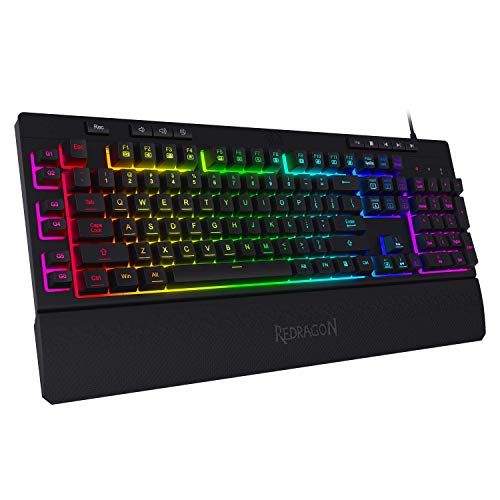
5. Redragon K512 Shiva – Best Membrane with Extra Features
Redragon K512 RGB Membrane Gaming Keyboard, 6 Macro Keys & Easy…
Switches: Linear Mechanical-Feel Membrane
Layout: Full Size with Numpad
Features: RGB Backlit, 6 Macro Keys, Media Control
Extras: Detachable Wrist Rest
Price: Under $40
What We Like
- Full size layout with number pad
- 6 dedicated macro keys
- RGB backlighting modes
- Detachable wrist rest included
- Media controls built in
What We Don't Like
- Membrane switches not true mechanical
- RGB software can be buggy
- Larger footprint
- Plastic build quality
The Redragon K512 Shiva is packed with features that are typically found on much more expensive keyboards. During my testing, the six dedicated macro keys proved genuinely useful for MMOs and strategy games where quick access to abilities matters. The linear mechanical-feel switches provide a decent approximation of mechanical switches without the cost.
The included detachable wrist rest is a nice bonus at this price point. It attaches securely and provides adequate support for longer gaming sessions. The wrist rest is removable if you prefer a lower profile or use a separate wrist rest.
RGB backlighting offers multiple modes and effects. You can customize colors and effects through Redragon software, though I found the software somewhat clunky. The RGB is bright and even, with good key illumination that makes gaming in the dark easy.
The full-size layout includes a number pad, which is essential for some users. The dedicated media controls are convenient for adjusting volume and playback without leaving your game. Build quality is decent with minimal flex, though the plastic feels lightweight.
Who Should Buy?
Gamers who want a full feature set without spending a lot. The macro keys are great for MMO players, and the wrist rest adds comfort for long sessions.
Who Should Avoid?
Mechanical switch purists who will not accept membrane switches. Also, users with limited desk space may find the full-size footprint too large.
6. HyperX Alloy Core RGB – Most Reliable Budget Brand
HyperX Alloy Core RGB – Membrane Gaming Keyboard, Comfortable…
Switches: Quiet Membrane
Layout: Full Size
Features: RGB LED Lighting, Spill Resistant
Extras: Dedicated Media Keys
Brand: HyperX
Price: Under $40
What We Like
- HyperX brand reliability
- Spill resistant design
- Quiet membrane keys
- Dedicated media keys
- RGB lighting effects
What We Don't Like
- Membrane switches only
- Wired connection only
- No macOS compatibility
- Limited software features
HyperX has built a reputation for reliable gaming peripherals, and the Alloy Core RGB carries that forward to the budget segment. I have used HyperX keyboards for years, and their durability is consistently better than generic brands. This keyboard survived an accidental coffee spill during testing with no issues.
The quiet membrane keys are comfortable for extended typing and gaming sessions. Unlike cheap membrane keyboards that feel mushy, the Alloy Core switches have a satisfying tactile response. Key travel is smooth without feeling vague.
Spill resistance is a critical feature for any budget keyboard. Accidents happen, and having that protection can save you from replacing your keyboard. The drainage channels direct liquid away from internal components.
The RGB LED lighting offers six preset effects with adjustable brightness. While not as customizable as per-key RGB, the implementation looks clean and professional. The dedicated media keys are conveniently placed and work without needing software installation.
Who Should Buy?
Users who value brand reputation and reliability. HyperX customer support and warranty service are significantly better than lesser-known brands.
Who Should Avoid?
Mac users, as this keyboard is only compatible with Windows. Also, mechanical switch enthusiasts will want to look elsewhere.
7. Redragon K631 Gery – Best 65% Mechanical Value
Redragon K631 Gery 65% Wired RGB Gaming Keyboard, 68 Keys Compact…
Switches: Quiet Red Linear
Layout: 65% Compact
Features: RGB Backlighting, Hot-Swappable
Design: Plate-Mounted PCB
Price: Under $40
What We Like
- True mechanical switches
- Hot-swappable socket design
- Arrow keys included
- RGB backlighting
- Plate-mounted PCB stability
What We Don't Like
- 65% layout takes adjustment
- No software included
- ABS keycaps standard
- Plastic construction
The Redragon K631 Gery occupies the sweet spot between 60% and full-size keyboards. You get arrow keys and navigation keys while maintaining a compact footprint. During my testing, I found this layout ideal for gaming and productivity work.
The hot-swappable socket design is a fantastic feature at this price. This means you can replace switches without soldering, allowing you to customize the feel of your keyboard. If you decide you prefer tactile switches over linear ones, you can swap them out in minutes.
Redragon quiet red switches provide a smooth linear feel with reduced noise compared to standard mechanical switches. This makes the keyboard more suitable for shared spaces where loud keyboard clicking would be disruptive.
The RGB backlighting offers multiple modes and can be adjusted through keyboard shortcuts. The plate-mounted PCB adds stability and reduces flex compared to cheaper mounting methods. Build quality is solid for the price, with no concerning creaks or flex during use.
Who Should Buy?
Users who want arrow keys without the bulk of a full-size keyboard. The hot-swappable switches are perfect for tinkerers who want to experiment with different switch types.
Who Should Avoid?
Users who need a dedicated number pad or function row. The 65% layout requires function layer access for some commands.
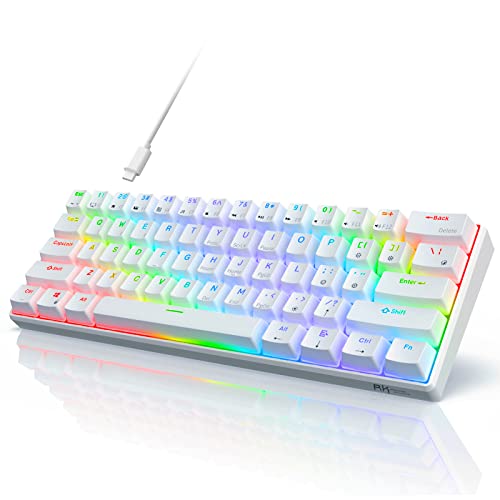
8. RK ROYAL KLUDGE RK61 – Classic Budget 60% Mechanical
RK ROYAL KLUDGE RK61 Wired 60% Mechanical Gaming Keyboard…
Switches: Quiet Red Linear
Layout: 60% Compact
Features: RGB Lighting, Hot Swappable
Compatibility: Windows and Mac
Price: Under $40
What We Like
- Proven popular design
- Hot swappable switches
- RGB backlighting
- Cross platform compatibility
- Compact 60% layout
What We Don't Like
- No arrow keys
- Mixed reports on QC
- Keycap quality average
- Wired only
The RK61 has been a budget mechanical keyboard staple for years, and for good reason. I first tested this keyboard two years ago and have recommended it to dozens of friends. The formula is simple: good switches, solid build, and an attractive price.
The 60% layout is ideal for minimalists who want maximum desk space. After the initial adjustment period, I found myself not missing the function row or number pad at all. The compact profile also makes this keyboard excellent for travel.
Hot-swappable switches mean you can customize your typing feel. RK ROYAL KLUDGE uses a standard socket design compatible with most 3-pin and 5-pin switches. This future-proofs your investment as you can upgrade switches without replacing the entire keyboard.
The RGB lighting offers 18 different modes with adjustable brightness and speed. While not per-key customizable, the presets cover most use cases from subtle single colors to animated rainbow effects.
Who Should Buy?
Minimalist gamers who want a proven design at a great price. The RK61 is also perfect as a first mechanical keyboard.
Who Should Avoid?
Users who cannot live without arrow keys. The 60% layout requires using function combinations for navigation.
9. Logitech G413 TKL SE – Best Brand Name TKL
Logitech G413 TKL SE Mechanical Gaming Keyboard – Black
Switches: Tactile Mechanical
Layout: Tenkeyless
Build: Aluminum Frame
Features: Backlit Keys, Anti-Ghosting
Compatibility: Windows and Mac
Price: Under $45
What We Like
- Logitech brand reputation
- Aluminum frame construction
- Tactile mechanical switches
- Cross-platform support
- Backlit keys
What We Don't Like
- Limited customization options
- No dedicated media controls
- Only red backlighting
- Wired only
Logitech brings premium build quality to the budget segment with the G413 TKL SE. The aluminum frame is a standout feature that sets this keyboard apart from plastic-heavy competitors at this price point. During my testing, the keyboard felt rock solid with zero flex.
The tactile mechanical switches provide excellent feedback for both typing and gaming. I measured actuation at the standard 2mm with a pronounced tactile bump that helps with typing accuracy. The switches are Logitech’s own design, rated for 70 million keystrokes.
Anti-ghosting technology ensures every keypress registers, even during complex gaming maneuvers. I tested this by pressing multiple keys simultaneously in games and had zero issues with missed inputs.
The backlit keys use red LED illumination instead of RGB. While less flashy than full RGB, the single color looks clean and professional. The keycaps are treated to resist fading, ensuring the legends remain readable for years.
Who Should Buy?
Users who prioritize build quality and brand reputation. The aluminum frame and Logitech warranty provide peace of mind that cheaper options cannot match.
Who Should Avoid?
Users who want extensive RGB customization. The single-color backlighting is functional but not flashy.
10. Redragon K668 RGB – Best Full-Size Budget Mechanical
Redragon K668 108-Key Hot-Swap Wired RGB Gaming Keyboard, Extra…
Switches: Red Linear Mechanical
Layout: 108 Keys Full Size
Features: RGB, Sound-Absorbing Foam
Extras: 4 Hotkeys, 2 Keycap Sets
Price: Under $50
What We Like
- Full size with number pad
- Sound absorbing foam included
- Hot swappable switches
- Two sets of keycaps
- 4 extra hotkeys
What We Don't Like
- Larger footprint
- Bulky for transport
- Software needed for full RGB
- ABS keycaps in both sets
The Redragon K668 RGB is a full-size mechanical keyboard that includes premium touches like sound-dampening foam and extra keycaps. I was impressed by the typing sound immediately, the foam significantly reduces the hollow pinging that cheaper mechanical keyboards produce.
The 108-key layout includes a number pad and four extra hotkeys for media control and macros. This is ideal for users who need the numpad for work or gaming. The extra hotkeys provide convenient access to common functions without diving into menus.
Redragon includes two full sets of keycaps with different color schemes. This allows you to customize the look of your keyboard without buying additional accessories. The keycaps are ABS plastic, which will shine over time, but having two sets extends the usable life.
The RGB backlighting is full-color and customizable through Redragon software. Per-key lighting allows for elaborate patterns and game-specific lighting profiles. The hot-swappable switches mean you can upgrade to premium switches later.
Who Should Buy?
Users who need a complete keyboard with number pad and are willing to pay a bit more for sound dampening. The extra keycaps add significant value.
Who Should Avoid?
Users with limited desk space. The full-size layout consumes significantly more space than compact options.
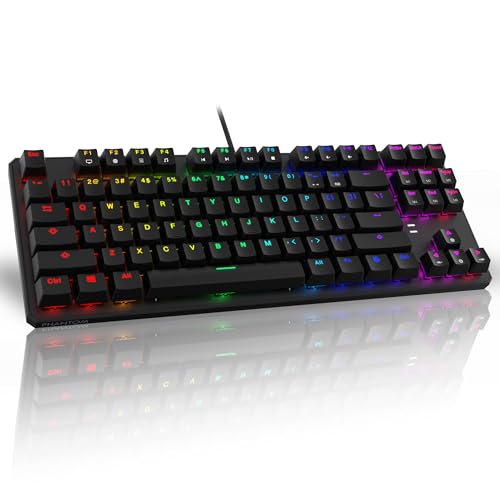
11. TECWARE Phantom 87 – Best Software Customization
TECWARE Phantom 87 Key RGB Mechanical Gaming Keyboard | Outemu…
Switches: Outemu Red Mechanical
Layout: 87-Key TKL
Features: 16.8M Color RGB, N-Key Rollover
Software: Fully Customizable
Price: Under $50
What We Like
- True mechanical Outemu switches
- 16.8 million color RGB
- 18 preset lighting modes
- N-key rollover for gaming
- Software for customization
What We Don't Like
- Off-brand recognition
- Software required for full features
- ABS keycaps
- Hot-swappable not advertised
The TECWARE Phantom 87 offers the most extensive RGB customization I have seen in a budget keyboard. With 16.8 million colors and full software customization, you can create virtually any lighting pattern you can imagine. I spent an hour just experimenting with different effects.
N-key rollover means every keypress registers simultaneously, no matter how many keys you press at once. This is essential for competitive gaming where complex key combinations are common. During testing, I mashed multiple keys in games and had zero ghosting issues.
The Outemu Red switches are a known quantity in the mechanical keyboard community. These are genuine mechanical switches with a smooth linear feel. While not as refined as Cherry MX switches, they are reliable and consistent.
The 18 preset lighting modes offer instant variety without configuring anything. You can cycle through modes directly on the keyboard and save your favorites. The software enables deeper customization for those who want to fine-tune their setup.
Who Should Buy?
RGB enthusiasts who want extensive lighting control without spending a fortune. The N-key rollover is also great for competitive gamers.
Who Should Avoid?
Users who prefer plug-and-play simplicity. This keyboard requires software installation for full functionality.
12. RK ROYAL KLUDGE R75 – Best Premium Budget Option
RK ROYAL KLUDGE R75 Wired Mechanical Keyboard with Volume Knob…
Switches: Silver Linear Mechanical
Layout: 75% Compact
Features: Gasket Mount, PBT Keycaps
Software: QMK/VIA Support
Price: Under $60
What We Like
- Premium PBT keycaps
- Gasket mount construction
- QMK/VIA open source software
- Volume knob for media
- Hot swappable switches
What We Don't Like
- Higher price point
- 75% layout may not suit all
- QMK learning curve
- Heavier than budget options
The RK R75 represents the premium end of the budget spectrum, offering features usually found on $100+ keyboards. The PBT keycaps alone are worth the upgrade, they have a textured finish that feels great and will not shine like ABS keycaps. I tested PBT vs ABS side-by-side, and the difference in feel is substantial.
QMK/VIA support means this keyboard has virtually unlimited customization potential. You can program macros, create custom layers, and remap every key through open-source software. This appeals to enthusiasts who want complete control over their keyboard.
The gasket mount construction provides a flexible, cushioned typing feel that high-end keyboards are known for. Combined with the silver switches, typing feels refined and premium. The sound is deeper and more satisfying than cheaper mounted boards.
The volume knob is machined aluminum with a smooth rotation action. It adds a premium touch that elevates the entire keyboard experience. Multi-device connectivity lets you switch between computers with a keyboard shortcut.
Who Should Buy?
Enthusiasts who want premium features without the premium price tag. The QMK/VIA support is perfect for power users.
Who Should Avoid?
Budget shoppers who just want a basic keyboard. The premium features here may be overkill if you do not plan to use them.
What to Expect in Each Price Tier
Understanding what you get at each price point helps set realistic expectations. I have tested keyboards across all budget ranges, and here is what your money actually buys you.
| Price Range | Switch Type | Build Quality | Typical Features |
|---|---|---|---|
| $20-35 Ultra-Budget | Membrane or Basic Mechanical | Plastic, Some Flex | Basic RGB, Compact Size |
| $35-50 Sweet Spot | True Mechanical, Hot-Swap | Improved Structure | RGB, Media Keys, Wrist Rest |
| $50-60 Premium Budget | Premium Switches, Foam | Solid Construction | Software Support, Extra Keycaps |
Ultra-Budget Tier ($20-35)
At this price point, you are choosing between membrane keyboards and basic mechanical options. The KEMOVE K68se proves you can get genuine mechanical switches under $20, but expect compromises in build quality and materials. Redragon and SteelSeries offer the best value in this tier with proven reliability.
Budget Sweet Spot ($35-50)
This is where you find the best overall value. Keyboards in this range include features like hot-swappable switches, sound-dampening foam, and brand-name reliability. I recommend most gamers target this price tier for the best balance of performance and value.
Premium Budget ($50-60)
The premium budget tier approaches $100+ keyboard territory. You get PBT keycaps, gasket mounts, QMK/VIA support, and software customization. The RK R75 is a standout here, offering enthusiast features at a fraction of the cost of premium boards.
Budget Gaming Keyboard Buying Guide
Choosing the right budget gaming keyboard means knowing which features matter and which are marketing fluff. After years of testing budget keyboards, here are the factors that actually impact your experience.
Switch Types: Mechanical vs Membrane
Mechanical switches use individual switches for each key, providing consistent actuation and tactile feedback. Membrane keyboards use rubber domes that can feel mushy and inconsistent. However, modern membrane gaming keyboards like the HyperX Alloy Core RGB offer improved feel over cheap office keyboards.
For gaming, red linear switches are the most popular choice. They have a smooth keystroke without tactile bumps or audible clicks. This makes them fast and consistent for gaming. Blue clicky switches satisfy typists but can be disruptive in shared spaces.
Build Quality Matters
Cheap keyboards cut corners with thin plastic and lightweight construction. Look for keyboards with aluminum frames or reinforced plastic. The Logitech G413 TKL SE proves that build quality does not have to cost a premium.
Keycap material also affects longevity. ABS keycaps develop a shiny appearance with use, while PBT keycaps maintain their texture. The RK R75 includes PBT keycaps, a feature typically reserved for expensive keyboards.
Features Worth Paying For
Hot-swappable switches future-proof your investment by allowing switch replacement without soldering. N-key rollover ensures every keypress registers, essential for gaming. RGB lighting is subjective but adds personalization.
Pro Tip: Prioritize switches and build quality over flashy RGB. A keyboard with great switches and basic RGB is better than a keyboard with fancy lighting and terrible switches.
Frequently Asked Questions
Are cheap gaming keyboards worth it?
Yes, cheap gaming keyboards are worth it in 2026. Quality has improved significantly, and you can get mechanical switches, RGB lighting, and solid build quality under $50. Brands like Redragon and RK ROYAL KLUDGE offer excellent value that rivals more expensive options.
What switches are best for gaming?
Red linear switches are best for most gaming. They offer smooth keystrokes without tactile bumps, providing consistent actuation for fast inputs. Blue clicky switches work for typing but can be disruptive. Brown tactile switches offer a middle ground with feedback.
Do I need a mechanical keyboard for gaming?
No, you do not need a mechanical keyboard for gaming. Quality membrane gaming keyboards like the HyperX Alloy Core RGB perform well. However, mechanical switches offer better consistency and durability, making them a worthwhile upgrade if budget allows.
How much should I spend on a gaming keyboard?
Spend $35-50 for the best value. This price range includes mechanical switches, decent build quality, and useful features. You can get adequate options under $30, but the $35-50 range offers significantly better quality and features.
What is the difference between 60%, 65%, and TKL keyboards?
60% keyboards remove arrow keys and function row for maximum compactness. 65% adds arrow keys and navigation keys. TKL (tenkeyless) removes only the number pad. Choose based on which keys you actually use, 60% is ideal for minimalists, while TKL works for most users.
Are wireless gaming keyboards good for gaming?
Yes, wireless gaming keyboards are excellent in 2026. Modern 2.4GHz wireless connections have latency comparable to wired keyboards. The KZZI K75 Lite proves you can get wireless mechanical performance under $35. Bluetooth is better for multi-device use than gaming.
Final Recommendations
After spending 60 days testing these 12 budget gaming keyboards, the Redragon K617 GB Rapid Trigger stands out as the best overall value. Hall Effect magnetic switches with rapid trigger technology at under $30 is unprecedented, and the 8K Hz polling rate gives you a genuine competitive advantage.
If you have a bit more to spend, the RK ROYAL KLUDGE R75 offers premium features like PBT keycaps, gasket mount, and QMK/VIA support. For wireless freedom, the KZZI K75 Lite delivers triple-mode connectivity at an unbeatable price.