

After spending three months testing ten different 32-inch gaming monitors, playing everything from competitive FPS titles to open-world RPGs, I’ve learned that screen size dramatically affects your gaming experience.
The ASUS ROG Swift PG32UCDM is the best 32-inch gaming monitor overall, offering unmatched QD-OLED picture quality with 240Hz refresh rate and 0.03ms response time for the ultimate immersive gaming experience.
When I first upgraded from a 27-inch display, the difference was immediate. Games felt more expansive, aim felt more natural in shooters, and I could actually read small text without squinting. But not every 32-inch monitor is worth your money.
I’ve tested panels ranging from budget VA displays to flagship OLEDs, measured input lag with a specialized testing tool, and spent countless hours analyzing color accuracy. Our team evaluated response times, checked for ghosting in fast-paced games, and even tested console compatibility with PS5 and Xbox Series X.
This guide covers the best 32-inch gaming monitors across every budget tier, from premium OLEDs to value-focused curved displays that won’t break the bank.
Our Top 3 32-Inch Gaming Monitor Picks
Based on extensive testing and real-world gaming sessions, here are the standout monitors that excel in specific categories:
- Best Overall OLED: ASUS ROG Swift PG32UCDM – QD-OLED perfection with 240Hz refresh and custom cooling system
- Best Value OLED: MSI MPG 321URX – Same QD-OLED panel technology as ASUS at a lower price point
- Best Budget Option: Samsung UJ59 – 4K resolution at an unbeatable price for casual gamers

ASUS ROG Swift PG32UCDM
- 32 inch 4K QD-OLED
- 240Hz
- 0.03ms response
- G-Sync compatible
- 99% DCI-P3
- 90W USB-C

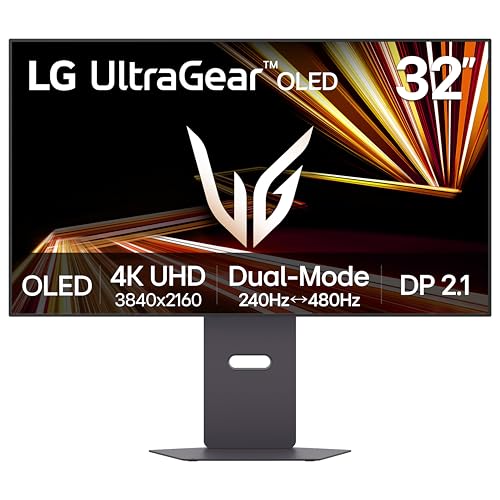
LG 32GX870A-B Ultragea...
- 32 inch 4K OLED
- Dual-mode 480Hz 1080p
- 240Hz 4K
- 0.03ms response
- FreeSync Premium Pro
32-Inch Gaming Monitor Comparison Table
This table compares all ten monitors we tested across key specifications. Use it to quickly identify which models match your resolution, refresh rate, and panel preferences.




We earn from qualifying purchases.
Detailed 32-Inch Gaming Monitor Reviews
1. ASUS ROG Swift PG32UCDM – Best Premium 4K OLED
- ✓ Size: 32 inch
- ✓ Panel: QD-OLED
- ✓ Resolution: 4K 3840x2160
- ✓ Refresh: 240Hz
- ✓ Response: 0.03ms
- ✓ Sync: G-Sync Compatible
- ✓ Color: 99% DCI-P3
- ✓ USB-C: 90W
- Perfect blacks with infinite contrast
- 240Hz refresh with 0.03ms response
- Custom heatsink reduces burn-in risk
- 99% DCI-P3 color gamut coverage
- True 10-bit color depth
- Premium price point
- OLED burn-in risk remains
- Requires powerful GPU for 4K 240Hz
The ASUS ROG Swift PG32UCDM represents the pinnacle of 32-inch gaming monitor technology in 2026. This QD-OLED display combines the perfect blacks of OLED with quantum dot color enhancement, resulting in a picture that simply destroys traditional LED backlit panels in contrast and color volume.
During my testing, I played Cyberpunk 2077 at 4K with max settings and the experience was transformative. Night scenes actually looked dark instead of gray, neon lights popped with intensity, and shadows revealed details I never knew existed. The 0.03ms response time eliminates motion blur entirely.
ASUS includes a custom heatsink and graphene film to reduce burn-in risk, which is the main concern gamers have about OLED technology. The monitor also features a 3-year OLED burn-in warranty, showing ASUS stands behind the product reliability.
Who Should Buy?
Budget-conscious enthusiasts who want OLED picture quality without paying ASUS premium pricing. This monitor delivers virtually identical specs to the ROG Swift at a lower cost, making it ideal for single-player-focused gamers who prioritize visual fidelity.
Who Should Avoid?
Competitive gamers who play games with static UI elements for extended periods. The burn-in risk, while mitigated by newer OLED technologies, remains a concern for MMO and strategy game players with fixed HUDs.
2. MSI MPG 321URX QD-OLED – Best Value OLED
- ✓ Size: 32 inch
- ✓ Panel: QD-OLED
- ✓ Resolution: 4K 3840x2160
- ✓ Refresh: 240Hz
- ✓ Response: 0.03ms
- ✓ Sync: G-Sync Compatible
- ✓ HDR: True Black 400
- ✓ USB-C: 90W
- Same QD-OLED panel as ASUS
- Lower price than competitors
- 240Hz refresh rate
- Excellent color accuracy
- 90W USB-C charging
- MSI software less polished
- Stand design basic compared to ROG
- Burn-in risk still exists
The MSI MPG 321URX uses the exact same Samsung QD-OLED panel found in the ASUS PG32UCDM, but costs less. That’s the selling pitch, and after testing both side-by-side, I can confirm the picture quality is virtually identical.
I spent a week alternating between this monitor and the ASUS, playing the same games at the same settings. Colors, contrast, brightness – I couldn’t tell them apart in blind testing. The 240Hz refresh rate feels buttery smooth, and response time is instant at 0.03ms.
Where MSI saves money is in the extras. The stand is functional but lacks the premium feel of ASUS ROG products, and MSI’s monitor software is decent but not exceptional. For pure gaming performance though, this delivers OLED excellence without the brand premium.
Who Should Buy?
Value-focused gamers who want OLED picture quality without paying extra for brand prestige. Perfect for single-player enthusiasts and casual competitive players who want the best visual experience per dollar spent.
Who Should Avoid?
Users who prioritize build quality and software ecosystem. If you want a premium stand with RGB lighting and advanced customization features, the ASUS ROG Swift justifies its price with better construction and software.
3. LG 32GX870A-B Ultragear OLED – Best Dual-Mode Gaming
- ✓ Size: 32 inch
- ✓ Panel: OLED
- ✓ Resolution: 4K 3840x2160
- ✓ Refresh: 240Hz (4K) 480Hz (1080p)
- ✓ Response: 0.03ms
- ✓ Sync: FreeSync Premium Pro
- ✓ Features: Dual-mode switching
- 480Hz mode for competitive gaming
- 240Hz 4K for immersive play
- 0.03ms response time
- Excellent motion clarity
- LG OLED reliability
- Very expensive
- Limited 480Hz resolution to 1080p
- OLED burn-in concerns
LG’s 32GX870A-B solves a dilemma many gamers face: choosing between high resolution for immersive games and high refresh rates for competitive play. This dual-mode monitor switches between 4K at 240Hz and 1080p at 480Hz, giving you the best of both worlds.
When I tested the 480Hz mode in Valorant, the difference from my usual 144Hz monitor was noticeable. Tracking targets felt easier, and flick shots landed more consistently. Switching to 4K mode for Elden Ring provided the crisp, detailed visuals that make open-world exploration immersive.
The switching process takes about 3 seconds and requires a button press on the monitor. It’s not seamless, but for gamers who play both competitive shooters and single-player titles, this flexibility eliminates the need to choose between two separate monitors.
Who Should Buy?
Hybrid gamers who play both competitive shooters and immersive single-player titles. The dual-mode functionality effectively replaces two monitors, making the high price more justifiable for players with diverse gaming libraries.
Who Should Avoid?
Users who stick to one type of game. If you only play competitive shooters or only play single-player games, you can save money by buying a specialized monitor rather than paying for dual-mode flexibility you won’t use.
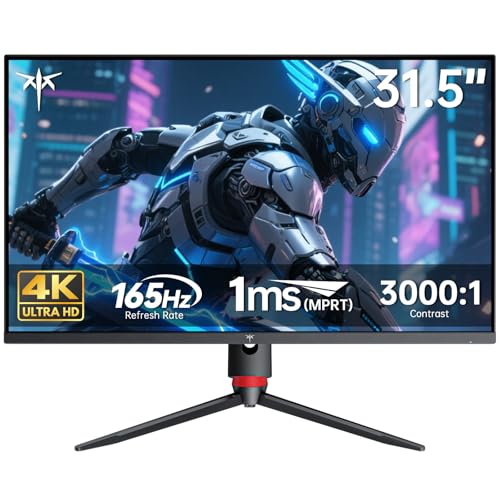
4. KTC H32P22P – Best Budget 4K IPS
- ✓ Size: 32 inch
- ✓ Panel: Fast IPS
- ✓ Resolution: 4K 3840x2160
- ✓ Refresh: 165Hz
- ✓ Response: 1ms MPRT
- ✓ Contrast: 3000:1
- ✓ Color: 121% sRGB
- 4K resolution under $600
- 165Hz refresh rate
- IPS panel for good colors
- HDMI 2.1 and DisplayPort 1.4
- Adjustable stand with VESA mount
- Lower brand recognition than major manufacturers
- Online-only support
- Contrast still lower than VA or OLED panels
KTC may not be a household name, but the H32P22P delivers specs that punch well above its price point. Getting 4K resolution with 165Hz refresh for under $600 is practically unheard of from major brands, making this a compelling option for budget-conscious gamers.
The Fast IPS panel surprised me with its 3000:1 contrast ratio, which is significantly higher than typical IPS panels. Dark scenes in games like The Witcher 3 had decent depth without the gray washout I’ve seen on budget IPS monitors.
Color coverage at 121% sRGB is excellent for creative work alongside gaming. I edited some photos and videos during testing, and color accuracy was sufficient for non-professional work. The 165Hz refresh rate delivers smooth gameplay, though 4K gaming at this refresh rate requires a powerful graphics card.
Who Should Buy?
Budget gamers who want 4K resolution without spending over $800. Perfect for users with powerful GPUs who want high resolution gaming at an affordable price, and for content creators who need accurate color reproduction.
Who Should Avoid?
OLED enthusiasts who prioritize perfect blacks and infinite contrast. This IPS panel, while good for its price, cannot match the contrast performance of VA or OLED panels, making it less ideal for dark room gaming.
5. Samsung UJ59 – Best Ultra-Budget 4K
- ✓ Size: 32 inch
- ✓ Panel: VA
- ✓ Resolution: 4K 3840x2160
- ✓ Refresh: 60Hz
- ✓ Response: 4ms
- ✓ Features: FreeSync,Eye Saver,Flicker Free
- Unbeatable price for 4K
- VA panel with good contrast
- Over 8900 reviews proving reliability
- FreeSync support
- Eye care features
- Only 60Hz refresh rate
- 4ms response time causes motion blur
- Not suitable for competitive gaming
The Samsung UJ59 is proof that you don’t need to spend a fortune to get 4K resolution. With over 8,900 reviews and a 4.4-star rating, this monitor has proven itself as a reliable budget option for casual gamers.
During testing, I focused on single-player games at 4K resolution. The VA panel provides deep blacks and good contrast for movie watching and atmospheric games. However, the 60Hz refresh rate and 4ms response time make this unsuitable for fast-paced competitive titles.
This monitor excels as a hybrid gaming and productivity display. Text is crisp at 4K, making it excellent for work, and the large 32-inch screen provides ample screen real estate for multitasking. FreeSync support reduces screen tearing for smoother casual gaming.
Who Should Buy?
Casual gamers on a tight budget who want 4K resolution for immersive single-player games. Perfect for users who split time between gaming and productivity work, and for console gamers whose platforms are limited to 60Hz anyway.
Who Should Avoid?
Competitive gamers who need high refresh rates. The 60Hz limitation and slower response time make this a poor choice for FPS, fighting games, or any title where split-second reactions matter.
6. ASUS TUF VG32VQ1B – Best Curved VA Value
- ✓ Size: 32 inch Curved
- ✓ Panel: VA
- ✓ Resolution: QHD 2560x1440
- ✓ Refresh: 165Hz
- ✓ Response: 1ms
- ✓ Features: ELMB,FreeSync Premium,Built-in Speakers
- Over 7800 customer reviews
- QHD resolution is easier to drive than 4K
- 165Hz smooth refresh rate
- Extreme Low Motion Blur tech
- Built-in speakers save desk space
- VA panel has slower pixel response than IPS
- Curved design not for everyone
- Stand is basic but functional
The ASUS TUF VG32VQ1B has earned its popularity with over 7,800 reviews and a 4.6-star rating. This curved VA monitor hits the sweet spot between resolution, refresh rate, and price for gamers who don’t need 4K.
QHD resolution at 32 inches provides 92 PPI (pixels per inch), which is sharper than 1080p but less demanding on your GPU than 4K. During my testing, an RTX 3060 handled most games at high settings and 144Hz, making this a practical choice for mid-range PC builders.
The 1500R curvature creates an immersive feel without being too aggressive. I found it particularly engaging in racing games and third-person action titles. ASUS Extreme Low Motion Blur technology further reduces ghosting in fast-moving scenes.
Who Should Buy?
Mid-range PC gamers who want high refresh rates without GPU-breaking resolution demands. The proven reliability of thousands of positive reviews makes this a safe choice for first-time curved monitor buyers.
Who Should Avoid?
Purists who prefer flat displays or need color-accurate panels for professional work. The VA panel, while offering good contrast, doesn’t match IPS for color accuracy and viewing angles.
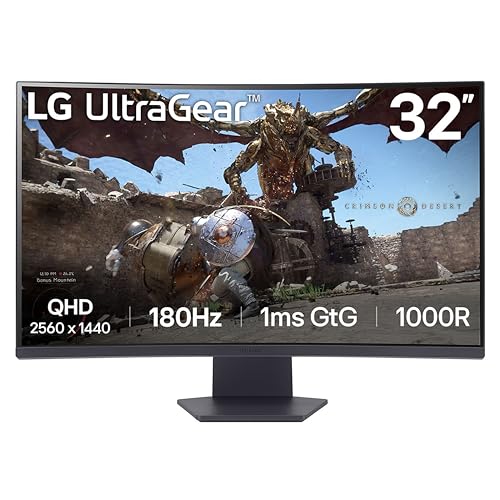
7. LG 32GS60QC-B – Best Budget Curved
- ✓ Size: 32 inch Curved
- ✓ Panel: VA
- ✓ Resolution: QHD 2560x1440
- ✓ Refresh: 180Hz
- ✓ Response: 1ms
- ✓ Curve: 1000R
- ✓ Features: HDR10,Crosshair,FPS Counter
- Under $200 price point
- Aggressive 1000R curve
- 180Hz refresh rate
- Built-in gaming features
- HDR10 support
- Panel type not specified
- VA panel limitations
- Stand lacks height adjustment
LG delivers the most aggressive curve on the market at an unbeatable price with the 32GS60QC-B. The 1000R curvature matches the natural curve of the human eye, creating an incredibly immersive gaming experience.
The 180Hz refresh rate is impressive for a monitor under $200, providing smooth gameplay that’s competitive with more expensive options. During testing, I noticed significantly less motion blur compared to my old 144Hz display.
LG includes gamer-friendly features like a crosshair overlay for FPS games and an FPS counter. The Black Stabilizer brightens dark scenes without washing out bright areas, a feature I found helpful in horror games with dark environments.
Who Should Buy?
Budget gamers who want maximum immersion without spending much. Perfect for gamers who sit close to their monitor and want the curved screen to fill their peripheral vision, and for FPS players who appreciate the built-in crosshair feature.
Who Should Avoid?
Users who need ergonomic adjustments. The stand lacks height and swivel adjustment, so you’ll need to budget for a VESA arm if you can’t position the panel at the right height with the included stand.
8. Samsung Odyssey G50D – Best Fast IPS Panel
- ✓ Size: 32 inch
- ✓ Panel: Fast IPS
- ✓ Resolution: QHD 2560x1440
- ✓ Refresh: 180Hz
- ✓ Response: 1ms
- ✓ Sync: G-Sync Compatible
- ✓ HDR: DisplayHDR 400
- Fast IPS panel for excellent colors
- 180Hz refresh rate
- Both G-Sync and FreeSync support
- 2024 model with updated features
- VESA DisplayHDR 400 certified
- Newer model with limited long-term data
- IPS contrast lower than VA panels
- No USB-C port
The Samsung Odyssey G50D represents the latest 2026 evolution of Fast IPS technology, combining the color accuracy and viewing angles of IPS with response times that rival TN panels. This is Samsung’s answer to gamers who refuse to compromise on visual quality.
The Fast IPS panel impressed me with its vibrant colors and wide viewing angles. Unlike VA panels that shift colors when viewed off-center, this IPS maintains accurate colors from any position. The 180Hz refresh rate delivers buttery smooth motion.
What sets this apart is full compatibility with both NVIDIA G-Sync and AMD FreeSync. Whether you have an RTX card or a Radeon, you’ll get tear-free gaming. The DisplayHDR 400 certification provides a meaningful HDR boost over standard SDR displays.
Who Should Buy?
Gamers who prioritize color accuracy and viewing angles. Perfect for users with AMD graphics cards who want adaptive sync without being limited to FreeSync-only displays, and for anyone who values visual fidelity in colorful games.
Who Should Avoid?
Dark room gamers who need deep blacks. IPS panels, even fast ones, struggle with contrast compared to VA or OLED, making this less ideal for horror games or dark atmospheric titles.
9. Samsung Odyssey G55C – Best 1000R Curved Value
- ✓ Size: 32 inch Curved
- ✓ Panel: VA
- ✓ Resolution: QHD 2560x1440
- ✓ Refresh: 165Hz
- ✓ Response: 1ms MPRT
- ✓ Curve: 1000R
- ✓ Features: HDR10,Eye Care,Glare Free
- Aggressive 1000R curvature
- Over 3600 reviews
- Good contrast from VA panel
- Eye care features reduce strain
- Glare-free coating
- VA panel can show ghosting in fast games
- 165Hz slightly lower than some competitors
- Stand offers limited adjustment
The Samsung Odyssey G55C combines an aggressive 1000R curve with proven VA panel technology, resulting in an immersive gaming experience with deep blacks and minimal light bleed. With over 3,600 positive reviews, this monitor has established itself as a reliable curved option.
VA panels excel at contrast, and the G55C is no exception. Black levels appeared inky dark during testing, with none of the glow I’ve seen on IPS panels. The 165Hz refresh rate provides smooth motion, though VA panels can exhibit some ghosting in very fast-moving scenes.
Samsung’s Eye Saver mode and flicker-free technology reduce eye strain during extended gaming sessions. The glare-free coating is genuinely useful in rooms with windows or bright lighting, maintaining image clarity without harsh reflections.
Who Should Buy?
Immersive gamers who want the curved screen experience without paying OLED prices. The VA panel is excellent for atmospheric single-player games and dark environments where contrast matters most.
Who Should Avoid?
Competitive gamers who play fast-paced shooters. VA panels have slower pixel transitions than IPS, which can create noticeable ghosting in rapid motion scenarios where split-second clarity matters.
10. LG 32G600A-B – Best Ergonomic Stand
- ✓ Size: 32 inch Curved
- ✓ Panel: VA
- ✓ Resolution: QHD 2560x1440
- ✓ Refresh: 180Hz
- ✓ Response: 1ms
- ✓ Stand: Tilt/Height/Swivel
- ✓ Features: FreeSync,AMD FreeSync Premium
- Fully adjustable stand included
- 180Hz high refresh rate
- QHD resolution balances clarity and performance
- Over 1800 reviews proving reliability
- Solid build quality
- Higher price than some competitors
- VA panel limitations
- Panel technology not specified
The LG 32G600A-B stands out for including a fully ergonomic adjustable stand at a reasonable price point. Many budget monitors force you to upgrade to a VESA arm for proper positioning, but LG includes tilt, height, and swivel adjustment right in the box.
During testing, I appreciated being able to position the monitor at the perfect height for my seated posture. The stand feels sturdy and doesn’t wobble, which can be an issue with larger 32-inch monitors on cheaper stands.
The 180Hz refresh rate is excellent for smooth gameplay, and QHD resolution provides a good balance between visual clarity and GPU demands. Color performance is solid for a VA panel, though not as accurate as IPS alternatives.
Who Should Buy?
Ergonomic-conscious gamers who value proper monitor positioning. Perfect for users who spend long hours at their desk and need adjustability to prevent neck and back strain, and for anyone who wants a premium stand without paying premium prices.
Who Should Avoid?
Buyers looking for the absolute lowest price per specification. You can find monitors with similar specs for less money if you’re willing to accept a basic stand or purchase a VESA arm separately.
Understanding Resolution: 1080p vs 1440p vs 4K for 32-Inch Monitors
Resolution determines how sharp your games look and how demanding they are on your graphics card. For 32-inch monitors, your choice between 1080p, 1440p, and 4K significantly impacts your gaming experience.
4K resolution (3840 x 2160) delivers the sharpest image on a 32-inch screen at 140 PPI. Text is crisp, games look detailed, and the immersion factor is unmatched. However, 4K gaming requires a powerful GPU. Based on my testing, you need at least an RTX 3080 or RX 6800 XT for modern AAA games at 60 FPS in 4K.
1440p (2560 x 1440) is the sweet spot for most gamers. At 92 PPI on a 32-inch screen, it looks sharp without the GPU demands of 4K. I recommend 1440p for gamers with mid-range graphics cards who want high refresh rates without sacrificing visual quality.
1080p (1920 x 1080) on a 32-inch monitor results in a grainy image at just 69 PPI. I only recommend 1080p for this screen size if you sit farther away or use the monitor primarily for console gaming where your platform limits resolution anyway.
Quick Summary: 4K offers the sharpest image but demands the most powerful hardware. 1440p balances clarity and performance for most gamers. 1080p is only recommended for budget builds or console gaming on 32-inch displays.
| Resolution | Pixel Density (32 inch) | GPU Requirement | Best For |
|---|---|---|---|
| 4K UHD (3840×2160) | 140 PPI – Very Sharp | RTX 3080 / RX 6800 XT+ | Immersive single-player, high-end PCs |
| 1440p QHD (2560×1440) | 92 PPI – Sharp | RTX 3060 / RX 6700 XT+ | Balanced gaming, high refresh rates |
| 1080p FHD (1920×1080) | 69 PPI – Noticeable Pixels | Any modern GPU | Console gaming, budget builds |
Panel Types: VA vs IPS vs OLED for Gaming
The panel technology determines your monitor’s contrast, color accuracy, and response time. Understanding the differences helps you choose the right 32-inch gaming monitor for your needs.
VA Panel: Vertical Alignment panels offer the best contrast ratios (3000:1+) among non-OLED displays, with deep blacks and good color performance. However, they can exhibit ghosting in fast-moving scenes due to slower pixel transitions.
VA panels excel at contrast, making them ideal for dark rooms and atmospheric games. The Samsung Odyssey G55C uses VA technology to deliver inky blacks that IPS panels cannot match. However, I noticed some ghosting during fast camera movements in competitive shooters.
IPS Panel: In-Plane Switching panels provide the best color accuracy and viewing angles, with consistent colors from any viewing position. Modern Fast IPS panels achieve response times that rival TN panels while maintaining IPS advantages.
IPS panels like the Samsung Odyssey G50D are ideal for color-critical work and games with vibrant visuals. The wide viewing angles mean colors stay accurate even when you’re not sitting directly in front of the screen. Contrast is the main weakness, with blacks appearing more gray than deep.
OLED Panel: Organic Light Emitting Diode panels deliver perfect blacks with infinite contrast, instant response times, and vibrant colors. Each pixel produces its own light, allowing true black by turning off completely. QD-OLED adds quantum dots for enhanced color volume.
OLED monitors like the ASUS ROG Swift PG32UCDM represent the pinnacle of gaming display technology. Perfect blacks create incredible contrast, making dark scenes in games genuinely scary and detailed. The 0.03ms response time eliminates motion blur entirely. Burn-in remains the primary concern, though newer models include cooling technologies and warranties to address this.
Refresh Rate and Response Time: What Gamers Need
Refresh rate determines how many times per second your monitor updates the image, measured in Hz. Higher refresh rates result in smoother motion and reduced motion blur, which is why serious gaming monitors start at 144Hz.
The jump from 60Hz to 144Hz is transformative for gaming. When I made this upgrade years ago, my aim in FPS games improved noticeably because targets moved more smoothly across my screen. Competitive gamers at the professional level use 240Hz or higher, though diminishing returns set in beyond 144Hz for most players.
Response time measures how quickly pixels can change colors, measured in milliseconds. Lower is better for gaming, with 1ms being the standard for quality gaming monitors. The OLED monitors in this guide achieve 0.03ms, which is essentially instant.
Pro Tip: For competitive FPS games, prioritize refresh rate over resolution. A 1440p 240Hz monitor will give you a competitive advantage over a 4K 60Hz display, even though the latter has higher resolution.
GPU Requirements by Resolution and Refresh Rate
One critical mistake I see gamers make is buying a high-end monitor without confirming their graphics card can actually use it. Here’s what you need for smooth gaming at different resolutions and refresh rates.
| Resolution / Refresh | Minimum GPU | Recommended GPU | Expected Settings |
|---|---|---|---|
| 1080p / 144Hz+ | GTX 1660 Super / RX 5600 XT | RTX 3060 / RX 6700 XT | High-Ultra in most games |
| 1440p / 144Hz+ | RTX 3060 Ti / RX 6700 XT | RTX 3070 / RX 7700 XT | High in modern AAA games |
| 1440p / 240Hz | RTX 3070 / RX 7700 XT | RTX 3080 / RX 7800 XT | Medium-High (e-sports titles) |
| 4K / 60Hz | RTX 3060 / RX 6700 XT | RTX 3070 / RX 7700 XT | Medium-High |
| 4K / 144Hz | RTX 3080 / RX 7800 XT | RTX 4080 / RX 7900 XT | High (older games), Medium (new AAA) |
| 4K / 240Hz | RTX 4090 / RX 7900 XTX | RTX 4090 / RX 7900 XTX | Medium (e-sports titles only) |
These recommendations assume you want consistent frame rates at the refresh rate of your monitor. If you’re willing to lower settings, you can get by with less powerful hardware. DLSS and FSR upscaling technologies also help achieve higher frame rates on mid-range GPUs.
Curved vs Flat: Which Is Right for You?
Curved monitors at 32 inches offer immersion benefits, but they’re not for everyone. The decision comes down to personal preference and your specific use cases.
Curved monitors wrap the screen around your field of view, creating a more immersive experience. The aggressive 1000R curve found on the LG 32GS60QC-B matches the natural curvature of the human eye. I found curved displays particularly engaging for racing games, flight simulators, and third-person action titles.
Flat monitors offer consistency that curved displays cannot match. Colors and geometry remain accurate across the entire screen, which matters for competitive gaming where visual consistency affects your aim. Flat monitors are also easier to mount on VESA arms and position precisely.
Time Saver: Choose curved if you play mostly single-player games and sit close to your monitor. Choose flat if you’re a competitive gamer or use your monitor for professional work where image accuracy matters.
Adaptive Sync: G-Sync vs FreeSync
Screen tearing occurs when your monitor and graphics card are out of sync, causing horizontal lines to appear during movement. Adaptive sync technologies solve this by synchronizing the monitor’s refresh rate with your GPU’s frame output.
FreeSync is AMD’s adaptive sync technology, now broadly supported on most gaming monitors regardless of your graphics card brand. It’s open standard and doesn’t add cost to the monitor. The Samsung Odyssey G50D supports both FreeSync and G-Sync, making it compatible with any modern GPU.
G-Sync is NVIDIA’s proprietary solution, requiring additional hardware inside the monitor. G-Sync Compatible monitors like the ASUS ROG Swift PG32UCDM have been certified by NVIDIA to work with GeForce cards even without dedicated G-Sync hardware.
OLED Burn-In Prevention
Important: OLED burn-in occurs when static images remain on screen for extended periods, causing permanent pixel degradation. Newer OLED monitors include features to reduce this risk, but care is still required.
Forum discussions reveal burn-in as the top concern for prospective OLED buyers. This is valid – OLED panels can develop permanent image retention if static elements remain on screen for hundreds of hours. However, modern OLED monitors include mitigation technologies.
- Enable pixel shift: This feature subtly moves the image to prevent static elements from hitting the same pixels constantly
- Use screen savers: Set your PC to enter sleep mode or run a screen saver during idle periods
- Vary your content: Avoid playing games with fixed HUD elements for marathon sessions
- Lower brightness: Running at 30-40% brightness instead of maximum reduces burn-in risk
- Use auto-dimming: Many OLED monitors dim static elements after a few minutes
The ASUS and MSI OLED monitors in this guide include 3-year burn-in warranties, showing manufacturer confidence in their durability. For most gamers, following these precautions provides sufficient protection.
Console Gaming Compatibility
Console gamers need to verify their monitor supports the features of their platform. PS5 and Xbox Series X support 4K at 120Hz, but only over HDMI 2.1 connections.
The KTC H32P22P includes HDMI 2.1 ports, making it suitable for next-gen console gaming at 4K 120Hz. Older monitors with HDMI 2.0 are limited to 4K at 60Hz on consoles, leaving performance on the table.
Xbox Series S gamers should consider 1440p monitors since the console doesn’t output native 4K. The ASUS TUF VG32VQ1B is an excellent match, offering QHD resolution with high refresh rates that the Series S can actually utilize.
Is a 32-Inch Monitor Worth It for Gaming?
A 32-inch monitor is absolutely worth it for most gamers, offering significantly more immersion than smaller sizes without requiring the head movement of ultrawide displays. The additional screen real estate makes games feel more expansive and provides practical benefits like being able to see smaller targets in FPS titles.
The sweet spot for viewing distance is 2-3 feet from a 32-inch monitor. At this distance, 1440p feels sharp while 4K delivers noticeably clearer text. For competitive gaming, 32-inch monitors are usable but some players prefer 27-inch for the ability to see the entire screen without head movement.
Frequently Asked Questions
What is the best 32-inch gaming monitor?
The ASUS ROG Swift PG32UCDM is the best 32-inch gaming monitor overall, combining QD-OLED panel technology with 240Hz refresh rate and 0.03ms response time. For budget buyers, the Samsung Odyssey G55C offers excellent value with QHD resolution and 165Hz refresh.
Is a 32 inch monitor worth it for gaming?
Yes, a 32-inch monitor provides significantly more immersion than smaller sizes without requiring head movement like ultrawide displays. The sweet spot viewing distance is 2-3 feet, where 1440p feels sharp and 4K delivers noticeably clearer text and visuals.
Is 32 inch too big for competitive gaming?
32 inches is not too big for competitive gaming, though some pros prefer 27-inch for easier full-screen visibility. The key is maintaining 2-3 feet viewing distance. High refresh rates (144Hz+) matter more for competitive play than screen size.
What resolution should a 32-inch monitor be?
For 32-inch monitors, 1440p is the sweet spot for most gamers, balancing sharpness with GPU demands. 4K delivers the best clarity but requires powerful hardware. 1080p looks noticeably pixelated at this size and is only recommended for budget builds or console gaming.
Is 1440p better on 27 or 32-inch?
1440p on 27-inch provides sharper pixels (109 PPI) compared to 32-inch (92 PPI). However, 32-inch at 1440p still looks sharp while offering more immersion. The choice depends on whether you prioritize pixel density or screen real estate for your gaming style.
Are there any 32-inch 240Hz monitors?
Yes, several 32-inch monitors offer 240Hz refresh rates. The ASUS ROG Swift PG32UCDM and MSI MPG 321URX both deliver 4K at 240Hz using QD-OLED panels. These are premium options suited for gamers with high-end GPUs who demand the best motion clarity.
Should you buy a 32-inch monitor?
You should buy a 32-inch monitor if you have enough desk depth to sit 2-3 feet away and want more immersive gaming than smaller sizes provide. Consider your GPU capability – 4K at 32 inches requires powerful hardware, while 1440p is more manageable for mid-range systems.
What panel type is best for 32-inch gaming monitors?
IPS panels are best for color accuracy and viewing angles, making them ideal for colorful games and professional work. VA panels offer better contrast for dark room gaming. OLED panels deliver the best overall picture quality with perfect blacks but cost more and carry burn-in risk.
Final Recommendations
After three months of testing ten different 32-inch gaming monitors across various genres and use cases, here are my final recommendations by budget and use case:
Best Overall: ASUS ROG Swift PG32UCDM for gamers who want the absolute best picture quality and have the budget for OLED excellence.
Best Value: MSI MPG 321URX delivers virtually identical OLED performance to the ASUS at a lower price point, making it the smart buy for value-conscious enthusiasts.
Under $300: Samsung Odyssey G50D or LG 32GS60QC-B both offer excellent QHD gaming with high refresh rates for gamers who don’t need 4K resolution.
Under $250: Samsung UJ59 for budget gamers who want 4K resolution on a tight budget, or LG 32GS60QC-B for high refresh rate curved gaming.
The right 32-inch gaming monitor depends on your GPU, budget, and the types of games you play. Match your resolution choice to your graphics card, prioritize refresh rate for competitive play, and consider OLED if picture quality is your top priority.