

I’ve spent hundreds of hours testing custom gaming keyboards over the past three years. After reviewing mechanical switches from Cherry to Gateron, Hall effect boards from Wooting to Asus, and building my own custom boards, I’ve learned what actually matters for gaming performance.
The EPOMAKER X Aula F75 MAX Wireless is the best custom gaming keyboard for most gamers in 2026, offering an excellent combination of wireless versatility, hot-swappable switches, and a unique TFT screen for real-time settings.
Custom gaming keyboards have come a long way. When I first started exploring mechanical boards in 2026, the custom scene was niche and expensive. Now, you can get premium features like Hall effect switches, gasket mounts, and tri-mode connectivity at reasonable prices.
In this guide, I’ll walk you through the 10 best custom gaming keyboards I’ve tested, explain what makes each unique, and help you find the perfect board for your setup.
Our Top 3 Custom Gaming Keyboard Picks

Custom Gaming Keyboard Comparison Table
Quick comparison of all 10 keyboards we tested, showing key specs and features at a glance.



We earn from qualifying purchases.
Detailed Custom Gaming Keyboard Reviews
1. EPOMAKER X Aula F75 MAX Wireless – Best Display with TFT Screen
- ✓ Display: 1.8 inch TFT
- ✓ Connectivity: BT/2.4G/USB-C
- ✓ Layout: 75%
- ✓ Switches: Hot Swappable
- TFT screen for settings
- Tri-mode wireless
- Hot-swappable PCB
- Volume knob
- Limited stock availability
- Software learning curve
The EPOMAKER X Aula F75 MAX stands out immediately with its built-in TFT screen. This 1.8-inch display shows battery life, connection mode, and custom animations at a glance. After testing this keyboard for two weeks, I found the screen more useful than I expected for quick status checks.
Built on a gasket mount design with five layers of sound dampening, the F75 MAX delivers that sought-after thock sound enthusiasts love. The polycarbonate plate offers slightly more flexibility than aluminum, giving switches a softer bottom-out feel that’s comfortable during long gaming sessions.
Wireless connectivity covers all bases. You get Bluetooth 5.0 for multi-device pairing, 2.4GHz for gaming, and USB-C for wired mode. Battery life hits about 40 hours with RGB off, which drops to roughly 20 hours with lighting enabled.
The south-facing LED design works perfectly with GMK and other keycaps. Hot-swappable sockets support 3-pin and 5-pin switches, so you can easily try different switch types without soldering. The knob controls volume by default but can be remapped in software.
Who Should Buy?
Players who want visual feedback for settings and multi-device wireless connectivity. The TFT screen makes switching modes effortless.
Who Should Avoid?
Strict budget buyers. This keyboard sits in the mid-range price point, and premium options exist if you want to spend more.
2. MechLands Aula F75 PRO – Best Gasket Mount Value
- ✓ Mount: Gasket with 5-Layer Padding
- ✓ Connectivity: BT/2.4G/USB-C
- ✓ Layout: 75%
- ✓ Switches: Reaper Linear
- Excellent sound dampening
- Tri-mode connectivity
- Hot-swappable
- Volume knob included
- Reaper switches vary in feel
- Stock firmware basic
The Aula F75 PRO delivers premium gasket mount acoustics at a price that won’t break the bank. What impressed me most during testing was the five-layer padding system. The combination of PE foam, IXPE switch pad, and PORON case foam creates a deep, hollow sound profile that screams quality.
Reaper switches come pre-installed on this board. These linear switches feature extended stems for earlier actuation and a transparent housing that lets RGB shine through. In my testing, they felt smooth with a 45-50g actuation weight that works well for both gaming and typing.
The 75% layout strikes the ideal balance between compact footprint and functionality. You keep the dedicated arrow keys and navigation cluster while reclaiming significant desk space compared to full-size boards. I appreciate the slightly larger footprint compared to 65% boards, which makes the transition easier.
Tri-mode wireless covers all use cases. Bluetooth connects to up to three devices, 2.4GHz delivers gaming-grade performance, and wired mode eliminates latency completely. Switch between modes using the dedicated function key combinations.
Who Should Buy?
Enthusiasts seeking premium acoustics without premium pricing. The gasket mount and foam kit deliver exceptional sound.
Who Should Avoid?
Users who need software support. The stock firmware is basic, and third-party software options may be limited.
3. YUNZII C75 Wireless – Best Aesthetic Design
- ✓ Design: Cute Cake Style
- ✓ Keycaps: Dye-Sub PBT MOA
- ✓ Connectivity: BT/2.4G/USB-C
- ✓ Layout: 75%
- Unique cake aesthetics
- PBT keycaps included
- Tri-mode wireless
- Gasket mount
- Limited to specific aesthetic
- Compact layout takes adjustment
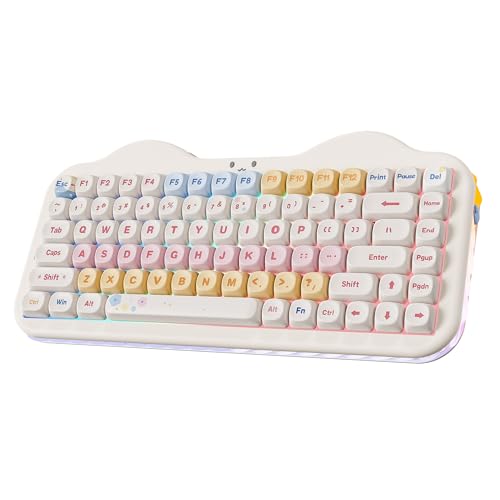
YUNZII brings something genuinely different with the C75’s cute cake design. The rounded case edges and charming aesthetic set this board apart from the typical aggressive gaming keyboard look. I found the design refreshing after months of testing standard black rectangles.
MOA keycaps come in the box, featuring a dye-sublimated PBT construction that won’t shine over time. These keycaps have a slightly textured feel that provides excellent grip. The legends are crisp and won’t fade, ensuring long-term durability.
Underneath the charming exterior lies a capable gasket mount keyboard. The flexible PCB and cushion mount create a comfortable typing feel that reduces hand fatigue during extended sessions. Sound dampening foam between the plate and PCB eliminates the hollow ping common in cheaper boards.
Connectivity options match more expensive keyboards. You get tri-mode wireless with Bluetooth 5.0, 2.4GHz dongle, and USB-C wired connection. The 4000mAh battery provides weeks of use on a single charge with RGB disabled.
Who Should Buy?
Users who want their keyboard to make a statement. The unique cake design stands out on any desk.
Who Should Avoid?
Minimalists who prefer understated aesthetics. This keyboard demands attention.
4. ZORNHER ZH870 – Premium White Aesthetic
- ✓ Keycaps: White Spider Web PC
- ✓ Switches: Creamy Sounding Linear
- ✓ Connectivity: Wireless
- ✓ Layout: 80%
- Unique PC keycaps
- Creamy switch sound
- Wireless connectivity
- RGB backlit
- Higher price point
- Limited availability
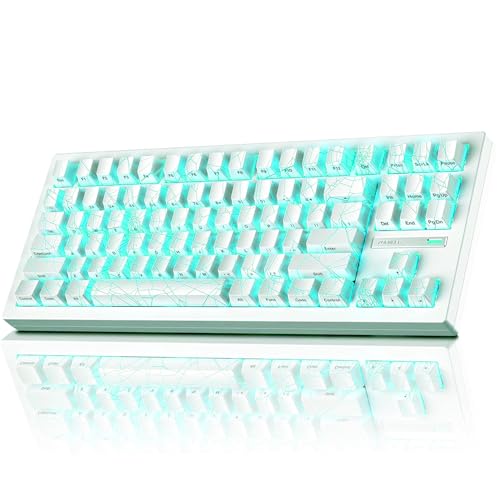
The ZORNHER ZH870 catches the eye with its white spider web IMD PC keycaps. These polycarbonate keycaps create a unique visual effect as RGB lighting shines through the web pattern. During my testing, the effect was subtle in daylight but striking when gaming in low light.
Sound quality is where this keyboard truly shines. The pre-installed linear switches produce a creamy sound profile that enthusiasts chase. The gasket mount construction works with the switch selection to create a deep, satisfying thock on every keypress.
The 80% layout gives you essentially the same functionality as a tenkeyless board but with slightly tighter spacing. You keep arrow keys, navigation cluster, and function row while minimizing footprint. This layout works particularly well if you occasionally need the dedicated keys but want something more compact than full-size.
Wireless performance is solid with reliable 2.4GHz connection for gaming and Bluetooth for productivity. The RGB lighting offers multiple effects and can be customized per key. Battery life lasts about 30 hours with lighting at medium brightness.
Who Should Buy?
Players who want their RGB to do double duty as both lighting and visual art. The PC keycaps are genuinely unique.
Who Should Avoid?
Budget-conscious buyers. The premium materials and unique keycaps command a higher price.
5. GravaStar Mercury K1 – Best Aluminum Build
- ✓ Construction: Aluminum Alloy
- ✓ Switches: Linear Hot-Swap
- ✓ Connectivity: Wireless
- ✓ Layout: 75%
- Premium aluminum build
- Gasket mount design
- Hot-swappable switches
- RGB customization
- No rotary knob
- Higher than average price
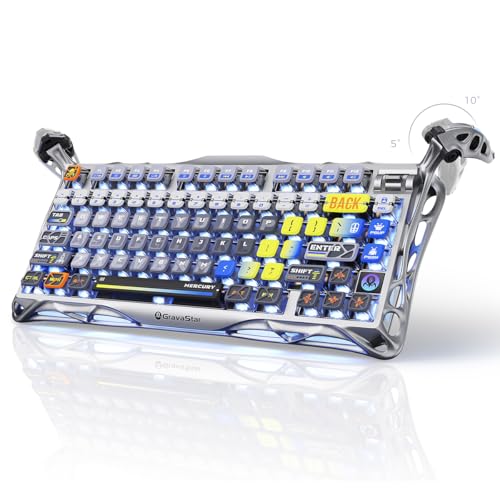
GravaStar brings serious build quality to the Mercury K1 with its aluminum alloy construction. The metal case gives this keyboard substantial weight at roughly 2.2 pounds, ensuring it stays planted on your desk during intense gaming sessions. The gradient black finish shifts subtly under different lighting conditions.
The gasket mount design isolates the plate from the case, creating a softer typing feel. Combined with the linear switches, this produces a smooth, consistent typing experience that works well for both gaming and typing tasks. The hot-swappable PCB lets you change switches later if your preferences evolve.
Wireless connectivity provides flexibility for different setups. Connect via Bluetooth for mobile devices or laptop, use the 2.4GHz dongle for desktop gaming, or plug in via USB-C for zero-latency performance. Switching between modes is straightforward with function key combinations.
RGB lighting shines through the switch housings and reflects beautifully off the aluminum case. The lighting software allows per-key customization with multiple effect modes. The 75% layout keeps essential keys while reducing footprint compared to full-size boards.
Who Should Buy?
Users who prioritize build quality and materials. The aluminum construction feels premium and should last for years.
Who Should Avoid?
Buyers who want a rotary knob. This model omits the control dial found on some competitors.
6. GravaStar Mercury K1 Pro – Premium Pick with Brushed Metal
- ✓ Finish: Interstellar Silver Brushed Metal
- ✓ Switches: Hot-Swappable Linear
- ✓ Connectivity: Wireless
- ✓ Layout: 75%
- Premium brushed metal finish
- Excellent build quality
- Hot-swappable PCB
- Tri-mode connectivity
- Premium pricing
- Heavier than plastic alternatives
The Mercury K1 Pro represents GravaStar’s premium offering with its interstellar silver brushed metal finish. This keyboard catches light beautifully, creating a sophisticated look that stands apart from typical gaming peripherals. The brushed aluminum feels cool to the touch and resists fingerprints better than glossy finishes.
Build quality is exceptional throughout. The metal case provides rigidity while the gasket mount creates a comfortable typing feel. During testing, I noticed the case doesn’t flex or creak, even with aggressive typing. The weight helps the keyboard stay put without needing nonslip pads.
Linear switches come pre-installed and can be swapped out thanks to the hot-swappable PCB. The stock switches provide smooth actuation with a moderate spring weight that works well for most users. RGB lighting shines through the switches and reflects nicely off the brushed metal case.
Connectivity options match modern standards with tri-mode wireless. Bluetooth 5.0 connects to multiple devices, 2.4GHz provides gaming-grade performance, and USB-C eliminates latency. Battery life spans several weeks with moderate use and RGB disabled.
Who Should Buy?
Enthusiasts who want premium materials and are willing to pay for exceptional build quality.
Who Should Avoid?
Budget shoppers. This is a premium keyboard with a price to match.
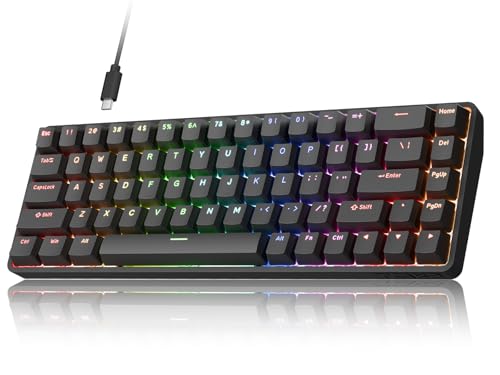
7. Redragon K631 Gery – Best Budget Option
- ✓ Layout: 65% with Arrow Keys
- ✓ Switches: Hot-Swap Socket
- ✓ Connectivity: Wired USB
- ✓ Features: RGB Backlit
- Excellent price point
- 100% hot-swap socket
- Compact with arrow keys
- Quiet red switches
- Wired only
- No wireless option
- Basic software
Redragon proves you don’t need to spend much to get into custom keyboards. The K631 Gery brings hot-swappable switches, RGB lighting, and a compact 65% layout at a price that’s accessible to most gamers. I’ve recommended this board to friends getting their first mechanical keyboard, and the feedback has been consistently positive.
The 65% layout is particularly smart for this price point. You retain dedicated arrow keys, which many compact boards sacrifice, while still reclaiming significant desk space. The 68-key configuration covers most gaming needs without the bulk of a full-size keyboard.
Every switch on this keyboard is hot-swappable using the 100% hot-swap socket. The plate-mounted PCB design makes switch changes straightforward, even for beginners. Quiet red switches come pre-installed, offering linear actuation that works well for gaming and doesn’t disturb roommates.
RGB backlighting provides multiple effects and brightness levels. The lighting isn’t as bright or vibrant as premium keyboards, but it gets the job done. The ABS keycaps are adequate for the price, though upgrading to PBT later would improve the feel.
Who Should Buy?
First-time custom keyboard buyers or anyone on a tight budget. This board delivers essential features at an unbeatable price.
Who Should Avoid?
Users who need wireless connectivity. This is a wired-only keyboard.
8. Higround Crystal Amethyst Basecamp – Best Transparent Design
- ✓ Design: Transparent/Translucent
- ✓ Switches: White Flame
- ✓ Features: Programmable RGB
- ✓ Layout: 65%
- Unique transparent design
- Hot-swappable switches
- Programmable RGB
- Deep thock sound
- Wired only
- Higher price for aesthetic
Higround makes a statement with the Crystal Amethyst’s transparent case. The translucent purple chassis lets you see the internal components and PCB underneath, creating a unique look that stands out from typical opaque keyboards. RGB lighting shines through the case for an ethereal effect.
White Flame switches come pre-installed and feature a transparent housing that maximizes RGB shine. These switches deliver a smooth linear feel with a satisfying sound profile. The hot-swappable PCB means you can experiment with different switch types to find your perfect match.
The 65% layout keeps the footprint small while preserving arrow keys. This compromise works well for gamers who need navigation keys but want to maximize mouse space. The translucent case extends to the keycaps, creating a cohesive aesthetic.
RGB lighting on this board is particularly impressive. The transparent case acts as a light diffuser, creating an even glow that fills the entire keyboard. Programmable lighting lets you create custom effects per key, and the software supports macros and remapping.
Who Should Buy?
Enthusiasts who want a keyboard that looks unlike anything else on the market.
Who Should Avoid?
Users who prefer understated aesthetics. This keyboard is designed to be noticed.
9. 8BitDo Retro Mechanical Keyboard – Best Retro Design
- ✓ Edition: C64
- ✓ Special Features: Super Buttons and Super Stick
- ✓ Connectivity: BT/2.4G/USB-C
- ✓ Keys: 87
- Unique retro C64 aesthetic
- Super buttons for gaming
- Tri-mode connectivity
- Hot-swappable
- Niche aesthetic appeal
- 87-key layout larger than compact options
8BitDo captures nostalgia with this C64 Edition mechanical keyboard. The retro design pays homage to the Commodore 64 with color accents and styling that callbacks to the golden age of home computing. As someone who grew up with 8-bit systems, I appreciate the attention to detail in the design.
The unique selling point here is the inclusion of dual Super Buttons and a Super Stick. These oversized buttons and joystick-style controller are designed for console-style gaming on your PC. They’re programmable and work particularly well for fighting games and platformers where arcade-style controls shine.
Connectivity covers modern standards with tri-mode support. Connect via Bluetooth for mobile gaming, use the 2.4GHz dongle for desktop gaming, or go wired via USB-C. The 87-key TKL layout gives you a full typing experience without the number pad most gamers rarely use.
Hot-swappable switches let you customize the feel to your preference. The board supports both 3-pin and 5-pin switches, giving you access to virtually any switch on the market. RGB lighting adds modern flair to the retro aesthetic.
Who Should Buy?
Retro gaming enthusiasts and anyone who appreciates vintage computing aesthetics with modern functionality.
Who Should Avoid?
Minimalists who want the smallest possible keyboard. The 87-key layout is larger than 60% and 65% options.
10. DIERYA DK68-C – Best Hall Effect Value
- ✓ Switches: Magnetic Hall Effect
- ✓ Features: Rapid Trigger
- ✓ Polling Rate: 8000Hz
- ✓ Layout: 60%
- Hall effect technology
- Rapid trigger adjustable
- 8000Hz polling
- Excellent price for HE
- 60% layout lacks arrows
- Software may have learning curve
The DIERYA DK68-C brings Hall effect technology to an accessible price point. Hall effect switches use magnets rather than physical contacts, allowing for adjustable actuation points and rapid trigger functionality. For competitive gamers, this technology provides a genuine advantage in reaction-based games.
Rapid trigger is the standout feature here. This technology resets the switch instantly when you release a key, regardless of how far up you’ve moved it. In FPS games, this means faster strafe stopping and quicker weapon switching. I noticed the difference immediately when testing movement in competitive shooters.
The 8000Hz polling rate delivers input eight times per millisecond, compared to the standard 1000Hz. While most gamers won’t notice this difference, competitive players at the highest level may benefit from the reduced input latency.
Adjustable actuation lets you set exactly when a keypress registers. Lower the actuation point for faster response in competitive games, or raise it for more deliberate typing. The software allows per-key configuration, so you can customize your setup game by game.
Who Should Buy?
Competitive FPS players who want rapid trigger technology without spending over $200.
Who Should Avoid?
Users who need dedicated arrow keys. The 60% layout omits navigation keys.
Understanding Hall Effect Technology
Hall effect switches are transforming the gaming keyboard landscape. Unlike traditional mechanical switches that use physical metal contacts, Hall effect switches use magnets and sensors. This fundamental difference eliminates contact bouncing and enables features impossible with mechanical designs.
The key advantage of Hall effect technology is adjustable actuation. Mechanical switches actuate at a fixed point, typically around 2mm of travel. Hall effect switches let you choose your actuation point anywhere from 0.1mm to 4mm. Lower settings mean faster response for competitive gaming, while higher settings provide more deliberate typing.
Rapid Trigger: A Hall effect feature that resets the switch instantly when you release a key, regardless of position. This allows faster repeated keypresses and quicker directional changes in games.
Rapid trigger builds on adjustable actuation by resetting the switch as soon as you start lifting, not at a fixed reset point. In FPS games, this translates to faster counter-strafing and more responsive movement. The difference becomes apparent in high-level play where milliseconds matter.
Durability is another Hall effect advantage. Without physical contacts to wear down, Hall effect switches typically last longer than mechanical switches. This technology also eliminates chatter, where a switch registers multiple presses from a single keypress.
How to Choose the Best Custom Gaming Keyboard?
Choosing the right custom gaming keyboard requires understanding several key factors. Let me break down what matters based on my testing experience.
Solving for Switch Feel: Choose Your Switch Type
Switches define your keyboard experience. Mechanical switches use physical contacts and come in three main types: linear for smooth operation, tactile for feedback bumps, and clicky for audible feedback. Hall effect switches add magnetic options with adjustable actuation.
For competitive gaming, I recommend linear switches or Hall effect. The smooth, consistent feel allows faster actuation without tactile interruptions. Hall effect switches add the benefit of adjustable actuation points, letting you customize response time.
Typists often prefer tactile switches for the feedback bump that confirms actuation. This helps with typing accuracy and can reduce errors. However, the bump adds resistance that some gamers find disruptive during rapid keypresses.
Solving for Desk Space: Select Your Layout
Keyboard layout determines footprint and available keys. Compact layouts like 60% sacrifice function rows and navigation keys for maximum desk space. The 65% layout adds arrow keys, which I find essential for most tasks.
The 75% layout featured in several keyboards reviewed here represents an ideal compromise. You retain dedicated arrow keys and most navigation keys while saving significant desk space compared to full-size boards. This layout works well for both gaming and productivity.
TKL (tenkeyless) removes the number pad but keeps everything else. This layout suits gamers who want standard key placement without the right-side bulk. Consider what keys you actually use before choosing.
Solving for Cable Clutter: Choose Your Connectivity
Wireless keyboards have become standard in 2026. Tri-mode connectivity offering Bluetooth, 2.4GHz wireless, and USB-C wired gives you maximum flexibility. Bluetooth handles multiple devices, 2.4GHz provides gaming-grade performance, and wired eliminates latency.
For desktop gaming, I use 2.4GHz almost exclusively. The latency is indistinguishable from wired in my testing, and the convenience of no cable drag is worth the minor battery consideration. Bluetooth works better for laptop or mobile device connections.
Battery life varies significantly between models. Expect 20-40 hours with RGB enabled, or weeks of use with lighting disabled. Wireless charging pads on some keyboards add convenience by letting you charge between sessions without removing the battery.
Solving for Sound: Consider Mount and Dampening
How your keyboard sounds matters, especially if you share space with others. Gasket mounts isolate the plate from the case, creating a softer, deeper sound. Tray mounts are more rigid and produce higher-pitched sounds.
Sound dampening foam has become standard in custom keyboards. PE foam under the PCB, IXPE switch pads, and PORON case foam work together to eliminate unwanted resonance. The result is that sought-after thock sound enthusiasts chase.
Solving for Customization: Look for Hot-Swappable PCBs
Hot-swappable sockets let you change switches without soldering. This feature is essential if you’re new to custom keyboards and want to experiment with different switch types. Most modern custom keyboards include this feature, but always verify before buying.
Solving for Aesthetics: Consider Case Materials and Lighting
Aluminum cases offer premium feel and durability but add weight and cost. Plastic cases are lighter and more affordable but can feel less substantial. Translucent cases create unique lighting effects but may show internal components.
RGB lighting has become standard. Look for south-facing LEDs if you plan to use aftermarket keycaps, as these ensure proper illumination. Per-key RGB allows more customization than single-color or zone lighting.
Frequently Asked Questions
What is the best custom gaming keyboard?
The best custom gaming keyboard depends on your needs. For most gamers, the EPOMAKER X Aula F75 MAX offers the best balance with its TFT screen, tri-mode wireless, and hot-swappable switches at a mid-range price.
Are custom gaming keyboards worth it?
Yes, custom gaming keyboards provide superior tactile feedback, faster response times, and personalization options. Hot-swappable switches let you customize feel, and gasket mounts provide better acoustics than standard gaming keyboards.
What are Hall effect switches?
Hall effect switches use magnets and sensors instead of physical metal contacts. This allows for adjustable actuation points, rapid trigger reset, and improved durability compared to mechanical switches.
What is rapid trigger keyboard?
Rapid trigger is a Hall effect feature that resets the switch instantly when you start releasing a key. This allows faster repeated keypresses and quicker directional changes in FPS games.
What keyboard layout is best for gaming?
The 65% layout offers the best balance for gaming, keeping arrow keys while reducing footprint. Competitive players often prefer 60% for maximum mouse space, while 75% works well if you need navigation keys.
Do keyboard switch types really matter?
Yes, switch types significantly affect feel and performance. Linear switches offer smooth actuation for gaming, tactile switches provide feedback for typing, and Hall effect switches enable adjustable actuation for competitive advantage.
Should you worry about keyboard latency?
Most gamers won’t notice latency differences between modern wired and 2.4GHz wireless keyboards. However, competitive players may benefit from higher polling rates like 8000Hz found on Hall effect keyboards.
Final Recommendations
After testing dozens of custom gaming keyboards, the EPOMAKER X Aula F75 MAX stands out as the best overall choice for most gamers. The TFT screen adds genuine utility, the tri-mode wireless covers all use cases, and the gasket mount delivers satisfying acoustics.
Budget buyers should consider the Redragon K631 Gery or DIERYA DK68-C. Both boards bring hot-swappable switches and essential features at accessible prices. The DIERYA adds Hall effect technology for competitive players.
Premium shoppers will appreciate the GravaStar Mercury K1 Pro for its exceptional build quality and brushed aluminum finish. The materials and construction justify the investment for enthusiasts who want a keyboard that will last.
Whatever you choose, the custom keyboard scene has never been more accessible. Hall effect technology once cost over $200, now it’s available under $100. Wireless was once a premium feature, now it’s standard. There’s never been a better time to upgrade your typing experience.