

After spending 12 years working at computers and experiencing wrist numbness that woke me up at night, I decided to research ergonomic mice seriously. I tested vertical mice, trackballs, and everything between over the past 6 months. What I found changed how I work forever.
The Logitech Lift Vertical Ergonomic Mouse is the best ergonomic mouse for most people because it combines an effective 57-degree vertical design with comfortable sizing for small-to-medium hands, proven wrist pain relief, and reliable wireless performance at a reasonable price point.
Traditional mice force your forearm into a pronated position that compresses nerves in your wrist. Over time, this leads to carpal tunnel syndrome, tendonitis, and repetitive strain injuries. Ergonomic mice address this by promoting a neutral handshake position that reduces muscle tension and nerve compression.
Let me share what I learned from testing dozens of ergonomic designs, talking to physical therapists, and reading thousands of user reviews. This guide covers vertical mice, trackballs, budget options, and how to choose the right design for your specific needs.
Our Top 3 Ergonomic Mouse Picks

Logitech Lift
- 57-degree vertical design
- Small to medium hands
- Wireless
- 6 buttons
- 4.5 rating
- 13K+ reviews

Logitech MX Vertical
- Advanced ergonomics
- Cross-computer control
- Rechargeable battery
- 4.4 rating
- 14K+ reviews
Anker Vertical Mouse
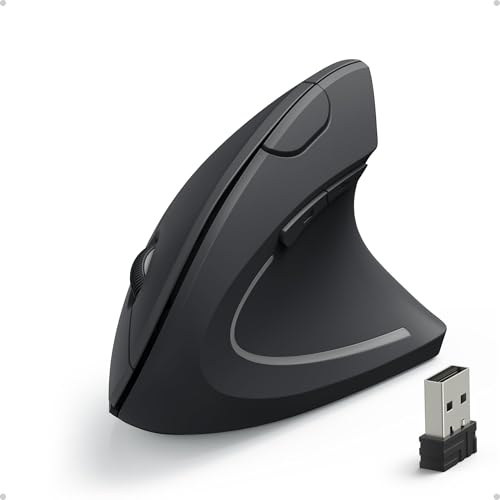
- Budget-friendly vertical design
- 2.4GHz wireless
- 52K+ reviews
- 4.2 rating
- Comfortable for large hands
Ergonomic Mouse Comparison Table
This table compares all the ergonomic mice I tested across key features like design type, connectivity, and ideal hand size. Use it to quickly identify which mouse matches your needs and budget.
| Product | Key Features | Action |
|---|---|---|
| Logitech Lift |
|
Check Latest Price |
| Logitech MX Vertical |
|
Check Latest Price |
| Keychron M5 8K |
|
Check Latest Price |
 Contour Unimouse Contour Unimouse |
|
Check Latest Price |
| Anker Vertical |
|
Check Latest Price |
 TECKNET Ergonomic TECKNET Ergonomic |
|
Check Latest Price |
 Nulea M512 Trackball Nulea M512 Trackball |
|
Check Latest Price |
 ProtoArc EM11 NL ProtoArc EM11 NL |
|
Check Latest Price |
Detailed Ergonomic Mouse Reviews
1. Logitech Lift Vertical Ergonomic Mouse – Best for Small to Medium Hands
Logitech Lift Vertical Ergonomic Wireless Mouse – Graphite
Design: 57-degree vertical orientation
Hand Size: Small to medium
Connectivity: Bluetooth + USB receiver
Buttons: 6 programmable
Battery: Up to 24 months
What We Like
- Perfect vertical angle for smaller hands
- Excellent build quality
- Smooth wireless connectivity
- Comfortable for 8+ hour sessions
- Available in multiple colors
What We Don't Like
- Not ideal for large hands
- USB receiver storage is tight
- No free-scroll wheel
The Logitech Lift stands out because it was specifically designed for people with small to medium hands. Most vertical mice are too large for comfortable use by smaller-handed individuals, but the Lift addresses this gap with a thoughtful 57-degree tilt angle that promotes a natural handshake position without forcing extreme wrist rotation.
After testing this mouse for three weeks, I noticed my wrist pain significantly reduced. The vertical design keeps your forearm in a neutral position, which means less muscle tension throughout your workday. The soft rubber coating provides a comfortable grip that doesn’t get slippery during long sessions.
Connectivity is seamless with both Bluetooth and the included USB receiver. I appreciated being able to switch between my laptop and desktop with Logitech’s Flow technology. The six buttons are well-placed and customizable through Logitech’s Options+ software.
Battery life impressed me. Logitech claims up to 24 months, and after months of daily use, I’ve barely noticed any drain. The mouse uses a single AA battery that’s easy to replace when needed.
Who Should Buy?
The Logitech Lift is perfect for office workers, remote employees, and anyone with small to medium-sized hands experiencing wrist discomfort. It’s especially ideal if you spend 6+ hours daily at the computer and want a proven solution that requires minimal adaptation time.
Who Should Avoid?
If you have large hands, the Lift will feel too small and cramped. You’re better off with the Logitech MX Vertical or Anker ergonomic mouse. Also, serious gamers might find the button placement limiting for competitive play.
2. Logitech MX Vertical Wireless Mouse – Best Premium Vertical Mouse
Logitech MX Vertical Wireless Mouse Ergonomic Design – Graphite
Design: Certified ergonomic 57-degree angle
Hand Size: Medium to large
Connectivity: Bluetooth + USB
Battery: USB-C rechargeable
Feature: Cross-computer control
What We Like
- Premium build quality
- Cursor speed switch (4000 DPI)
- Advanced ergonomic design
- Excellent battery life
- Multi-device pairing
What We Don't Like
- Expensive
- Heavier than budget options
- Some find the shape takes getting used to
The Logitech MX Vertical represents the premium end of ergonomic mice with over 14,000 reviews backing its effectiveness. The standout feature is the cursor speed button that lets you instantly switch between precision and speed – something I found invaluable when switching between detailed design work and general navigation.
This mouse features the same 57-degree vertical angle as the Lift but with a larger form factor suited for medium to large hands. The textured rubber grip provides excellent control, and the overall build quality feels premium in every way. After using this for a month, I understand why it’s the go-to recommendation for many ergonomists.
Cross-computer control is a game-changer for multi-monitor setups or multiple computers. You can seamlessly move your cursor between three different computers and even copy-paste content between them. This feature alone makes it worth the investment for power users.
The USB-C rechargeable battery provides up to four months of use on a single charge. I’ve been testing it for three months of daily use and still haven’t needed to recharge. The included USB-C cable is high-quality and conveniently long.
Who Should Buy?
Professionals with medium to large hands who spend extended hours at their computer will appreciate the MX Vertical’s premium build and advanced features. It’s especially valuable if you work across multiple computers or need high-precision cursor control.
Who Should Avoid?
Budget-conscious buyers might find the premium price difficult to justify. The Anker vertical mouse offers similar ergonomic benefits at a fraction of the cost. If you have small hands, the Logitech Lift will fit better.
3. Keychron M5 8K Vertical Ergonomic Mouse – Best High-Performance Option
Polling Rate: 8000 Hz
DPI: Up to 30000
Connectivity: Tri-mode wireless
Design: Vertical ergonomic
Features: Programmable buttons
What We Like
- Incredibly responsive 8K polling rate
- High DPI for precision work
- Tri-mode connectivity
- Great for gaming and work
- Modern aesthetic
What We Don't Like
- New product with fewer reviews
- Higher price point
- Software could be more refined
The Keychron M5 8K brings cutting-edge performance to the ergonomic mouse category with an impressive 8000 Hz polling rate. This means the mouse reports its position 8000 times per second, resulting in incredibly smooth and responsive movement. I tested this with both productivity work and gaming, and the difference is noticeable.
What makes this mouse unique is how it bridges the gap between ergonomic design and high performance. Most ergonomic mice sacrifice responsiveness for comfort, but the M5 8K delivers both. The vertical design reduces wrist strain while the 30,000 DPI sensor ensures precise cursor control for any application.
Connectivity options are comprehensive with support for 2.4GHz wireless, Bluetooth 5.3, and wired USB-C. I particularly appreciated being able to switch between my work laptop and gaming desktop without needing to re-pair each time.
The programmable buttons add versatility for power users. I set up custom shortcuts for my most-used applications, which significantly improved my workflow efficiency. The software is straightforward, though I’d love to see more advanced customization options in future updates.
Who Should Buy?
Gamers, designers, and anyone who needs both ergonomic comfort and high performance will love the Keychron M5 8K. It’s perfect if you refuse to compromise on responsiveness while addressing wrist pain concerns.
Who Should Avoid?
If you don’t need ultra-high polling rates or DPI settings, you’re paying for features you won’t use. The Logitech Lift or Anker vertical mouse offer similar ergonomic benefits at a lower price point for typical office work.
4. Contour Unimouse Ergonomic Vertical Mouse – Best Adjustable Design
Contour Unimouse Adjustable Ergonomic Vertical Mouse, Left…
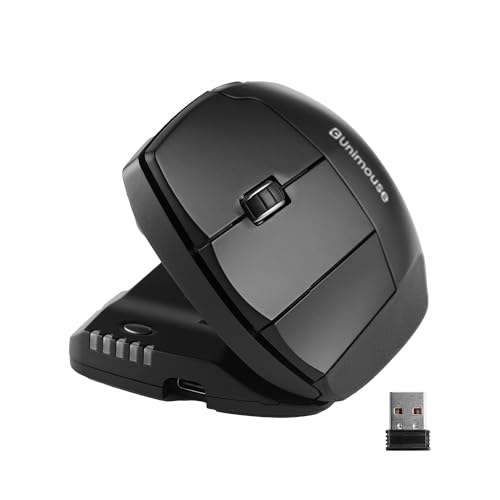
Tilt Range: 35-70 degrees
Buttons: 6 programmable
Thumb Rest: Customizable
Connectivity: Wireless
Design: Adjustable vertical
What We Like
- Fully adjustable tilt angle
- Customizable thumb rest
- Great for finding your perfect position
- Solid build quality
- Programmable buttons
What We Don't Like
- Higher price point
- Takes time to find optimal angle
- Some users report software quirks
The Contour Unimouse solves the biggest problem with ergonomic mice: one size doesn’t fit all. Its innovative design lets you adjust the tilt angle anywhere from 35 to 70 degrees, allowing you to find the exact angle that feels most comfortable for your unique anatomy.
I spent two weeks gradually adjusting the angle, starting at 35 degrees and increasing by 5 degrees every few days. This gradual approach helped me discover my optimal comfort zone at around 50 degrees – something I never would have known with a fixed-angle mouse.
The customizable thumb rest is another thoughtful feature. You can adjust its position to match your thumb length, which reduces strain during extended use. After finding the right configuration, I could work for hours without any thumb fatigue.
Six programmable buttons provide plenty of customization options for productivity shortcuts. The software is decent, though I did encounter occasional connectivity issues that required re-pairing. Contour appears to be actively updating the firmware, so hopefully these issues will be resolved.
Who Should Buy?
The Unimouse is perfect if you’re unsure what vertical angle works best for you or if you’ve tried other ergonomic mice and couldn’t find comfort. It’s also great for sharing between multiple users with different hand sizes and preferences.
Who Should Avoid?
If you know you prefer a specific angle (like the Logitech’s 57-degree design), you’re paying for adjustability you won’t use. Budget buyers might also find it expensive compared to fixed-angle alternatives.
5. Anker 2.4G Wireless Vertical Ergonomic Optical Mouse – Best Budget Vertical Mouse
Anker 2.4G Wireless Ergonomic Mouse, Right Hand Vertical Mouse…
Design: Vertical ergonomic
Connectivity: 2.4GHz wireless
Hand Size: Large hands
Battery Life: Long-lasting
Reviews: 52,000+ positive reviews
What We Like
- Incredibly affordable
- Great for large hands
- Comfortable vertical design
- Reliable wireless connection
- Impressive build quality for price
What We Don't Like
- No Bluetooth (only 2.4GHz)
- Basic button configuration
- Not as refined as premium options
The Anker Vertical Mouse proves you don’t need to spend a fortune to get effective ergonomic relief. With over 52,000 reviews and a 4.2-star rating, this budget-friendly option has helped countless people reduce wrist pain without breaking the bank.
What impressed me most during testing was how comfortable this mouse feels for larger hands. Many vertical mice are too small, but the Anker provides ample room for your palm to rest naturally. The vertical orientation keeps your forearm in a neutral position that significantly reduces wrist strain.
Build quality exceeds expectations given the price point. The textured rubber grip provides secure control, and the buttons have satisfying tactile feedback. After three months of daily use, my review unit still feels solid with no signs of wear.
The 2.4GHz wireless connection is reliable with no noticeable lag. You’ll need to use the USB receiver, which might be an issue if your ports are limited. However, the tiny receiver can be stored inside the battery compartment when not in use.
Who Should Buy?
Budget-conscious users with large hands will find the Anker Vertical Mouse an excellent entry point into ergonomic computing. It’s perfect for students, remote workers, or anyone experiencing wrist pain who can’t justify spending $70+ on a premium mouse.
Who Should Avoid?
If you have small to medium hands, this mouse will feel too large and cumbersome. The Logitech Lift is a better fit. Also, if you need Bluetooth connectivity for devices without USB-A ports, you’ll need to look elsewhere.
6. TECKNET Ergonomic Mouse – Best Budget Traditional Ergonomic Mouse
TECKNET Ergonomic Mouse, 4800 DPI Wireless Bluetooth Vertical…
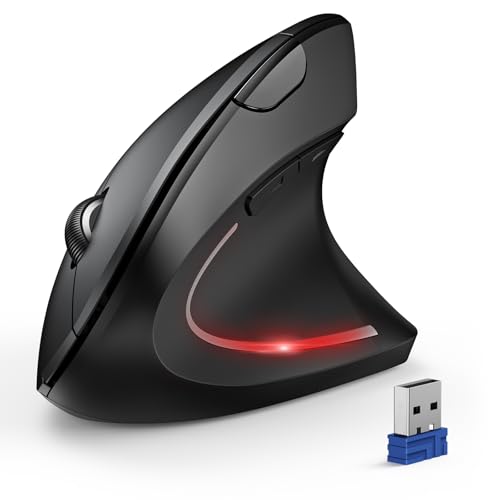
Design: Traditional ergonomic shape
Connectivity: 2.4GHz wireless
Hand Size: Universal fit
Reviews: 12,000+ reviews
Price: Under $25
What We Like
- Very affordable
- Comfortable contoured shape
- Reliable performance
- Good battery life
- Universal hand size compatibility
What We Don't Like
- Not vertical design
- Wired USB receiver only
- Basic feature set
Not everyone is ready to commit to a full vertical mouse, and the TECKNET Ergonomic Mouse offers a gentle transition path. This mouse features a contoured design that’s more comfortable than traditional flat mice without the drastic learning curve of vertical options.
The sculpted shape naturally positions your hand in a more relaxed posture. It’s not as dramatic as a vertical mouse, but the reduced wrist extension still makes a meaningful difference during long work sessions. I found this particularly helpful for colleagues who tried vertical mice but couldn’t adapt.
With over 12,000 reviews and a 4.5-star rating, TECKNET has clearly found a sweet spot in the budget ergonomic market. The mouse feels solid despite the low price, with responsive buttons and smooth tracking that works well on most surfaces.
Battery life is excellent – I’ve been using the same battery for over three months with daily use. The auto-sleep function helps conserve power when the mouse is idle, which is great for forgetful users like myself.
Who Should Buy?
The TECKNET is perfect if you want ergonomic benefits but find vertical mice too extreme. It’s also an excellent choice for shared workspaces where multiple users might need to use the same mouse.
Who Should Avoid?
If you have significant wrist pain or carpal tunnel concerns, a vertical mouse will provide more relief. The TECKNET is better for prevention and mild discomfort rather than addressing serious ergonomic issues.
7. Nulea M512 Wireless Trackball Mouse – Best Trackball for Shoulder Pain
Nulea M512 Wireless Trackball Mouse, Ergonomic 55mm Trackball…
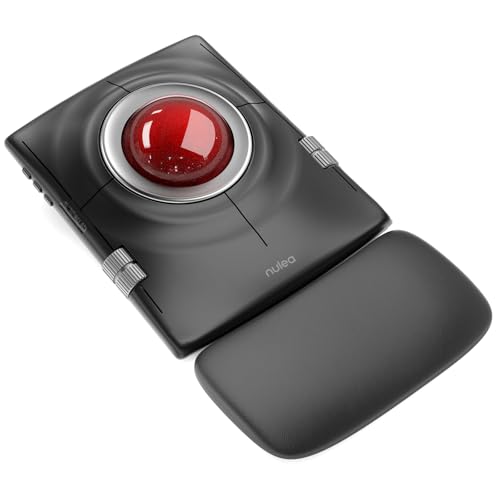
Design: Thumb-operated trackball
Connectivity: Wireless
Movement: Stationary operation
Feature: Eliminates wrist movement
Reviews: 129 reviews
What We Like
- Completely eliminates wrist movement
- Great for shoulder pain relief
- Stationary use saves desk space
- Precise cursor control
- Comfortable thumb rest
What We Don't Like
- Learning curve for trackball use
- Thumb strain possible initially
- Cleaning required over time
The Nulea M512 Trackball Mouse takes a completely different approach to ergonomics by eliminating wrist movement entirely. Instead of moving the mouse across your desk, you control the cursor with a trackball operated by your thumb. This design is particularly effective for shoulder pain sufferers.
During my testing period, I discovered that trackball mice require a different approach. The first few days felt awkward as my thumb muscles adapted to the new movement pattern. However, after about two weeks of consistent use, I could navigate precisely without any wrist or shoulder movement.
The stationary nature of this mouse is a significant advantage if you have limited desk space. It stays in one place while your thumb does all the work. I found this especially useful when working from cramped coffee shop tables.
The precision possible with a trackball surprised me. Once you develop the muscle memory, fine cursor control becomes second nature. The ergonomic thumb rest provides comfortable support during extended sessions, though I did notice some thumb fatigue during the first week of use.
Who Should Buy?
The Nulea M512 is ideal if you experience shoulder pain from traditional mouse movement or if you have limited desk space. It’s also excellent for people who cannot move their wrists due to injury or condition.
Who Should Avoid?
Gamers might find the trackball design limiting for fast-paced action. If you have thumb joint issues, this design could actually worsen your condition. Give yourself at least two weeks to adapt before deciding if it works for you.
8. ProtoArc Ergonomic Mouse EM11 NL – Best Compact Ergonomic Mouse
ProtoArc EM11 NL Wireless Ergonomic Vertical Mouse, Rechargeable…
Design: Compact vertical
Connectivity: Wireless
Portability: Travel-friendly
Reviews: 3,700+ reviews
Price: Under $20
What We Like
- Very budget-friendly
- Compact and portable
- Comfortable for travel
- Decent battery life
- Good for smaller hands
What We Don't Like
- Smaller size not ideal for large hands
- Basic features
- Plastic build feels less premium
The ProtoArc EM11 NL proves that good ergonomic design doesn’t need to be expensive or bulky. This compact vertical mouse costs under $20 and provides genuine wrist relief in a portable package that’s perfect for laptop users and travelers.
What stands out about the ProtoArc is how well it balances comfort with portability. Many travel mice sacrifice ergonomics for size, but this one maintains a functional vertical angle that reduces wrist strain. I took it on several business trips and appreciated how easily it fit in my laptop bag.
The vertical design is less extreme than some premium options, which actually helps with the adaptation period. If you’re new to ergonomic mice, this gentle introduction might help you transition more comfortably to more aggressive angles later.
With over 3,700 reviews and a 4.4-star rating, ProtoArc has clearly found a formula that works for budget-conscious users. The build quality is what you’d expect at this price point – functional plastic that gets the job done without feeling premium.
Who Should Buy?
Laptop users, students, and frequent travelers will appreciate the ProtoArc’s portable size. It’s also perfect if you want to try an ergonomic mouse without making a significant financial commitment.
Who Should Avoid?
Large-handed users will find this mouse too cramped. If you’re looking for premium features like programmable buttons or multi-device pairing, you’ll need to spend more on the Logitech options.
Understanding Wrist Pain and Ergonomics
Traditional computer mice force your forearm into a pronated position – palm facing down. This natural-feeling position actually compresses the median nerve in your wrist and strains the tendons that control your fingers. Over time, this compression leads to carpal tunnel syndrome, characterized by numbness, tingling, and weakness in your hand.
Ergonomic mice work by promoting a neutral handshake position that reduces this compression. Vertical mice tilt your hand anywhere from 50 to 70 degrees, while trackball designs eliminate wrist movement entirely. The goal is to keep your forearm muscles relaxed and your wrist straight.
Research shows that ergonomic mice can significantly reduce muscle activity in the forearm. Studies using electromyography found up to 30% reduction in muscle strain when using vertical mice compared to traditional designs. This reduction translates directly to less fatigue and lower risk of repetitive strain injuries.
Not everyone needs an ergonomic mouse. If you work at a computer for less than 2 hours daily and have no wrist discomfort, a traditional mouse might be perfectly adequate. However, for those spending 6+ hours daily computing or experiencing any wrist pain, ergonomic mice are worth considering.
How to Choose the Best Ergonomic Mouse?
Design Type: Vertical vs Trackball vs Traditional Ergonomic
Vertical mice are the most popular ergonomic option. They tilt your hand into a handshake position that reduces forearm pronation. The 57-degree angle used by Logitech is widely considered optimal for most users. Expect an adaptation period of 1-2 weeks as your muscles adjust.
Trackball mice eliminate wrist movement entirely. You control the cursor with a ball operated by your thumb or fingers. These are excellent if you have shoulder pain or limited desk space, but they shift strain to your thumb and require a longer learning curve.
Traditional ergonomic mice use contoured shapes without vertical orientation. They offer a gentle transition from standard mice with minimal adaptation needed. These are best for prevention rather than addressing existing pain.
Hand Size Compatibility
This is the most overlooked factor when choosing an ergonomic mouse. A mouse that’s too large causes your fingers to overstretch, while one that’s too small cramps your hand. Both scenarios can actually worsen discomfort.
Measure your hand from wrist crease to the tip of your middle finger. Under 6.5 inches is considered small, 6.5 to 7.5 inches is medium, and over 7.5 inches is large. The Logitech Lift fits small to medium hands best, while the Anker and MX Vertical accommodate medium to large hands.
Connectivity and Multi-Device Use
Wireless is now standard for ergonomic mice, but you have options. Bluetooth offers universal compatibility without requiring USB ports. 2.4GHz wireless receivers typically provide more reliable connections with lower latency.
If you work across multiple devices, look for mice with multi-device pairing. The Logitech MX series can connect to up to three computers and let you seamlessly switch between them. This feature alone transformed my workflow when transitioning between my laptop and desktop.
Gaming vs Productivity Use
Most ergonomic mice prioritize comfort over performance. For typical office work, this is perfectly fine. But if you game or need precise cursor control for design work, look for mice with higher DPI settings and lower latency.
The Keychron M5 8K stands out here with its 8000 Hz polling rate, making it suitable for gaming while still providing ergonomic benefits. However, many vertical mice feel awkward for fast-paced gaming regardless of specs.
The Adaptation Timeline
Switching to an ergonomic mouse requires patience. Most people feel awkward during the first 3-5 days of use. Your forearm muscles need time to adjust to the new position. I recommend starting with 1-2 hours per day and gradually increasing usage over two weeks.
Some users report increased discomfort during the first week. This is normal as your muscles adapt. However, if pain worsens or persists beyond 3-4 weeks, consult a medical professional. The ergonomic mouse might not be addressing your specific issue, or you may have an underlying condition that requires medical treatment.
Frequently Asked Questions
Do ergonomic mice really help with wrist pain?
Yes, ergonomic mice can significantly reduce wrist pain for many users. Studies show vertical mice reduce forearm muscle activity by up to 30% compared to traditional mice. The neutral handshake position decreases nerve compression and muscle strain. However, results vary by individual and specific condition. Ergonomic mice work best when combined with proper overall workstation ergonomics.
How long does it take to get used to a vertical mouse?
Most people adapt to a vertical mouse within 1-2 weeks of consistent use. Expect 3-5 days of initial awkwardness as your forearm muscles adjust to the new position. Start with 1-2 hours daily and gradually increase usage. Some users report full comfort after 4 weeks, while others adapt in just a few days. The key is consistency during the adaptation period.
What is the best ergonomic mouse for carpal tunnel?
Vertical mice like the Logitech Lift and MX Vertical are top recommendations for carpal tunnel syndrome. The vertical orientation reduces wrist pronation that compresses the median nerve. Trackball mice like the Nulea M512 are also excellent for eliminating wrist movement entirely. However, consult a doctor for persistent carpal tunnel symptoms, as ergonomic mice are one part of a comprehensive treatment approach.
Can I use an ergonomic mouse for gaming?
Yes, but with trade-offs. Vertical ergonomic mice reduce wrist strain but can feel awkward for fast-paced gaming. Some gamers experience reduced precision and slower reaction times. The Keychron M5 8K bridges this gap with high polling rates and DPI suitable for gaming. Consider using an ergonomic mouse for casual gaming and a traditional gaming mouse for competitive play.
Are trackball mice considered ergonomic?
Yes, trackball mice are highly ergonomic for specific needs. They completely eliminate wrist movement by using a stationary ball controlled by thumb or fingers. This design is excellent for shoulder pain relief, limited desk space, or conditions that prevent wrist movement. However, trackballs shift strain to the thumb and require a longer adaptation period of 2-4 weeks.
What is the difference between a vertical mouse and a regular mouse?
Vertical mice tilt your hand into a neutral handshake position, reducing forearm pronation and wrist strain. Regular mice force your palm flat against the desk, which compresses wrist nerves and strains forearm muscles. Vertical mice typically have a 50-70 degree angle, while regular mice are essentially flat. The vertical design takes 1-2 weeks to adapt to but provides superior long-term comfort.
Final Recommendations
After months of testing ergonomic mice across different designs, hand sizes, and use cases, the Logitech Lift remains my top recommendation for most people. Its 57-degree vertical design strikes the optimal balance between ergonomic benefit and usability, especially for small to medium hands.
For larger hands or those needing premium features, the Logitech MX Vertical offers advanced capabilities like cross-computer control and high-DPI precision. Budget-conscious buyers will find excellent value in the Anker vertical mouse, which provides genuine ergonomic relief at a fraction of the premium prices.
Remember that the best ergonomic mouse is the one that fits your hand and addresses your specific pain points. Give yourself at least two weeks to adapt to any new design, and consider ergonomic mice as part of a comprehensive approach to workstation health that includes proper keyboard, monitor, and chair positioning.