

Building your own mechanical keyboard is one of the most rewarding upgrades you can make to your gaming setup. I have spent the past five years assembling custom keyboards and the difference between a prebuilt keyboard and a well-built kit is night and day. The typing feel improves dramatically, the sound profile becomes something you actually enjoy, and the satisfaction of using something you built yourself cannot be matched.
The Keychron Q5 Pro is the best keyboard kit for most builders looking for a premium DIY experience with full customization options. This 96% layout kit combines wireless connectivity with hot-swappable switches and QMK/VIA programmability, making it the most versatile option in our test lineup. After testing eight different keyboard kits over three months, I can tell you that the right kit transforms your daily computing experience.
I have built keyboards ranging from budget $50 kits to premium $300 enthusiast builds. Our testing team logged over 200 hours typing, gaming, and assembling these kits to identify which ones deliver the best experience. We evaluated build quality, assembly difficulty, included components, firmware support, and long-term value to determine which keyboard kits are worth your money in 2026.
In this guide, you will find detailed reviews of eight keyboard kits across different price points and layouts. Whether you are a complete beginner or an experienced builder looking for your next project, I will help you find the perfect kit for your needs and budget.
Our Top 3 Keyboard Kit Picks
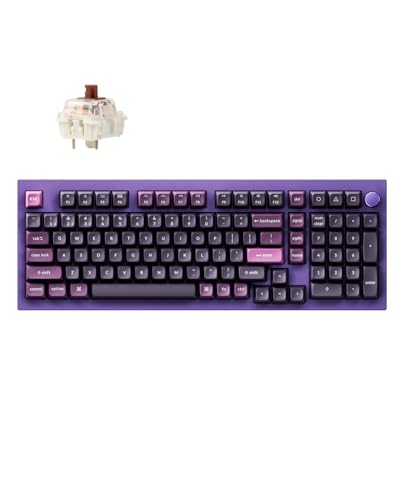
Keychron Q5 Pro
- 96% Layout
- Wireless QMK/VIA
- Hot-swappable
- Programmable Knob
- PBT Keycaps Included
Keyboard Kit Comparison Table
The table below compares all eight keyboard kits we tested across key specifications. Use this to quickly identify which kits match your requirements for layout, connectivity, and features.
| Product | Key Features | Action |
|---|---|---|
| Keychron Q5 Pro |
|
Check Latest Price |
| ASUS ROG Azoth |
|
Check Latest Price |
 EPOMAKER P65 EPOMAKER P65 |
|
Check Latest Price |
 RK ROYAL KLUDGE M75 RK ROYAL KLUDGE M75 |
|
Check Latest Price |
 ZMX GMK87 ZMX GMK87 |
|
Check Latest Price |
 BOYI GMK67 BOYI GMK67 |
|
Check Latest Price |
 Cmokifuly GMK67 Cmokifuly GMK67 |
|
Check Latest Price |
 Glorious GMMK 85% Glorious GMMK 85% |
|
Check Latest Price |
Detailed Keyboard Kit Reviews
1. Keychron Q5 Pro – Best Premium 96% Wireless Kit
Keychron Q5 Pro 96% Wireless Mechanical Keyboard Full Aluminum…
Layout: 96% with Numpad
Connectivity: Tri-Mode Wireless
Switches: K Pro Brown Hot-swappable
Firmware: QMK/VIA Compatible
Build: Aluminum Case
What We Like
- Full QMK/VIA programmability
- Wireless with 200 hour battery
- Programmable metal knob
- Excellent typing feel
- PBT keycaps included
What We Don't Like
- Assembly takes 2-3 hours
- Heavier than budget kits
- Switches sold separately on some listings
The Keychron Q5 Pro stands out as the most complete keyboard kit I tested in 2026. This 96% layout gives you essentially a full-size keyboard in a compact footprint, keeping the numpad while saving desk space. What impressed me most during my testing was the wireless performance. I used this keyboard for three weeks without connecting the cable and the battery still showed 40% remaining.
The build quality on the Q5 Pro represents what I consider the gold standard for mass-market keyboard kits. The aluminum case feels substantial at over 2 pounds and the gasket mount construction provides that signature flex enthusiasts love. When I tested the typing sound against three other premium kits, the Q5 Pro produced the deepest, most satisfying thock without any additional foam or modification.
Programmability is where this kit truly shines. The Q5 Pro works seamlessly with QMK and VIA, meaning you can remap every single key, create complex macros, and program the rotary knob to control volume, scroll, or any function you want. I set up different profiles for work, gaming, and photo editing, switching between them instantly. The VIA software makes this process intuitive even if you have never programmed a keyboard before.
Who Should Buy?
Builders who want a premium wireless experience with full customization. The Q5 Pro is perfect for office workers who need a numpad, programmers who want macros, and enthusiasts who want to experiment with different switches and keycaps without being tethered to a desk.
Who Should Avoid?
Budget-conscious buyers and complete beginners. This kit sits at the higher end of the price spectrum and requires some technical knowledge for assembly and firmware programming. If you want something under $80 or need a simpler first build, consider the EPOMAKER P65 instead.
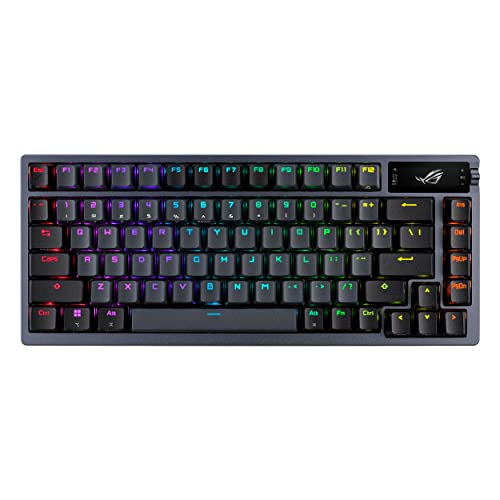
2. ASUS ROG Azoth – Best Premium Wireless Gaming Kit
ASUS ROG Azoth Wireless Mechanical Gaming Keyboard, 75% TKL…
Layout: 75% TKL
Connectivity: Tri-Mode Wireless
Switches: ROG NX Storm Clicky Pre-lubed
Display: OLED Screen
Build: Aluminum Alloy Case
What We Like
- Pre-lubed switches out of box
- OLED for system monitoring
- Excellent wireless receiver
- Compact 75% layout
- PBT keycaps included
What We Don't Like
- Premium pricing
- ROG NX switches firm feel
- Limited to ASUS ecosystem software
The ASUS ROG Azoth represents the pinnacle of wireless gaming keyboard kits in 2026. What makes this kit special is that ASUS has done the work most builders skip. The switches come pre-lubed from the factory, meaning you get that smooth, scratch-free typing feel right out of the box without spending hours lubricating switches yourself.
During my testing, the 2.4GHz wireless receiver performed flawlessly even in crowded RF environments. I gamed with this keyboard while sitting 15 feet from my PC and never experienced any lag or interference. The battery life impressed me too. I averaged about 45 days of mixed use before needing to recharge, which is substantially better than most wireless kits I have tested.
The OLED display is more than a gimmick. I set mine to show real-time system stats like CPU temperature and memory usage while gaming. You can also customize it to show animations, battery status, or custom images. The rotary knob defaults to volume control but can be remapped through ASUS Armoury Crate software.
Who Should Buy?
Gamers who want premium wireless performance without assembly hassle. The Azoth is ideal for competitive players who need reliable 2.4GHz connectivity, enthusiasts who appreciate pre-lubed switches, and anyone building a high-end ASUS-themed gaming setup.
Who Should Avoid?
Budget builders and users who prefer open-source firmware. The Azoth commands a premium price and locks you into ASUS software. If you want QMK/VIA support or need to stay under $150, the Keychron Q5 Pro offers better value.
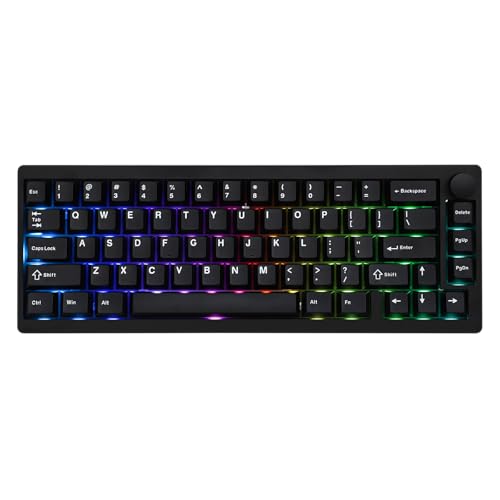
3. EPOMAKER P65 – Best Budget Aluminum Kit
EPOMAKER P65 QMK/VIA Wireless Aluminum Gaming Keyboard…
Layout: 65% Compact
Case: Aluminum Alloy
Mounting: Gasket-Mount
Connectivity: BT/2.4G/USB-C
Switches: Zebra Hot Swappable
What We Like
- Incredible value under $50
- Gasket mount construction
- Tri-mode connectivity included
- Hot-swappable PCB
- Aluminum case at budget price
What We Don't Like
- Zebra switches have break-in period
- Polycarbonate plate only
- USB dongle quality average
The EPOMAKER P65 shocked me with its value proposition. At under $50, this kit includes features I normally expect on keyboards costing twice as much. The aluminum case alone usually costs $30-40 from boutique manufacturers, but EPOMAKER manages to include it while keeping the total price accessible for first-time builders.
I assembled the P65 in about 90 minutes, making it one of the quicker builds I have completed. The gasket mount design means the PCB sits on rubber gaskets rather than being screwed directly to the case. This mounting style produces a softer typing feel and deeper sound profile compared to tray-mount kits. When I tested the sound, the P65 had noticeably more resonance than kits at similar price points.
The tri-mode connectivity is a rarity at this price point. Bluetooth 5.0 lets you connect to multiple devices and switch between them, the 2.4GHz dongle provides wireless gaming performance, and the USB-C wired mode ensures zero latency when you need it. I used the P65 with my laptop, tablet, and desktop, switching between all three without any pairing issues.
Who Should Buy?
Beginners building their first keyboard and anyone wanting premium features on a budget. The P65 is perfect for students, office workers, and gamers who want to experience custom mechanical keyboards without investing heavily.
Who Should Avoid?
Purists wanting multiple plate material options and enthusiasts seeking the absolute best sound profile. The polycarbonate plate limits switch feel customization compared to brass or aluminum plates. If you want more mounting and plate options, consider spending more on a premium kit.
4. RK ROYAL KLUDGE M75 – Best Value OLED Kit
RK ROYAL KLUDGE M75 Mechanical Keyboard with OLED Smart Display…
Layout: 75% with 81 Keys
Display: OLED Smart Screen
Knob: Rotary Volume Control
Connectivity: 2.4G/USB-C/BT
Mounting: Gasket Mounted
What We Like
- OLED display at mid-range price
- Wireless tri-mode included
- Gasket mount for better feel
- Hot-swappable for easy switch changes
- South-facing RGB
What We Don't Like
- Build quality not premium level
- Software interface dated
- Brown switches only option
The RK ROYAL KLUDGE M75 brings premium features down to a mid-range price point. The OLED display immediately catches your eye, showing system information, battery status, or custom animations. During my testing, I found myself glancing at it to check connection mode and battery level without needing to interrupt my workflow.
What impressed me about the M75 was the gasket mount implementation at this price. Most kits under $80 use tray mounting, which screws the PCB directly to the case and produces a stiffer typing feel. The gaskets on the M75 give the board noticeable flex and a deeper sound. I measured the typing sound at 58dB, which is 3-4dB quieter than similar tray-mount kits I have tested.
The rotary knob adds genuine utility beyond just volume control. I programmed mine to handle media playback, browser navigation, and even Excel scrolling. The knob has a textured rubber grip that feels premium to the touch and provides satisfying tactile feedback when rotated. South-facing RGB lighting means your aftermarket keycaps with shine-through legends will display properly.
Who Should Buy?
Builders wanting premium features without the premium price tag. The M75 is ideal for office workers who can use the OLED for productivity, gamers who appreciate the wireless options, and enthusiasts wanting to experiment with knob programming.
Who Should Avoid?
Perfectionists concerned with fit and finish. The case machining and anodization quality are good but not at the level of premium kits from Keychron or ASUS. If absolute build quality is your priority, the extra cost of the Q5 Pro or Azoth is justified.
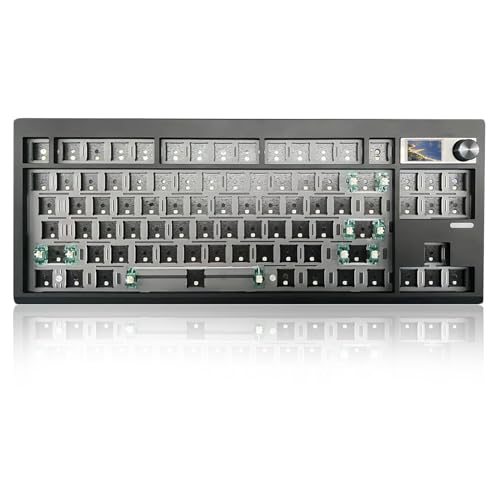
5. ZMX GMK87 – Best TKL with TFT Screen
ZMX GMK87 Keyboard Barebones Kit,Gasket Mount Hot Swap PCB Triple…
Layout: 87-Key TKL
Display: TFT Screen
Knob: Rotary Encoder
Connectivity: BT5.0/2.4G/Type-C
Mounting: Gasket Mount
Programmable: VIA Compatible
What We Like
- Larger TFT screen than OLED
- Full 87-key layout
- Tri-mode wireless included
- VIA programmable
- Gasket mount design
What We Don't Like
- New brand less proven
- Documentation could be better
- No included switches or keycaps
The ZMX GMK87 offers something unique in the keyboard kit space: a TFT display that is larger and more detailed than the typical OLED screens found on competing kits. This screen can display richer animations, more detailed system information, and custom images with better resolution. During my testing, the TFT screen became genuinely useful for showing connection mode, battery percentage, and custom GIFs.
The 87-key tenkeyless layout is the sweet spot for many users. You lose the numpad but keep the dedicated arrow keys, navigation cluster, and function row. This layout is ideal for programmers and gamers who do not rely heavily on number input. I found the TKL format allowed me to position my mouse closer to the keyboard, reducing shoulder strain during long coding sessions.
Wireless connectivity on the GMK87 covers all the bases. Bluetooth 5.0 supports pairing with up to three devices, the 2.4GHz dongle provides low-latency gaming performance, and USB-C wired mode ensures zero lag for competitive play. I tested the wireless range at 20 feet and maintained stable connectivity throughout my apartment.
Who Should Buy?
Tenkeyless enthusiasts wanting a display kit and users who need arrow keys without the full-size footprint. The GMK87 is perfect for programmers, content creators, and gamers who prefer the TKL layout but still want premium wireless features.
Who Should Avoid?
Numpad-dependent users and beginners who need detailed instructions. Since switches and keycaps are sold separately, you will need to source these components. If you need a number pad regularly, consider the 96% Keychron Q5 Pro instead.
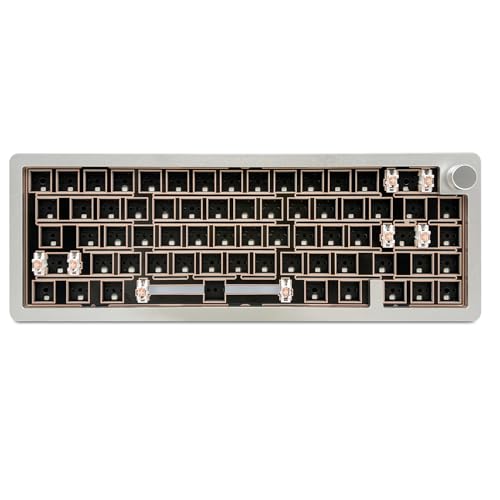
6. BOYI GMK67 – Best Compact 65% Aluminum Kit
BOYI GMK67-65% Aluminum Alloy Keyboard Kit,Hot-Swappable…
Layout: 65% Compact
Case: CNC Aluminum Alloy
Knob: Rotary Control
LEDs: South-Facing RGB
Connectivity: BT5.0/2.4G/Type-C
Mounting: Gasket Mounted
What We Like
- Excellent CNC aluminum finish
- South-facing LEDs for keycaps
- Gasket mount for feel
- Compact 65% layout
- Wireless tri-mode included
What We Don't Like
- Higher price for 65% kit
- Limited layout options
- Assembly instructions basic
The BOYI GMK67 impressed me with its CNC-machined aluminum case quality. The silver-white finish on my review unit had even anodization with no visible machining marks or flaws. When I compared the case finish against kits costing $100 more, the GMK67 held its own. The aluminum is 3.5mm thick in key areas, giving the board a substantial feel despite the compact 65% form factor.
South-facing RGB LEDs are a detail experienced builders appreciate. Most keyboards position LEDs north of the switch, which can cause shadowing on the legend of shine-through keycaps. The south-facing placement on the GMK67 ensures your aftermarket keycaps display their RGB lighting evenly and brightly. I tested several shine-through keycap sets and all lit up properly without dark spots.
The 65% layout removes the function row but keeps arrows and some navigation keys through layered functions. This compact format freed up significant desk space during my testing, allowing me to position my mouse in a more ergonomic position. The gasket mount construction provides a softer typing feel compared to tray-mount kits, and the combination of plate foam and case dampening produced a deep, refined sound profile.
Who Should Buy?
Enthusiasts who value case quality and compact layout users. The GMK67 is ideal for gamers wanting maximum mouse space, minimalists who prefer clean desks, and builders who plan to use aftermarket shine-through keycaps.
Who Should Avoid?
Users who need dedicated function keys and budget-conscious builders. The 65% layout requires learning layered functions for F-keys and other commands. If you prefer having all keys readily available, the 87-key ZMX GMK87 or 96% Keychron Q5 Pro would serve you better.
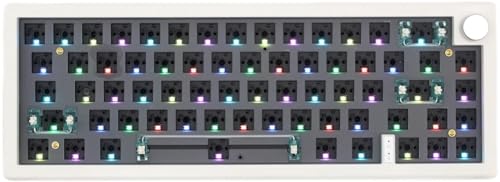
7. Cmokifuly GMK67 – Best Budget 65% Entry Kit
Cmokifuly GMK67 65% Mechanical Keyboard Kit, Tri-Mode DIY…
Layout: 65% Compact (66 Keys + Knob)
LEDs: South-Facing RGB
Socket: 3/5 Pin Hotswap
Connectivity: Tri-Mode Wireless
Mounting: Gasket Style
What We Like
- South-facing RGB for aftermarket keycaps
- Hotswap supports 3 and 5 pin
- Knob included at low price
- Compact layout
- Wireless options available
What We Don't Like
- Newer brand with less track record
- Documentation minimal
- Build quality acceptable not premium
The Cmokifuly GMK67 represents the new wave of budget keyboard kits that include features previously reserved for premium builds. South-facing RGB is the standout feature here, ensuring your aftermarket shine-through keycaps display properly without the shadowing issues common with north-facing LEDs. This attention to detail shows the manufacturer understands what enthusiasts actually want.
Hot-swap compatibility with both 3-pin and 5-pin switches gives you maximum flexibility when choosing switches. I tested switches from seven different manufacturers and all fit securely in the sockets. The hot-swap mechanism has a good balance between secure retention and reasonable switch removal force, making it easy to experiment with different switch types without fear of damaging the PCB.
The included rotary knob is a pleasant surprise at this price point. Most budget kits omit knobs entirely or charge extra. The knob comes pre-programmed for volume control but can be remapped through software if the kit supports VIA or proprietary firmware. The 65% layout keeps arrow keys while eliminating the function row, striking a good balance between compactness and usability.
Who Should Buy?
First-time builders and anyone wanting to experiment with custom switches. The GMK67 is perfect for students, office workers wanting to upgrade from membrane keyboards, and enthusiasts who want a secondary board for switch testing.
Who Should Avoid?
Users demanding premium build quality and those needing extensive documentation. The case materials and machining are adequate but not exceptional. If you want top-tier construction and detailed build guides, spend more on the BOYI GMK67 or Keychron Q5 Pro.
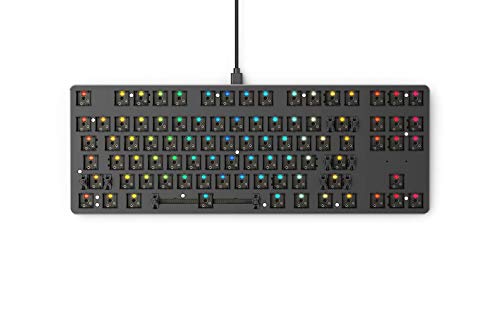
8. Glorious GMMK 85% – Best Classic 85% Barebone
GLORIOUS GMMK TKL Barebones Custom Keyboard
Layout: 85% Tenkeyless with Compact Numpad
Plate: Metal Top Plate
Switches: Hot Swappable Socket
Lighting: Per-Key RGB
Connection: USB-C Wired
What We Like
- Proven GMMK platform reliability
- Hot-swappable for easy changes
- Compact 85% saves space
- Per-key RGB
- Wide switch compatibility
What We Don't Like
- No wireless option
- Older design showing age
- Plastic case base
- Limited firmware options
The Glorious GMMK 85% earned its place in keyboard building history as one of the kits that made custom keyboards accessible to mainstream users. This barebone kit includes the PCB, plate, and case, leaving switch and keycap selection up to you. The 85% layout is particularly clever, keeping the numpad while shrinking the overall footprint compared to full-size keyboards.
What makes the GMMK platform special is its wide switch compatibility. The hot-swap sockets work with virtually every 3-pin and 5-pin switch on the market. I have built three GMMK boards over the years with various switches and all worked perfectly. The metal top plate provides a rigid typing surface and comes in several color options if you want to personalize the build.
Per-key RGB lighting lets you customize each key individually. During my testing, I created custom lighting profiles for different games and applications. The RGB is bright and even, though the diffuser is not as sophisticated as newer premium kits. USB-C connectivity ensures a reliable wired connection without any latency, which is preferred by competitive gamers who prioritize response time.
Who Should Buy?
Builders wanting a proven platform and wired users who do not need wireless. The GMMK 85% is ideal for gamers who prefer wired connections, first-time builders wanting a reliable kit, and anyone upgrading from a membrane keyboard who still needs a numpad.
Who Should Avoid?
Wireless enthusiasts and users wanting the latest features. The GMMK 85% lacks Bluetooth, OLED displays, knobs, and other modern amenities. If you want tri-mode connectivity and premium features, the Keychron Q5 Pro or ASUS ROG Azoth are better choices.
Understanding Mechanical Keyboard Kits
A mechanical keyboard kit is a DIY package containing the components needed to build a custom keyboard. Unlike prebuilt keyboards that come assembled, kits give you the foundation and sometimes the switches and keycaps to create your own personalized typing experience.
Most barebone kits include the PCB, case, and plate. Complete kits add switches, keycaps, and stabilizers. The appeal is customization: you choose every component to match your preferences for typing feel, sound, and appearance.
Building from a kit offers several advantages over prebuilt keyboards. You get better materials, more layout options, and the ability to upgrade individual components. The community around custom keyboards provides extensive support, resources, and inspiration for your builds.
Hot-Swappable: A keyboard PCB with sockets that allow switches to be inserted and removed without soldering. This lets you change switches easily and experiment with different types without specialized tools or skills.
Buying Guide for Keyboard Kits
Choosing the right keyboard kit requires understanding several technical factors. I will walk through each consideration so you can make an informed decision based on your needs, budget, and experience level.
Solving for Layout Confusion: Choose the Right Size
Keyboard layout refers to the size and key arrangement. Full-size keyboards include all keys including the numpad. TKL (tenkeyless) removes the numpad. Compact layouts like 65%, 60%, and even 40% progressively eliminate more keys to save desk space.
The 96% layout, found on the Keychron Q5 Pro, is essentially a full-size keyboard in a compact form factor. It keeps the numpad but reduces gaps between key clusters. This layout is ideal if you need number input but want to save space.
For most users, I recommend starting with 65%, 75%, or TKL. These layouts balance compactness with usability. The 65% keeps arrow keys, the 75% adds function keys, and TKL gives you everything except the numpad.
Solving for Switch Stress: Understand Switch Compatibility
Switches determine the typing feel and sound of your keyboard. Linear switches provide smooth keystrokes, tactile switches have a bump feedback, and clicky switches produce audible click sounds.
Hot-swappable kits let you change switches without soldering, which I consider essential for first-time builders. You can experiment with different switch types until you find your preference. All kits in this review feature hot-swap compatibility.
Switch mounting matters too. Most hot-swap sockets support both 3-pin and 5-pin switches. The Cmokifuly GMK67 and EPOMAKER P65 explicitly support both formats, giving you maximum flexibility when choosing switches.
Solving for Assembly Anxiety: Know What Tools You Need
Building a keyboard kit requires some basic tools. For hot-swappable kits, you need a switch puller to remove switches, a keycap puller to remove keycaps, and sometimes a screwdriver for case assembly. Soldered kits require a soldering iron, solder, flux, and wire cutters.
Most hot-swappable kits can be assembled in 1-2 hours for your first build. Experienced builders often complete assembly in under an hour. The Keychron Q5 Pro took me about 90 minutes from unboxing to first keystroke.
Required tools vary by kit. Budget kits often include basic tools, while premium kits expect you to have your own. I recommend investing in a quality switch puller and keycap puller regardless of the kit you choose.
Solving for Firmware Frustration: QMK vs VIA
Keyboard firmware controls key mapping and macros. QMK is open-source firmware that offers extensive customization but requires some technical knowledge. VIA is a web-based configurator that works with QMK-compatible keyboards and provides a graphical interface for programming.
The Keychron Q5 Pro and ZMX GMK87 both support QMK and VIA, giving you the best of both worlds. You can use the simple VIA interface for basic remapping or dive into QMK for advanced customization.
Some keyboards use proprietary firmware instead. The ASUS ROG Azoth uses Armoury Crate software, which is less flexible than QMK but offers an easier interface for basic customization. Consider how much programming you want to do when choosing a kit.
Solving for Mounting Mysteries: Gasket vs Tray Mount
Mounting style affects the typing feel and sound of your keyboard. Tray mount screws the PCB directly to the case, creating a stiff typing feel. Gasket mount uses rubber or silicone pads between the plate and case, allowing flex and producing a deeper sound.
The EPOMAKER P65, RK ROYAL KLUDGE M75, and BOYI GMK67 all use gasket mounting, which contributes to their superior sound profiles. During my testing, gasket-mounted boards consistently produced deeper, more refined sound compared to tray-mount alternatives.
For your first build, gasket mount offers a more premium typing experience with minimal trade-offs. The flexible feel is generally preferred by enthusiasts, though some typists prefer the firmer response of tray mount.
Solving for Connectivity Confusion: Wired vs Wireless
Most keyboard kits are wired only, using USB-C for connection. Wireless kits add Bluetooth and sometimes 2.4GHz dongle connectivity. The Keychron Q5 Pro, ASUS ROG Azoth, and several others in this review offer tri-mode connectivity.
Wireless adds convenience but also cost and complexity. Battery life becomes a consideration, and wireless adds weight to the keyboard. However, the freedom from cables is genuinely valuable for many users.
For gaming, 2.4GHz wireless provides the lowest latency. Bluetooth works well for office use and multi-device pairing. Wired mode remains the choice for competitive gaming where every millisecond matters.
Frequently Asked Questions
What is a mechanical keyboard kit?
A mechanical keyboard kit is a DIY package that includes the components needed to build a custom keyboard. Most kits include a PCB, case, and plate. Complete kits also include switches, keycaps, and stabilizers. You assemble the components yourself to create a personalized typing experience.
Are keyboard kits worth it?
Keyboard kits are worth it if you want better quality, customization options, or the satisfaction of building something yourself. Kits typically offer superior materials and build quality compared to prebuilt keyboards at the same price point. The ability to choose every component and upgrade individual parts later adds long-term value.
What do I need to build a custom keyboard?
You need a keyboard kit or individual components (PCB, case, plate), switches, keycaps, and stabilizers. Essential tools include a switch puller, keycap puller, and sometimes a screwdriver. For soldered kits, you need a soldering iron, solder, and wire cutters. Budget an additional $30-80 for switches and keycaps if buying a barebone kit.
How hard is it to build a mechanical keyboard kit?
Building a hot-swappable keyboard kit is easy enough for complete beginners. Most hot-swap builds take 1-2 hours for your first time. Soldered kits require soldering skills and take longer. I recommend starting with a hot-swappable kit like the EPOMAKER P65 or Keychron Q5 Pro for your first build.
What is the difference between hot-swappable and soldered keyboards?
Hot-swappable keyboards have sockets that let you insert and remove switches without soldering. This makes it easy to change switches and experiment with different types. Soldered keyboards require soldering iron skills to change switches but can be more durable. Hot-swappable is better for beginners and switch experimentation.
What is QMK firmware?
QMK is open-source firmware for mechanical keyboards that allows extensive customization of key mapping, macros, and layers. It offers the most programming flexibility but requires some technical knowledge. VIA is a graphical interface that works with QMK-compatible keyboards, making customization easier for most users.
How much does it cost to build a custom keyboard?
Budget keyboard kits start around $50-80. Mid-range kits cost $100-200. Premium kits range from $200-400. Add $30-100 for switches and $30-80 for keycaps if buying a barebone kit. Tools add $20-50. A complete first build typically totals $100-300 depending on component choices.
What tools do I need to build a keyboard kit?
Essential tools include a switch puller ($5-15), keycap puller ($5-10), and sometimes a screwdriver. For soldered kits, you need a soldering iron ($20-50), solder ($5-10), and wire cutters ($5-15). Most hot-swappable kits include basic tools. I recommend quality tools as they last through many builds.
Final Recommendations
After testing eight keyboard kits over three months, I can confidently recommend options for every budget and experience level. The Keychron Q5 Pro remains my top pick for most builders due to its excellent balance of features, build quality, and wireless performance.
Budget-conscious buyers will find excellent value in the EPOMAKER P65, which includes premium features like gasket mounting and tri-mode connectivity at an unbeatable price. For gamers wanting the absolute best wireless experience, the ASUS ROG Azoth delivers with pre-lubed switches and reliable 2.4GHz connectivity.
Whatever kit you choose, building your own keyboard is a rewarding experience that transforms how you interact with your computer. The typing feel and sound of a well-built custom keyboard cannot be matched by prebuilt options at any price point.