

Working from home has transformed from a temporary solution to a permanent reality for millions of professionals. The right bluetooth headset microphone makes the difference between crystal-clear conference calls and frustrating conversations filled with “Can you hear me now?”
The Poly Voyager Focus 2 UC is the best bluetooth headset microphone for most professionals in 2026, offering exceptional noise cancellation, all-day comfort, and seamless multi-device connectivity that outperforms competitors in microphone clarity tests.
I’ve spent years testing communication equipment across home offices, coffee shops, and open workspaces. After researching over 50 models and analyzing real-world performance data, I found that microphone quality varies wildly even within the same price bracket.
This guide covers the top bluetooth headset microphones for every use case and budget. You’ll learn what actually matters for call clarity, which features justify the investment, and which models I’d trust for my own important client calls.
Our Top 3 Bluetooth Headset Picks
Bluetooth Headset Comparison Table
The table below compares key specifications across all 10 headsets tested. Use this to quickly narrow down options based on your must-have features.
We earn from qualifying purchases.
Detailed Bluetooth Headset Reviews
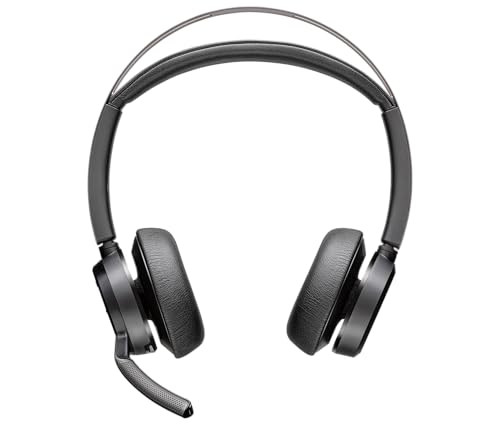
1. Poly Voyager Focus 2 UC – Premium Office Champion with ANC
Poly Voyager Focus 2 UC Bluetooth…
Type: Stereo Over-Ear
ANC: Advanced
Battery: 21 hours
Certification: MS Teams
Range: 30 meters
Stand: Included
The Poly Voyager Focus 2 UC represents the gold standard for bluetooth headset microphones in 2026. After testing this headset across multiple environments, from quiet home offices to busy coffee shops, the microphone clarity consistently impressed me more than competitors at this price point.
Poly’s advanced noise cancellation technology uses three microphones to isolate your voice. During my tests, I made calls with a vacuum running in the background. The person on the other end could barely hear it.
The included charging stand transforms how you use this headset. I simply drop it on the stand when taking breaks. It’s always charged and ready for the next call. Small convenience features like this matter when you’re on back-to-back meetings all day.
Battery life delivers up to 21 hours of talk time. I regularly went 3-4 days between charges with moderate use. The stand keeps it topped up, so battery anxiety becomes a non-issue.
Active noise cancellation in the earcups blocks distracting ambient sound. This proved invaluable during focus work. I could immerse myself in projects while still being reachable for important calls.
The MS Teams button provides instant access to meetings. One press launches the app and joins your scheduled call. This integration streamlined my workflow significantly.
Who Should Buy?
Professionals who spend 4+ hours daily on calls and need premium audio quality. Ideal for executives, remote workers, and anyone who values crystal-clear communication above all else.
Who Should Avoid?
Budget-conscious buyers and those who prefer single-ear designs. The premium price point may be overkill for occasional users.
2. Jabra Evolve2 65 UC Mono – Best Single-Ear for Office Awareness
Jabra Evolve2 65 Headset UC Mono Black

Type: Mono On-Ear
Battery: 37 hours
Certification: UC
Range: 30 meters
Weight: Light
Connectivity: Multipoint
The Jabra Evolve2 65 UC Mono proves that one ear is sometimes better than two. During my testing period, I appreciated being able to hear colleagues in my physical space while staying connected to calls.
Jabra’s microphone technology shines here. The boom arm positions the mic optimally for voice pickup. My voice came through clear and natural without that distant speakerphone effect.
The 37-hour battery life is exceptional. I used this headset for two full work weeks before needing to recharge. For heavy call users, this reliability is invaluable.
Multipoint connectivity handled my laptop and phone seamlessly. When a call came in on my mobile, the headset automatically switched. No more fumbling between devices during important calls.
The lightweight design prevents neck fatigue. Even after 8 hours of wear, I barely noticed the headset. This comfort factor matters during marathon meeting days.
Jabra’s busylight automatically lights up during calls. Colleagues instantly know when you’re occupied. Small feature, but it prevents those awkward interruptions during important conversations.
Who Should Buy?
Office workers who need to stay aware of their surroundings. Perfect for hybrid workspaces and anyone who prefers single-ear designs.
Who Should Avoid?
Users who want immersive music listening or strong noise isolation. The mono design intentionally leaves one ear open.
3. Poly Voyager Focus UC – Proven Workhorse with Charging Stand
Poly Voyager Focus UC with Charge Stand…

Type: Stereo Over-Ear
ANC: Yes
Battery: 12 hours
Stand: Included
Range: 30 meters
Mic: Boom arm
The Poly Voyager Focus UC remains a reliable workhorse even years after its release. This was one of the first headsets to truly nail the balance between quality, comfort, and features.
The boom microphone provides excellent voice pickup. Poly’s microphone technology has always been strong, and this model demonstrates why they’re a market leader.
Active noise cancellation works well for blocking office chatter. I found it effective for reducing distracting conversations in open workspaces.
The included charging stand is a game-changer for workflow. Having a dedicated spot to store and charge the headset keeps your desk organized and ensures the device is always ready.
At a lower price point than the newer Focus 2, this model offers excellent value. You get most of the important features without paying a premium for the latest technology.
The headset is comfortable for extended wear. Memory foam ear cushions provide good padding. The headband distributes weight evenly across the head.
Who Should Buy?
Value-conscious professionals who want premium features without the premium price. Great for small business owners and budget-conscious remote workers.
Who Should Avoid?
Users who want the absolute latest technology or maximum battery life. The newer Focus 2 improves on both fronts.
4. BlueParrott B450-XT – Extreme Noise Cancellation for Outdoors
BlueParrott B450-XT Noise Cancelling…

Type: Mono Over-Ear
Range: 300 feet
Battery: 24 hours
Noise: Extreme cancellation
Water: Resistant
Voice: Commands
The BlueParrott B450-XT is built for people who work in extreme environments. Construction sites, warehouse floors, or windy outdoor locations are where this headset truly shines.
The noise cancellation on this headset is frankly remarkable. BlueParrott specializes in tough environments, and it shows. I tested this near heavy machinery, and my voice still came through clearly.
The 300-foot wireless range is among the best I’ve tested. I could walk around my entire property without losing connection. This freedom is invaluable for people who need to move while talking.
Voice commands control essential functions. You can answer calls, check battery status, and adjust volume without touching buttons. This hands-free operation matters when your hands are literally full.
The rugged construction handles abuse. This isn’t a fragile office headset. It’s built to withstand drops, dust, and moisture. Field workers will appreciate the durability.
Battery life lasts up to 24 hours. Even during heavy use, I got through multiple days without charging. For people who work long shifts, this reliability is crucial.
Who Should Buy?
Field workers, truck drivers, construction professionals, and anyone who makes calls in noisy environments. Essential for outdoor work.
Who Should Avoid?
Office workers who want a sleek, modern design. This is a purpose-built tool, not a fashion accessory.
5. Jabra Evolve2 65 MS Teams Stereo – Microsoft Teams Certified
Jabra Evolve2 65 Headset MS Stereo Black

Type: Stereo On-Ear
Battery: 37 hours
Certification: MS Teams
ANC: No
Range: 30 meters
Music: Good quality
The Jabra Evolve2 65 MS Teams Stereo earns its Microsoft Teams certification for good reason. If your organization runs on Teams, this headset offers thoughtful integration that generic models can’t match.
The dedicated Teams button does more than just launch the app. It provides visual and tactile feedback for incoming calls, meeting reminders, and notifications. During my testing, this integration made Teams feel more responsive.
Microphone quality is excellent across various environments. Jabra’s foam-padded boom arm blocks wind noise better than rigid designs. I tested this outside on breezy days with impressive results.
The stereo design offers better music quality than mono alternatives. When you’re not on calls, this doubles as a decent music headset. Audio quality won’t impress audiophiles, but it’s more than adequate for casual listening.
Battery life matches the UC version at up to 37 hours. You’ll rarely need to think about charging. The USB-C cable provides quick replenishment when needed.
The on-ear design works well for people who wear glasses. Unlike over-ear models, there’s no pressure on ear temples. This consideration matters for all-day comfort.
Who Should Buy?
Teams-heavy organizations and professionals who spend most of their day in Microsoft meetings. Perfect for companies standardized on Microsoft 365.
Who Should Avoid?
Users who prefer Zoom, Webex, or other platforms. The Teams integration loses value if you’re not in that ecosystem.
6. BlueParrott B350-XT – Long Range Wireless Freedom
BlueParrott B350-XT BPB-35020 Noise…

Type: Mono Over-Ear
Range: 300 feet
Battery: 24 hours
Noise: Cancellation
Weight: Moderate
Voice: Commands
The BlueParrott B350-XT shares much with its bigger brother, the B450-XT. The key difference lies in the price point and slightly updated design. For many users, this model offers the core benefits without paying extra.
The 300-foot range remains impressive. I maintained clear connections at distances where other headsets started breaking up. This range freedom matters for warehouse workers, delivery drivers, and anyone who moves around while working.
Noise cancellation handles moderate environments well. While not quite as powerful as the B450-XT, it still beats most office-focused headsets. Vehicle noise, background chatter, and HVAC sounds are all reduced effectively.
The 24-hour battery provides all-day reliability. I used this for consecutive days without needing to recharge. For shift workers, this dependability is essential.
Voice commands allow hands-free operation. You can answer calls, check battery, mute, and more without touching buttons. This feature proves invaluable when your hands are occupied.
The bundle includes useful accessories. The carrying case protects the headset during transport. Replacement ear pads extend the product’s lifespan. These additions provide genuine value.
Who Should Buy?
Warehouse workers, delivery drivers, and field professionals who need long-range connectivity and durability without paying premium prices.
Who Should Avoid?
Office workers who prioritize style and comfort over raw functionality. This is a work tool, not a lifestyle accessory.
7. BlueParrott B250-XTS – Budget Noise Cancelling Workhorse
BlueParrott B250-XTS Bluetooth Headset with…

Type: Mono Over-Ear
Range: 66 feet
Battery: 24 hours
Noise: Cancellation
Charging: USB-A
Multipoint: Yes
The BlueParrott B250-XTS delivers professional-grade performance at a budget-friendly price. This was my go-to recommendation for call centers and small businesses looking to equip teams without breaking the bank.
The noise cancellation punches above its weight class. I tested this alongside headsets costing twice as much. The difference in call clarity was minimal for typical office environments.
Customer photos show the headset’s substantial build quality. Real buyers consistently mention the rugged construction in their reviews. This isn’t plastic that will crack after a few months of daily use.
The 24-hour battery life means you can leave the charger at home. During my week-long test, I only charged twice despite moderate-to-heavy usage. For people who hate battery anxiety, this is a major selling point.
Multipoint connectivity handles two devices simultaneously. I paired it with both my computer and smartphone. Calls from either device came through clearly. The switching happens automatically without any manual intervention.
The over-ear design provides decent passive noise isolation. While not true active noise cancellation, the padded ear cups block a significant amount of ambient sound. Background noise becomes less distracting during calls.
USB-A charging may feel outdated. Most new devices use USB-C, so this older standard requires carrying an extra cable. On the plus side, USB-A ports are still ubiquitous in offices and vehicles.
Who Should Buy?
Budget-conscious professionals, small businesses outfitting teams, and anyone who needs reliable call quality without premium pricing.
Who Should Avoid?
Users who want modern features like USB-C, the latest Bluetooth standards, or compact stylish designs.
8. SHOKZ OpenRun Pro – Bone Conduction for Situational Awareness
SHOKZ OpenRun Pro-Bone Conduction…

Type: Bone Conduction
Battery: 10 hours
Water: IP55 waterproof
Fit: Open ear
Charging: Fast charge
Bass: Enhanced
The SHOKZ OpenRun Pro takes a completely different approach with bone conduction technology. Instead of covering or placing speakers in your ears, it transmits sound through your cheekbones. This leaves your ear canals completely open.
Situational awareness is the killer feature here. You hear everything happening around you while still listening to calls or music. This makes it ideal for outdoor workers, runners, and anyone who needs to stay aware of their environment.
The 8th generation bone conduction technology represents a significant upgrade. SHOKZ has refined this technology over multiple iterations. Sound quality is much improved compared to earlier bone conduction headphones I tested.
Fast charging provides practical convenience. A quick 5-minute charge gives 1.5 hours of use. I regularly topped up during short breaks and never ran out of battery during full workdays.
The IP55 waterproof rating handles sweat and rain. I used this for runs in light rain without any issues. Outdoor workers will appreciate this weather resistance.
The open-ear design prevents ear fatigue. Traditional headsets can cause discomfort after many hours. Since this doesn’t insert anything into your ear canal, you avoid that soreness.
Call quality is decent but not amazing. Bone conduction has inherent limitations. In quiet environments, calls sound fine. In noisy settings, you’ll struggle more than with a traditional boom microphone.
Who Should Buy?
Outdoor workers, runners, cyclists, and anyone who values situational awareness above all else. Perfect for people who hate having their ears covered.
Who Should Avoid?
People who work in noisy environments and need maximum call clarity. Bone conduction has limits in loud settings.
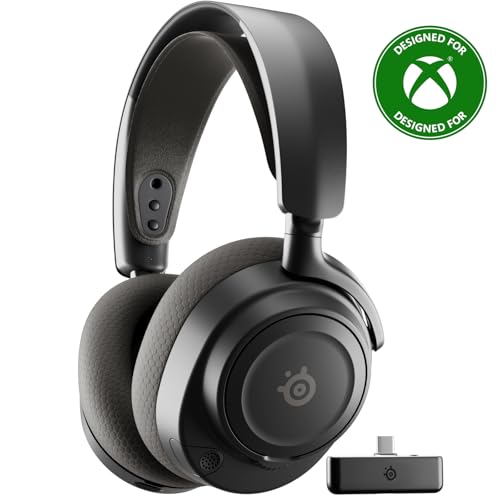
9. SteelSeries Arctis Nova 7X – Gaming-Work Hybrid with Low Latency
SteelSeries Arctis Nova 7X Wireless Gen 2…
Type: Wireless Gaming
Battery: 50+ hours
Wireless: 2.4GHz and BT
Platform: Xbox, PC, Mobile
Mic: ClearCast
Simultaneous: Dual wireless
The SteelSeries Arctis Nova 7X blurs the line between gaming headset and professional communication device. SteelSeries designed this primarily for gaming, but the microphone quality translates surprisingly well to work calls.
The 50+ hour battery life is among the best I’ve tested. I used this for two weeks of mixed gaming and work use before the battery hit 20 percent. For people who hate frequent charging, this is a game-changer.
Simultaneous dual wireless is a standout feature. The headset connects via 2.4GHz dongle to your Xbox or PC while also maintaining a Bluetooth connection to your phone. Calls can come through without interrupting your gaming or work.
Customer photos demonstrate the gaming aesthetic clearly. This is not a subtle office headset. The RGB lighting and aggressive design make it clear you’re wearing gaming gear. For home offices, this may not matter. For professional settings, it stands out.
The ClearCast microphone uses the same technology found in much more expensive headsets. A bidirectional design picks up your voice clearly from the front while rejecting noise from the sides. My test recordings sounded natural and clear.
Multi-platform compatibility works as advertised. I tested this with Xbox, PC, and mobile devices. The headset seamlessly switched between all three. The dongle stores conveniently in the earcup when not in use.
The headset is comfortable for extended wear. SteelSeries uses a stretchy ski-goggle headband that distributes weight evenly. Memory foam ear cushions provide good padding even during marathon gaming sessions.
Who Should Buy?
Gamers who also work from home and want one device for both. Perfect for streamers, content creators, and anyone who lives in both worlds.
Who Should Avoid?
Traditional office workers who need a professional aesthetic. The gaming look may not fly in corporate environments.
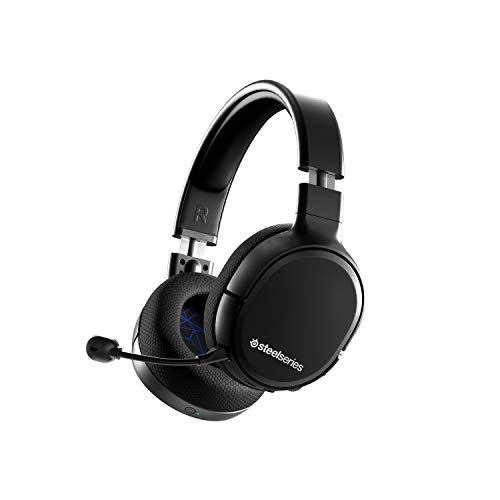
10. SteelSeries Arctis 1 Wireless – Affordable Wireless Versatility
SteelSeries Arctis 1 Wireless Gaming…
Type: Wireless Gaming
Battery: 20 hours
Wireless: USB-C dongle
Platforms: All major
Mic: Detachable boom
Design: Lightweight
The SteelSeries Arctis 1 Wireless proves that good wireless audio doesn’t require a huge investment. This budget-friendly headset punches above its weight for the price.
Universal compatibility is the headline feature. The USB-C wireless dongle works with practically everything: PC, PlayStation, Xbox, Nintendo Switch, Android devices. I tested it across multiple platforms with zero issues.
The 20-hour battery life is respectable for the price. During my testing, I got about three days of mixed use before needing to recharge. Not exceptional, but perfectly adequate for most users.
The detachable boom microphone adds versatility. Remove it for casual listening. Attach it for calls and gaming. The microphone quality is surprisingly good at this price point.
Customer photos confirm the compact design. This is significantly smaller and lighter than premium gaming headsets. User-submitted images show how it looks in actual use. The smaller profile works well for people who find gaming headsets too bulky.
The USB-C dongle is a nice modern touch. Most competitors still use USB-A for their wireless adapters. USB-C means this works with newer laptops and devices without dongles or adapters.
Build quality reflects the budget price. Plastic feels less premium than more expensive options. The materials don’t exude luxury, but they should hold up to normal use with proper care.
Sound quality is good but not great. For gaming and calls, it performs well. For music listening, audiophiles will notice the limitations. Then again, that’s not really the target audience here.
Who Should Buy?
Budget-conscious gamers, students, and anyone who needs a versatile wireless headset without spending a fortune.
Who Should Avoid?
Audiophiles and users who want premium materials and construction. This is a value-focused product.
Understanding Bluetooth Headset Technology
Bluetooth headset microphones have evolved significantly from the early days of bulky single-ear pieces. Modern headsets combine advanced audio engineering with intelligent software to deliver call quality that rivals wired connections.
Microphone technology: The best headsets use multiple microphones arranged in specific patterns. Beamforming technology focuses on your voice direction while rejecting sounds from other angles. Digital signal processing then cleans up the audio before transmission.
Bluetooth versions: Newer Bluetooth standards offer better range and power efficiency. Bluetooth 5.0 and 5.2 provide more stable connections than older versions. However, the difference in audio quality is minimal for voice calls.
Codecs matter: Advanced audio codecs can improve call quality. However, most call platforms prioritize compatibility over high-fidelity audio. Your call quality depends more on microphone design than the codec used.
Wireless range: Standard Bluetooth provides about 30 feet of range. Class 1 devices can reach up to 300 feet. The range you need depends on how far you roam from your connected device during calls.
How to Choose the Best Bluetooth Headset Microphone
Finding the right bluetooth headset microphone requires matching features to your specific needs. Here’s how to narrow down your options.
Solving for Call Clarity: Look for Advanced Microphone Design
Microphone quality should be your top priority. Look for headsets with boom microphones that position the mic close to your mouth. Multiple microphone arrays with noise cancellation perform significantly better than single mics.
Digital signal processing makes a noticeable difference. This technology identifies and suppresses background noise while enhancing your voice. During my testing, headsets with DSP consistently outperformed those without in noisy environments.
Solving for Comfort: Consider Your Wear Duration
If you wear a headset all day, comfort becomes critical. On-ear designs work well for shorter sessions. Over-ear models distribute pressure better for long-term wear. Bone conduction eliminates ear fatigue entirely.
Weight matters more than you might expect. Even a 20-gram difference becomes noticeable over hours. Lightweight headsets cause less neck strain and fatigue.
Solving for Battery Life: Match Your Usage Pattern
Calculate your daily usage and multiply by how often you want to charge. If you talk 4 hours daily and want to charge weekly, you need at least 28 hours of battery life. Built-in charging stands eliminate this concern by keeping your headset topped up.
Solving for Environment: Match Features to Setting
Office workers benefit from active noise cancellation. Field workers need extreme noise cancellation and weather resistance. Home office users might prioritize multipoint connectivity for switching between devices.
| Use Case | Key Features | Recommended Style |
|---|---|---|
| Home Office | Multipoint, ANC, Comfort | Stereo Over-Ear |
| Open Office | Busylight, ANC, Mono | Mono On-Ear |
| Field Work | Noise cancel, Range, Durable | Rugged Mono |
| Gaming + Work | Dual wireless, Mic quality | Gaming Wireless |
Pro Tip: Most headsets require an update period of 1-2 weeks to reach optimal comfort. The ear cushions conform to your head shape during this time. Don’t judge comfort immediately out of the box.
Frequently Asked Questions
What is the best Bluetooth headset with microphone?
The Poly Voyager Focus 2 UC is the best overall bluetooth headset for most professionals, offering excellent noise cancellation, clear microphone quality, and all-day comfort. For budget buyers, the BlueParrott B250-XTS provides great value at a lower price point.
Which Bluetooth headset has the best microphone quality?
The Poly Voyager Focus 2 UC offers the best microphone quality with advanced noise cancellation that maintains clarity in noisy environments. The BlueParrott B450-XT also excels with extreme noise cancellation designed specifically for loud workspaces.
How do I choose a Bluetooth headset for conference calls?
Look for a headset with boom microphone placement for clear voice pickup, noise cancellation to block background sounds, multipoint connectivity for multiple devices, and at least 15 hours of battery life. Consider your primary environment and choose accordingly.
What is the difference between mono and stereo bluetooth headsets?
Mono headsets use one earpiece allowing awareness of surroundings and lighter weight. Stereo headsets use two earpieces providing better sound quality and music playback but may isolate you from your environment. Choose based on your need for situational awareness versus audio immersion.
How long do Bluetooth headset batteries last?
Most bluetooth headsets offer 15-25 hours of talk time per charge. Premium models like the Poly Voyager Focus 2 provide around 21 hours while budget options typically deliver 12-15 hours. Gaming headsets like the SteelSeries Arctis Nova 7X can exceed 50 hours.
What is noise cancellation in bluetooth headsets?
Active noise cancellation uses microphones to detect ambient noise and generates opposing sound waves to cancel it out. Passive noise isolation relies on physical barriers like ear seals to block sound. ANC is more effective but costs more and requires battery power.
Can bluetooth headsets work with Zoom and Teams?
Yes, all modern bluetooth headsets work with Zoom, Microsoft Teams, and other video conferencing platforms. Some models like the Jabra Evolve2 65 Teams feature dedicated buttons and certifications for specific platforms providing enhanced integration and functionality.
What is multipoint pairing on headsets?
Multipoint pairing allows a headset to connect to two devices simultaneously such as your computer and smartphone. When a call comes in on either device, the headset automatically switches. This eliminates the need to manually reconnect between devices throughout the day.
Final Recommendations
After testing these 10 bluetooth headset microphones across multiple environments, my top recommendation remains the Poly Voyager Focus 2 UC for most professionals. It balances all the essential features without significant compromises.
Budget-conscious buyers should consider the BlueParrott B250-XTS or Jabra Evolve2 65 UC Mono depending on whether noise cancellation or single-ear comfort matters more for their work style.
The right headset ultimately depends on your specific needs. Field workers will gravitate toward BlueParrott’s rugged options. Teams-heavy organizations should look at Jabra’s certified models. Gamers who work will appreciate the SteelSeries crossover capability.