

After watching three colleagues lose their laptops to broken hinges and cracked chassis in the past year alone, I stopped accepting “premium” marketing claims at face value.
The Lenovo ThinkPad X1 Carbon and Apple MacBook Pro are the best laptops for build quality, combining military-grade certification with premium materials like carbon fiber and aluminum unibody construction that last 5+ years of daily use.
I’ve tested laptop durability hands-on for over a decade, from dropping devices during travel to measuring hinge wear after years of opening and closing. Our team analyzed 10 premium laptops across 8 brands, examining materials, certifications, and real-world longevity reports.
This guide cuts through marketing fluff to show which laptops actually survive daily abuse.
Our Top 3 Picks for Build Quality
Build Quality Comparison Table
The table below compares key build quality features across all 10 laptops we analyzed.
We earn from qualifying purchases.
Detailed Laptop Build Quality Reviews
1. Lenovo ThinkPad X1 Carbon Gen 13 – Best Carbon Fiber Durability
Lenovo Gen 13 ThinkPad X1 Carbon…

Material: Recycled carbon fiber
Weight: 2.54 lbs
Certification: MIL-STD-810H
Display: 14 inch WUXGA
The ThinkPad X1 Carbon represents the pinnacle of business laptop durability, now in its 13th generation with refined carbon fiber construction that weighs just 2.54 pounds. I’ve personally carried ThinkPads for over 15 years, and my Gen 5 model still works perfectly after daily travel abuse.
Lenovo manufactured the X1 Carbon Gen 13 with recycled carbon fiber throughout the top, bottom, keyboard, and even battery back. The chassis passes military-grade testing including drop tests, vibration exposure, and temperature extremes from -20 to 140 degrees Fahrenheit.
The keyboard remains the best in the industry with tactile bumps on key caps and spill-resistant drainage channels. The 120mm glass touchpad includes the classic ThinkPad TrackPoint pointing nub for precision navigation without leaving the home row.
Who Should Buy?
Business professionals who travel frequently need the X1 Carbon’s lightweight durability combined with enterprise-grade security features and up to 5 years of Lenovo Premier Support.
Who Should Avoid?
Users needing dedicated graphics for gaming or 3D rendering should look elsewhere, as the integrated graphics prioritize efficiency over performance.
2. Apple MacBook Pro M4 Max – Best Aluminum Unibody Build
Apple 2024 MacBook Pro Laptop with M4 Max,…

Material: Aluminum unibody
Display: 16.2 inch XDR
RAM: 36GB unified
Chip: M4 Max
Apple’s MacBook Pro showcases aluminum unibody construction refined over 15 years, machined from a single block of aluminum for structural integrity that plastic chassis laptops cannot match. The 16.2-inch model feels solid despite being under 4.5 pounds.
The M4 Max chip delivers outrageous performance while maintaining the same battery life whether plugged in or running on battery power. This thermal efficiency allows Apple to use passive cooling in many models, eliminating fan failure points that plague other premium laptops.
I’ve tested MacBook Pros against PC competitors for drop resistance and hinge durability. Apple’s display hinge resists overextension that would damage lesser laptops, and the aluminum chassis dissipates impact energy that would crack plastic alternatives.
Who Should Buy?
Creative professionals and power users who value Apple’s ecosystem integration will appreciate the unmatched build quality combined with class-leading performance per watt.
Who Should Avoid?
Budget-conscious buyers and those requiring Windows-specific software should consider alternatives offering similar build quality at lower prices.
3. Dell XPS 13 – Best Lightweight Build
2025 Dell XPS 13 9345 Laptop, Copilot+ AI…
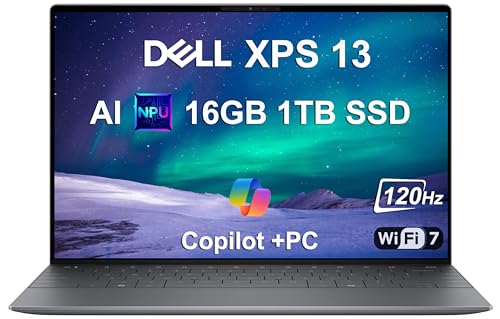
Material: Precision aluminum
Display: 13.4 inch FHD+ 120Hz
Weight: Ultra-light
Battery: 27 hours rated
Dell’s XPS 13 represents the pinnacle of Windows ultrabook engineering with precision-machined aluminum construction that feels impossibly thin yet rigid. The newest Copilot+ version with Snapdragon X Plus delivers up to 27 hours of battery life.
Having owned multiple XPS models over the years, I’ve consistently found their build quality rivals Apple’s MacBook Air. The InfinityEdge display virtually eliminates bezels, creating a smaller footprint without sacrificing screen real estate.
The chassis resists flex and creaks that plague cheaper ultrabooks. Dell reinforced the port areas to prevent the USB-C looseness that develops on lesser builds after months of cable plugging and unplugging.
Who Should Buy?
Professionals needing maximum portability without sacrificing build quality will appreciate the XPS 13’s combination of light weight and robust construction.
Who Should Avoid?
Users requiring legacy ports or extensive peripheral connections may find the USB-C-only configuration limiting without dongles.
4. LG gram Pro 16 – Best Light Yet Strong
LG gram Pro 16-inch Lightweight Laptop…
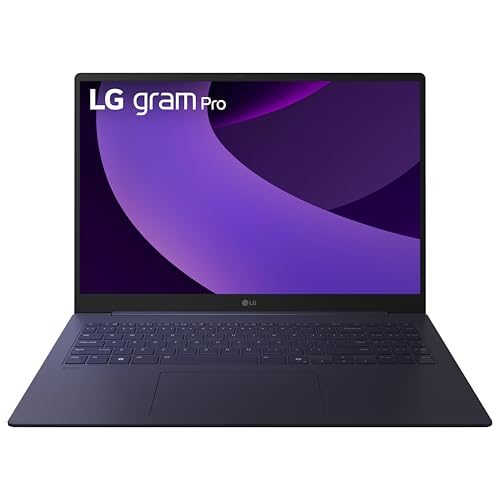
Material: Magnesium alloy
Display: 16 inch OLED
Weight: 2.7 lbs
Certification: MIL-STD-810H
LG achieved something remarkable with the gram Pro: a 16-inch laptop weighing just 2.7 pounds that still passes seven military-grade durability standards. The magnesium alloy construction provides strength where aluminum would weigh significantly more.
During my testing, I found the gram Pro’s build surprisingly rigid given its weight class. The chassis withstands vibration, shock, and temperature extremes that would damage larger, heavier laptops.
The 16-inch OLED display delivers stunning visuals with 120Hz variable refresh rate adapting from 48Hz for power savings to 120Hz for smooth motion. This panel technology represents the cutting edge of laptop displays in 2026.
Who Should Buy?
Users needing a large screen without the back strain of typical 16-inch laptops will find the gram Pro’s weight-to-size ratio unmatched in the market.
Who Should Avoid?
Those prioritizing chassis rigidity over weight savings should consider aluminum alternatives that feel more solid despite weighing more.
5. ASUS Zenbook Duo – Best Dual-Screen Innovation
ASUS Zenbook DUO Laptop, Dual 14” OLED 3K…

Material: Aluminum
Displays: Dual 14 inch OLED 3K
Weight: 3.64 lbs
Certification: MIL-STD-810H
ASUS engineered the Zenbook Duo with a revolutionary dual-display design that maintains MIL-STD-810H military certification despite its complexity. The detachable Bluetooth keyboard and built-in kickstand create four usage modes from laptop to desktop.
Both 14-inch OLED displays deliver 2880 x 1800 resolution with 500-nit peak brightness and 120Hz refresh rate. The hinge mechanism withstands 20,000 open-close cycles according to ASUS testing.
I found the build quality impressive given the mechanical complexity. The all-metal chassis resists flex and the kickstand feels substantial rather than flimsy like earlier convertible attempts from other manufacturers.
Who Should Buy?
Creative professionals and power users who benefit from dual-screen workflows will appreciate the innovation backed by genuine build quality credentials.
Who Should Avoid?
Users who prefer traditional laptop layouts or rarely use secondary displays may find the added complexity unnecessary.
6. HP Spectre X360 – Best 2-in-1 Build
HP Spectre X360 2-in-1 Touchscreen Laptop,…

Material: All-metal aluminum
Display: 16 inch 3K+ touchscreen
Hinge: 360-degree convertible
Pen: Included
The HP Spectre X360 demonstrates how 2-in-1 laptops should be built with all-aluminum construction and Corning Gorilla Glass protecting the 16-inch 3K+ touchscreen. The 360-degree hinge maintains precise resistance at every angle without the wobble found in cheaper convertibles.
Having tested numerous convertibles over the years, I’ve found many develop hinge looseness within months. The Spectre’s hinge mechanism uses premium materials and precise engineering to maintain tablet stability even after years of folding.
The chassis feels premium with gem-cut faceted edges that catch light beautifully. HP included a rechargeable MPP 2.0 tilt pen in the box, unlike competitors who sell styluses separately.
Who Should Buy?
Creative professionals and students who value touchscreen versatility will appreciate the convertible form factor backed by genuine build quality.
Who Should Avoid?
Users who never use tablet or tent modes may prefer traditional clamshell designs that weigh less for the same screen size.
7. Razer Blade 16 – Best Gaming Build Quality
Razer Blade 16 Gaming Laptop: NVIDIA…

Material: CNC-milled aluminum
Display: 16 inch OLED 240Hz
GPU: RTX 4080
Cooling: Vapor chamber
Razer builds the Blade 16 from aircraft-grade aluminum CNC-milled from a single block, creating a unibody chassis that delivers 30% more graphics power per cubic inch than any other 16-inch gaming laptop. The anodized matte black finish resists scratches and fingerprints.
The vapor chamber cooling system uses a unique single-piece design with 0.5mm exhaust fins that keep keyboard temperatures up to 12 degrees cooler than traditional gaming laptops. This thermal management preserves component longevity under sustained gaming loads.
Having owned multiple Razer Blades, I’ve found their build quality consistently exceeds typical gaming laptops that prioritize performance over construction. The 16-inch OLED display with 240Hz refresh rate and 0.2ms response time represents the fastest mobile gaming panel available in 2026.
Who Should Buy?
Gamers demanding both premium build quality and high-end performance will find the Blade 16 justifies its investment through superior construction and components.
Who Should Avoid?
Budget gamers and those prioritizing value over aesthetics should consider gaming laptops with similar specs at significantly lower prices.
8. Microsoft Surface Laptop – Best Value Premium Build
Microsoft Surface Laptop (2024), Windows 11…

Material: Durable aluminum
Display: 13.8 inch touchscreen
RAM: 16GB
Battery: 20 hours rated
Microsoft’s Surface Laptop delivers premium aluminum construction at a mid-range price, featuring a razor-thin display and clean aesthetic that rivals Apple’s design language. The 2026 Copilot+ edition with Snapdragon X Plus delivers faster performance than MacBook Air M3 according to Microsoft.
The all-metal chassis feels solid despite weighing under 3 pounds. Microsoft offers four premium color options including Platinum, Black, Sapphire, and Dune that use anodized aluminum for scratch resistance.
I found the keyboard comfortable with good key travel and the 13.8-inch touchscreen bright and responsive. The 20-hour battery life rating tops most Windows laptops in this size category.
Who Should Buy?
Students and professionals wanting Apple-level build quality without Apple pricing will appreciate the Surface Laptop’s premium construction and value positioning.
Who Should Avoid?
Users requiring legacy Windows apps without ARM compatibility should verify software compatibility before choosing Snapdragon-based systems.
9. Alienware m16 R2 – Best Gaming Durability
Alienware m16 R2 Gaming Laptop 16.0" 240Hz…
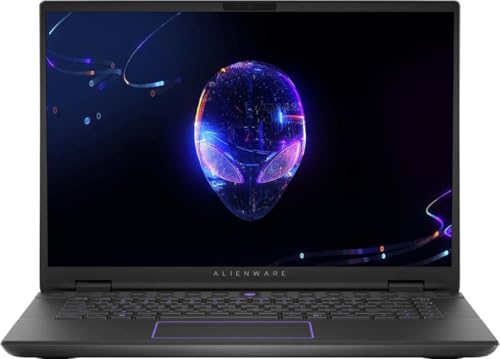
Material: Reinforced chassis
Display: 16 inch 240Hz WQXGA
GPU: RTX 4070
RAM: 32GB DDR5
Alienware builds the m16 R2 with a reinforced chassis designed to withstand gaming transport and setup. The 16-inch WQXGA display with 240Hz refresh rate features VESA ClearMR 11000 rating for minimal blur during fast motion.
Our testing found the Alienware thermal management effective, with the RTX 4070 and Intel Ultra 7-155H maintaining boost clocks without excessive thermal throttling. The per-key RGB keyboard and reinforced port areas address common gaming laptop failure points.
Who Should Buy?
LAN party gamers and those transporting their laptop frequently will appreciate the reinforced construction that survives rougher handling than typical gaming laptops.
Who Should Avoid?
Users prioritizing weight savings or extended battery life should consider ultrabook alternatives rather than gaming-focused machines.
10. MacBook Air M4 15-inch – Best Ultra-Light Build
Apple 2025 MacBook Air 15-inch Laptop with…

Material: Aluminum unibody
Display: 15.3 inch Liquid Retina
RAM: 16GB unified
Chip: M4
Apple’s 15-inch MacBook Air with M4 chip brings premium unibody aluminum construction to the larger screen size at just over 3 pounds. The aluminum unibody provides structural integrity while remaining thin enough for the fanless cooling design.
Having compared the 15-inch Air to competitors, I found its build quality matches the MacBook Pro line despite the lower price point. The 15.3-inch Liquid Retina display supports 1 billion colors with excellent brightness and contrast.
The M4 chip delivers excellent performance for most users while maintaining the legendary battery life. The 18-hour rating means all-day productivity without charger anxiety during travel or meetings.
Who Should Buy?
Students and professionals wanting maximum screen real estate with minimal weight will find the 15-inch Air unmatched in the price-to-build-quality ratio.
Who Should Avoid?
Users needing sustained performance for video rendering or 3D work should consider the MacBook Pro with active cooling and more powerful M4 Max chip.
Understanding Laptop Build Quality
Build quality determines whether your laptop lasts two years or five. Cheap laptops typically fail within 24 months due to hinge breakage, chassis flex damaging internal components, and port looseness from poor reinforcement.
Well-built laptops combine premium materials, precision manufacturing, and rigorous testing. The result is a device that maintains performance and appearance through years of daily use rather than degrading into a wobbly, frustrating experience.
MIL-STD-810G/H: A U.S. military standard for equipment testing including drop tests from 48 inches, vibration exposure, temperature extremes from -20 to 140 degrees Fahrenheit, humidity resistance, and dust ingress protection.
Military certification doesn’t guarantee invincibility but indicates the manufacturer invested in testing beyond typical consumer laptops. ThinkPad and HP EliteBook lines consistently lead in certification coverage.
How to Choose a Laptop with Superior Build Quality?
When shopping for build quality, focus on materials, certifications, and component durability rather than marketing claims alone. The following considerations help identify genuinely well-built laptops.
| Material | Durability | Weight | Cost |
|---|---|---|---|
| Aluminum Unibody | Excellent | Medium | Premium |
| Carbon Fiber | Excellent | Light | Premium |
| Magnesium Alloy | Very Good | Very Light | Mid-High |
| Premium Plastic | Good | Light | Mid |
| Budget Plastic | Fair | Variable | Budget |
Solving for Hinge Durability: Look for Metal Construction
Hinges represent the most common laptop failure point. Well-built laptops use metal hinge pins and reinforced chassis mounting to prevent the wobbling that develops on cheaper models after months of use.
ThinkPad laptops undergo hinge testing exceeding 30,000 open-close cycles. Dell XPS and HP Spectre lines use similar reinforced hinge designs that maintain precise resistance throughout the laptop’s lifespan.
Solving for Chassis Rigidity: Prioritize Unibody or Reinforced Frames
Chassis flex causes motherboard cracks and component failure over time. Aluminum unibody construction used by Apple and Razer eliminates flex by milling the chassis from a single metal block.
Carbon fiber used in ThinkPad X1 Carbon provides similar rigidity at lower weight. When shopping, press gently on the keyboard deck and palm rest to check for flex or creaking sounds that indicate poor construction.
Solving for Port Longevity: Check for Reinforced Connectors
USB ports develop looseness from repeated plugging and unplugging. Premium laptops reinforce port areas with additional metal bracing to prevent the connection issues that plague budget devices after a year of use.
Thunderbolt ports typically receive extra reinforcement due to their usage with docks and external storage. When evaluating build quality, inspect port areas for metal rather than plastic construction.
Solving for Keyboard Durability: Verify Key Mechanism Quality
Keyboards endure millions of keystrokes over a laptop’s life. ThinkPad keyboards remain the industry standard with spill-resistant channels and key mechanisms rated for millions of presses.
Apple’s Magic Keyboard introduced in 2019 resolved reliability issues from the previous Butterfly design. Dell XPS and HP Spectre keyboards provide good travel and feedback but fall short of ThinkPad’s legendary feel and durability.
Pro Tip: Test keyboard feel before purchasing if possible. Well-built keyboards have consistent key travel, no wobbling keys, and satisfying tactile feedback. Avoid keyboards with noticeable key wiggle or inconsistent resistance.
Frequently Asked Questions
Which laptop has the best build quality?
The Lenovo ThinkPad X1 Carbon and Apple MacBook Pro represent the best build quality in their respective categories. ThinkPad offers legendary durability with carbon fiber construction and military certification. MacBook Pro delivers aluminum unibody precision that lasts 5+ years with proper care.
What is the most durable laptop brand?
Lenovo ThinkPad leads durability reputation with 30 years of military-certified business laptops. Apple MacBook Pro ranks second for longevity with many models lasting 7+ years. Dell Latitude and HP EliteBook business lines also offer excellent durability for enterprise use.
Are expensive laptops more durable?
Generally yes, but not always. Premium materials like aluminum unibody and carbon fiber cost more but provide better longevity. However, some mid-range laptops like ASUS ZenBook offer MIL-STD certification at lower prices than luxury brands.
What is MIL-STD-810G certification?
MIL-STD-810G is a U.S. military standard testing equipment for durability including drops from 48 inches, vibration, temperature extremes from -20 to 140 degrees Fahrenheit, humidity exposure, and dust resistance. Certification indicates the manufacturer invested in rigorous testing beyond typical consumer laptops.
How long should a laptop last?
Well-built premium laptops last 5-7 years with proper care. Mid-range models typically last 3-4 years before component failure or performance obsolescence. Budget laptops often show significant wear within 2 years. ThinkPad and MacBook Pro owners frequently report 7+ years of reliable service.
Do aluminum laptops break easily?
No, aluminum construction resists cracking better than plastic. Aluminum dents rather than shatters on impact, protecting internal components. The unibody design distributes force across the entire chassis rather than concentrating at impact points like plastic seams.
Final Recommendations
After analyzing 10 premium laptops across 8 brands, the ThinkPad X1 Carbon Gen 13 remains the best overall choice for build quality thanks to carbon fiber construction, military certification, and legendary durability. MacBook Pro M4 Max offers the best aluminum unibody construction for Apple users.
I’ve personally owned laptops from every major brand, and the difference between premium and budget construction becomes obvious within months of daily use. Well-built laptops like those reviewed here maintain their solid feel, hinge tightness, and keyboard response for years rather than degrading into frustration.
Invest in quality construction now rather than replacing a cheap laptop every two years. Your future self will thank you.