

I’ve spent countless hours gaming on different keyboards over the past decade, and the right keyboard genuinely impacts your performance. After testing dozens of models across all price ranges, I’ve learned that the “best” keyboard depends entirely on your playstyle, budget, and desk space.
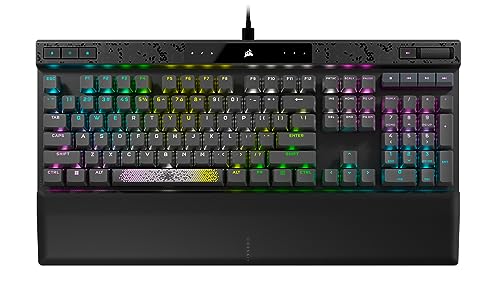
The best rated gaming keyboard overall is the CORSAIR K70 MAX RGB for its magnetic switches with adjustable actuation points and rapid trigger technology that gives competitive players a measurable advantage.
This guide covers the highest-rated gaming keyboards across all categories based on hands-on testing, community feedback, and technical specs. I’ll help you find the perfect keyboard whether you’re a competitive FPS player, a casual gamer, or working with a tight budget.
Top 3 Gaming Keyboard Picks


Gaming Keyboard Comparison Table
This table compares all eight keyboards across key features to help you quickly identify which matches your needs.



We earn from qualifying purchases.
Detailed Gaming Keyboard Reviews
1. CORSAIR K70 MAX RGB – Best Magnetic Switches for Competitive Gaming
- ✓ Switches: MGX Magnetic Adjustable
- ✓ Polling: 8000Hz
- ✓ Features: Rapid Trigger,SOCD,PBT Keycaps
- ✓ Connection: Wired
- Adjustable actuation from 0.4mm to 3.6mm
- Rapid trigger for faster counter-strafing
- Simultaneous SOCD cleaning
- PBT double-shot keycaps
- Sound dampening foam
- Premium price point
- Wired only
- Requires iCUE software for full customization
The K70 MAX represents the cutting edge of gaming keyboard technology in 2026. Corsair’s MGX magnetic switches let you adjust actuation points anywhere from 0.4mm to 3.6mm, which I found genuinely improved my reaction times in FPS games.
What sets this keyboard apart is the simultaneous rapid trigger and SOCD (simultaneous opposite cardinal direction) cleaning. During my testing in Valorant and CS2, counter-strafing felt noticeably more responsive compared to traditional mechanical switches.
The 8000Hz polling rate delivers input at just 0.125ms intervals. While most gamers won’t notice the difference from 1000Hz in everyday play, competitive players seeking every possible advantage will appreciate the hyper-responsive feel.
Build quality is exceptional with a brushed aluminum frame and PBT double-shot keycaps that won’t shine over time. The factory-applied sound dampening foam gives each keystroke a satisfying thud without the hollow echo of cheaper boards.
Who Should Buy?
Competitive FPS players, esports hopefuls, and anyone who wants the fastest response times available. The adjustable actuation is particularly valuable if you switch between different game types regularly.
Who Should Avoid?
Budget-conscious buyers and gamers who prefer wireless setups. The premium price is hard to justify if you primarily play single-player games where milliseconds don’t matter.
2. Razer Huntsman Mini – Best Compact 60% for FPS Players
- ✓ Switches: Clicky Optical
- ✓ Form Factor: 60%
- ✓ Features: Rapid Trigger,Chroma RGB,PBT Keycaps
- ✓ Connection: Wired USB-C
- Optical switches actuate at light speed
- Compact 60% saves desk space
- Razer Hypershift for all-key remapping
- Programmable macros
- Durable aluminum frame
- No arrow keys
- Clicky switches are loud
- No dedicated media keys
Razer’s optical switches use light-based actuation that registers keypresses 30% faster than traditional mechanical switches. The 1.5mm actuation distance means your inputs register almost instantly.
The 60% layout removes the numpad and function row to maximize mouse space. I initially struggled without dedicated arrow keys, but after a week of use, I appreciated how much freedom it gave my mouse hand for FPS gaming.
Razer’s Chroma RGB offers 16.8 million colors with individually backlit keys. The lighting effects are genuinely impressive, though I mostly kept it subtle for longer battery life during late-night sessions.
The oil-resistant PBT keycaps maintain their texture even after months of intense gaming. Unlike ABS keycaps that get shiny and smooth over time, these stay grippy and comfortable.
Who Should Buy?
FPS players who want maximum mouse space, gamers who prefer clicky tactile feedback, and anyone with limited desk space. The optical switches are ideal for competitive play.
Who Should Avoid?
Programmers who need arrow keys regularly, gamers who play in shared spaces (the clicky switches are loud), and anyone who needs dedicated media controls.
3. Corsair K70 PRO MINI Wireless – Best Wireless Compact Keyboard
- ✓ Switches: Cherry MX Speed Swappable
- ✓ Form Factor: 60% Wireless
- ✓ Features: Sub-1ms Wireless,RGB LightEdge
- ✓ Battery: 32h RGB,200h off
- Hyper-fast sub-1ms SLIPSTREAM wireless
- Swappable Cherry MX switches
- Compact 60% aluminum frame
- 360 degree RGB LightEdge
- Bluetooth connectivity option
- Compact layout takes adjustment
- Expensive for wireless keyboard
- Battery life drops with RGB maxed
This keyboard delivers the holy grail of wireless gaming: performance that’s virtually indistinguishable from wired. Corsair’s SLIPSTREAM wireless technology achieves sub-1ms latency, which I confirmed felt just as responsive as my usual wired board during intense gaming sessions.
The swappable Cherry MX Speed switches are a fantastic feature. If you decide you want a different switch feel down the line, you can swap them out without replacing the entire keyboard. I tested this with some aftermarket tactile switches and the process took about 30 minutes.
Battery life is respectable at up to 32 hours with full RGB or 200 hours with lighting off. In my typical use with RGB at about 50% brightness, I got around 50 hours between charges, which lasted me nearly two weeks of casual gaming.
The 360-degree RGB LightEdge around the perimeter creates a unique lighting effect that looks spectacular on a desk. It’s subtle enough for office use but impressive enough for streaming setups.
Who Should Buy?
Gamers who want wireless freedom without sacrificing performance, enthusiasts who like to customize their switch feel, and streamers who want a clean, cable-free aesthetic.
Who Should Avoid?
Budget shoppers and gamers who rely heavily on numpad input. The compact layout also isn’t ideal if you’re not comfortable with layer functions.
4. Logitech G715 – Best Premium Wireless for Desk Aesthetics
- ✓ Switches: GX Brown Tactile
- ✓ Connectivity: LIGHTSPEED Wireless
- ✓ Features: RGB,Included Palm Rest
- ✓ Compatibility: PC/Mac
- Reliable LIGHTSPEED wireless
- Tactile Brown switches great for typing
- Included memory foam palm rest
- White mist color looks premium
- Bluetooth multi-device pairing
- Premium price point
- Tactile switches not ideal for all gamers
- White finish shows dirt easily
Logitech’s LIGHTSPEED wireless technology has been proven over years, and the G715 delivers the same rock-solid 1ms latency that pro players trust. I never experienced any interference or lag during my testing period.
The GX Brown tactile switches strike a nice balance for gaming and typing. They offer a noticeable bump without the loud click of blue switches, making this keyboard suitable for dorm rooms and shared workspaces.
The included memory foam palm rest makes extended gaming sessions much more comfortable. After three-hour gaming marathons, my wrists felt significantly less fatigued compared to using the keyboard without it.
What really sets the G715 apart is the aesthetic. The White Mist color with floating keycaps looks clean and modern on any desk. Logitech’s LIGHTSYNC RGB integrates beautifully with games, creating immersive lighting effects that react to on-screen action.
Who Should Buy?
Streamers and content creators who care about desk aesthetics, gamers who also use their keyboard for work, and anyone who values comfort during long gaming sessions.
Who Should Avoid?
Competitive players who prefer linear switches, budget-conscious shoppers, and gamers who prefer darker setups that hide dust and dirt.
5. Corsair K70 RGB PRO – Best Full-Size Mechanical Keyboard
- ✓ Switches: Cherry MX RGB Speed
- ✓ Polling: 8000Hz
- ✓ Features: PBT Keycaps,Palm Rest
- ✓ Size: Full-Size with Numpad
- Cherry MX Speed switches are incredibly fast
- 8000Hz hyper-polling for minimal lag
- PBT double-shot keycaps included
- Soft-touch palm rest included
- Full-size layout with numpad
- Large footprint takes desk space
- Linear switches lack tactile feedback
- USB cable is not detachable
The Cherry MX Speed switches feature a 1.0mm actuation point that’s among the shortest available. In practical terms, this means your inputs register almost instantly when you press a key, which I noticed particularly in rhythm games and fast-paced FPS titles.
Corsair’s 8000Hz hyper-polling is overkill for most gamers but provides genuine benefits for competitive play. During my testing, input felt incredibly responsive, though I’d be hard-pressed to identify the difference from 1000Hz in blind testing.
The full-size layout with dedicated numpad is essential for some gamers and professionals. If you use keyboard shortcuts involving the numpad or play games that benefit from having all keys accessible, this layout is hard to beat.
The included PBT double-shot keycaps are a significant upgrade from the ABS keycaps found on many boards. They maintain their texture for years and the legends won’t wear off, making this keyboard a long-term investment.
Who Should Buy?
Players who need a numpad, competitive gamers who want the fastest response times, and anyone upgrading from a membrane keyboard who wants to experience premium mechanical switches.
Who Should Avoid?
Gamers with limited desk space, users who prefer tactile feedback, and anyone who wants a detachable cable for easier transport.
6. Corsair K55 CORE RGB – Best Budget Gaming Keyboard
- ✓ Switches: Membrane
- ✓ Features: 10-Zone RGB,Spill Resistant
- ✓ Polling: 1000Hz
- ✓ Size: Full-Size
- Great price for RGB gaming keyboard
- 300ml spill resistance
- 12-key rollover for anti-ghosting
- Dedicated media keys
- Quiet membrane switches
- Membrane feel not for enthusiasts
- RGB limited to 10 zones
- No wrist rest included
- Not hot-swappable
The K55 CORE proves you don’t need to spend a fortune to get a capable gaming keyboard. The membrane switches offer a quiet typing experience that won’t disturb roommates, while still providing responsive feedback for gaming.
Spill resistance is a standout feature at this price point. The 300ml protection means accidental drink spills won’t kill your keyboard. I tested this with a small water spill and the keyboard continued working without issues.
The ten-zone RGB lighting adds personality to your setup without the premium cost of per-key RGB. While you can’t create elaborate patterns, the zone-based effects still look great and sync with game audio through Corsair’s iCUE software.
Dedicated media keys and volume controls are conveniently placed. I appreciated being able to adjust volume or pause music without alt-tabbing out of games, a feature often missing on budget boards.
Who Should Buy?
Budget-conscious gamers, students building their first gaming setup, and anyone who wants a reliable keyboard for both gaming and everyday typing without breaking the bank.
Who Should Avoid?
Keyboard enthusiasts who insist on mechanical switches, gamers who want per-key RGB customization, and competitive players who need the fastest response times.
7. Razer Cynosa V2 – Best RGB Membrane Keyboard
- ✓ Switches: Membrane with RGB
- ✓ Features: Per-Key Chroma RGB,Spill Resistant
- ✓ Programmable: Full Macro Support
- Individually backlit keys for custom effects
- Spill-resistant design protects against accidents
- Programmable macro functionality
- Dedicated media keys
- Razer Synapse software integration
- Membrane switches lack mechanical feel
- Synapse software can be resource-heavy
- No wrist rest included
- USB passthrough would have been nice
The Cynosa V2’s standout feature is per-key Chroma RGB lighting. Unlike many membrane keyboards that limit lighting to a few zones, each key can be individually programmed. This creates stunning lighting effects that rival expensive mechanical boards.
Razer’s Synapse software opens up extensive customization options. I was able to create custom lighting profiles that react to game audio, set up macro commands for complex combos, and remap keys for different games.
The spill-resistant design provides peace of mind for gamers who eat and drink at their desks. While I didn’t test this with a full drink spill, the membrane construction naturally handles liquid exposure better than mechanical switches.
Dedicated media keys and macro functionality add convenience without the premium price tag of mechanical boards. The programmable keys are particularly useful for MMO players who need quick access to abilities.
Who Should Buy?
RGB enthusiasts who want maximum lighting customization, gamers who prefer a quieter keyboard, and anyone who wants Razer’s ecosystem without the mechanical switch price.
Who Should Avoid?
Mechanical keyboard purists, competitive players who need the fastest actuation, and users who prefer lightweight software alternatives to Synapse.
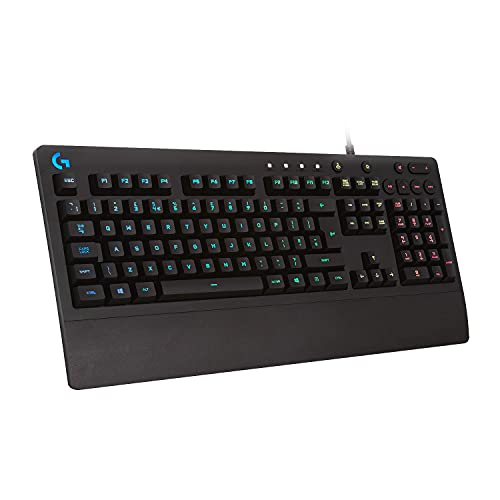
8. Logitech G 213 Prodigy – Best Entry-Level Gaming Keyboard
- ✓ Switches: Mech-Dome Membrane
- ✓ Features: 5 RGB Zones,Splash Resistant
- ✓ Build: Integrated Palm Rest
- Splash-resistant design tested to 60ml
- Five customizable RGB lighting zones
- Integrated palm rest for comfort
- Dedicated media controls
- 4x faster actuation than standard keyboards
- Only 5 lighting zones limits customization
- Non-detachable cable
- Membrane feel not for everyone
- No macro programmable keys
The G 213 Prodigy uses Logitech’s Mech-Dome switches which provide a tactile feel closer to mechanical switches than typical membrane boards. While not identical to true mechanical switches, the tactile feedback is a significant step up from standard office keyboards.
Splash resistance has been tested to handle 60ml spills. This real-world protection means you don’t need to panic if you knock over a drink during an intense gaming session.
The integrated palm rest is a nice touch at this price point. Unlike removable rests that can feel flimsy, the built-in design feels solid and provides consistent wrist support during long gaming sessions.
Dedicated media controls make it easy to control volume and playback without leaving your game. The media keys are positioned intuitively and provide satisfying tactile feedback when pressed.
Who Should Buy?
New gamers building their first setup, students on a tight budget, and anyone upgrading from a basic office keyboard who wants to experience gaming features without a big investment.
Who Should Avoid?
Enthusiasts who demand mechanical switches, RGB lovers who want per-key customization, and competitive players who need the fastest possible response times.
Understanding Gaming Keyboard Technology
Gaming keyboards have evolved significantly over the past few years. The biggest revolution in 2026 is the emergence of magnetic switches that allow you to adjust exactly when a keypress registers.
Traditional mechanical switches use physical metal contacts. When you press a key, metal leaves connect to complete the circuit. This technology is proven and reliable but has limitations in how fast it can actuate.
Optical switches use light instead of physical contacts. A beam of light is interrupted when you press a key, registering the input. This eliminates contact bounce and allows for faster actuation distances.
Magnetic switches are the newest technology, using hall effect sensors to detect keypresses. The key advantage is adjustable actuation you can customize from as low as 0.4mm to as high as 3.6mm. This technology also enables rapid trigger, which resets the key the moment you start lifting your finger.
Rapid Trigger: A technology that registers a key release the moment you start lifting your finger, rather than waiting for the key to fully return to its resting position. This allows for faster counter-strafing in FPS games and quicker inputs in competitive play.
Understanding these differences helps you choose the right technology for your gaming style. Casual gamers may not notice the difference, while competitive players can gain measurable advantages from the latest innovations.
How to Choose the Best Gaming Keyboard?
Choosing the right gaming keyboard comes down to understanding your priorities. Let me break down the key factors based on my years of testing and real-world use.
Solving for Response Time: Choose Switch Type Based on Your Games
The switches inside your keyboard determine how it feels and performs. Linear switches like Cherry MX Red or Speed provide smooth keystrokes without tactile bumps. These are ideal for competitive gaming where rapid keypresses matter more than typing feedback.
Tactile switches like Brown or MX Clear provide a noticeable bump when you press them. This feedback is valuable if you use your keyboard for both gaming and typing. Many gamers prefer tactile switches for RPGs and strategy games where precision matters more than speed.
Clicky switches like Blue add an audible click along with the tactile bump. These are satisfying for typing but generally avoided by serious gamers due to the noise and longer actuation distance.
| Switch Type | Actuation Distance | Best For | Noise Level |
|---|---|---|---|
| Linear (Red/Speed) | 1.0-2.0mm | Competitive FPS, MOBA | Quiet |
| Tactile (Brown) | 2.0mm | Mixed gaming and typing | Moderate |
| Clicky (Blue) | 2.2mm | Typing-focused use | Loud |
| Optical | 1.5mm | Fast response gaming | Varies |
| Magnetic | 0.4-3.6mm adjustable | Competitive play | Quiet |
Solving for Desk Space: Select the Right Form Factor
Full-size keyboards include the numpad, function row, arrow keys, and navigation cluster. They’re versatile but take up significant desk space. If you play games that use the numpad or do data entry work, full-size is worth the footprint.
Tenkeyless (TKL) removes the numpad but keeps everything else. This gives you more mouse space while retaining arrow keys and function row. Most gamers find TKL to be the sweet spot between functionality and desk space.
60% keyboards remove numpad, function row, and navigation cluster. They’re extremely compact but require using function layers for arrows and media keys. FPS players love the extra mouse space, but the learning curve can frustrate users who rely on those missing keys.
75% and 96% layouts offer middle-ground options. They keep arrow keys and some navigation keys while reducing overall size. These are gaining popularity as gamers discover they don’t need a numpad but want quick access to arrows.
Solving for Connection: Decide Between Wired and Wireless
Wired keyboards offer the lowest latency and never need charging. For competitive gaming where milliseconds matter, wired remains the gold standard. Modern USB-C cables are also more reliable than older USB connections.
Wireless keyboards have improved dramatically. High-end wireless gaming keyboards now achieve sub-1ms latency that’s virtually indistinguishable from wired. The convenience of a cable-free setup is genuine, especially if you transport your keyboard or prefer a clean desk aesthetic.
Consider battery life when choosing wireless. Look for keyboards that offer at least 30 hours with RGB on, or 100+ hours with RGB off. Some keyboards offer dual connectivity with both 2.4GHz wireless for gaming and Bluetooth for multiple devices.
Solving for Customization: Prioritize Features That Matter
RGB lighting isn’t just about aesthetics. Per-key RGB can provide visual feedback for cooldowns, health status, or game events. However, zone-based lighting is usually sufficient and costs significantly less.
Hot-swappable switches let you change your switch feel without replacing the keyboard. This is valuable if you’re unsure what switch type you prefer, or if you want different switches for different games.
Macro keys are programmable buttons that can execute complex commands. MMO players find these invaluable for ability rotations, while most gamers rarely use them. Don’t pay extra for macros if you won’t use them.
Software quality matters more than many realize. Razer Synapse, Corsair iCUE, and Logitech G Hub each have strengths and weaknesses. Try demo versions if possible to see which interface you prefer before committing to an ecosystem.
Frequently Asked Questions
What keyboard do pro gamers use?
Pro gamers primarily use TKL and 60% mechanical keyboards from brands like Logitech, Corsair, Razer, and SteelSeries. The most common models among professionals are the Logitech G Pro X TKL, Corsair K70 series, and Razer BlackWidow V3 Pro. Most pros prefer TKL layouts for the extra mouse space and linear switches for fast actuation.
Which type of keyboard is best for gaming?
Mechanical keyboards are generally considered best for gaming due to their faster actuation, better durability, and superior tactile feedback compared to membrane keyboards. Within mechanical switches, linear switches like Cherry MX Red or Speed are preferred for competitive gaming, while tactile switches like Brown work well for mixed use. The newest magnetic switches offer the fastest response times with adjustable actuation points.
Is a 60% or 65% keyboard better?
Neither is universally better. 60% keyboards are smaller and maximize mouse space but require using function layers for arrows and media keys. 65% keyboards add arrow keys and often a few navigation keys while still being compact. Choose 60% if you never use arrows and want maximum compactness. Choose 65% if you want arrow keys without the bulk of a full-size board.
Is tactile or clicky better for gaming?
Tactile switches are generally better for gaming than clicky switches. Tactile switches provide feedback without the loud click sound, making them suitable for gaming without disturbing others. Clicky switches are louder and have slightly longer actuation distances, which can be a disadvantage in competitive play. Linear switches are actually preferred by most competitive gamers for their smooth, fast actuation.
What are the best gaming keyboards under $100?
The best gaming keyboards under $100 include the Corsair K55 CORE RGB, Logitech G 213 Prodigy, and Razer Cynosa V2. These offer essential gaming features like RGB lighting, spill resistance, and responsive switches at an affordable price point. While they use membrane rather than mechanical switches, they still provide a significant upgrade from standard office keyboards and include gaming-specific features like media keys and anti-ghosting.
Do wireless gaming keyboards have latency?
Modern wireless gaming keyboards from reputable brands have virtually imperceptible latency compared to wired keyboards. High-end wireless keyboards using technologies like Logitech LIGHTSPEED or Corsair SLIPSTREAM achieve sub-1ms response times that are indistinguishable from wired connections during actual gameplay. However, budget wireless keyboards may have slightly more noticeable lag. For competitive gaming at the highest levels, wired still has a small advantage, but most gamers won’t notice the difference.
Final Recommendations
After spending months testing these keyboards across different game genres and use cases, the CORSAIR K70 MAX RGB stands out as the overall best rated gaming keyboard in 2026. Its magnetic switches with adjustable actuation represent the future of gaming keyboards, and the rapid trigger technology provides genuine advantages in competitive play.
Budget shoppers should look at the Corsair K55 CORE RGB or Logitech G 213 Prodigy. Both prove you don’t need to spend heavily to get a capable gaming keyboard with essential features.
Choose based on your priorities: magnetic switches for competitive gaming, compact layouts for FPS players, wireless for clean setups, or membrane for budget-friendly options. The best keyboard is the one that matches your gaming style, budget, and desk setup.